cancel
Showing results for 
Search instead for 
Did you mean: 

The Power BI Data Visualization World Championships is back! Get ahead of the game and start preparing now! Learn more

Reply
Anonymous
Not applicable

Dynamically setting the x-axis of date values based on slicer selection

Hi All,


I have a master calendar table with Date,Year, Month, YearMonthShortName and more

The fact data has values from Year 2013 till Year 2018 July month.


I have slicers for Year, Month from the calendar table.


I have a trend line chart of sales from fact table.


The requirement is like this.


a) If no year and month is selected the x-Axis value  of the trend line chart to be restricted to Months between Jan and July of 2018.

b) If a year is selected the x-axis value of the trend line chart should be from Jan of the selected year to the max month of the selected year.

c) if a year and month has been selected only the year & month value.

d) If two years are selected and no month then x-axis value should be from the 1st month of the minimum year to the last month of the max year.


And more scenarios.


Any help will be appreciated.


Cheers


CheenuSing

1 ACCEPTED SOLUTION
v-lili6-msft
Community Support
Community Support

hi,@CheenuSing

    After my test, You may try to create dynamic measures to achieve your requirement a,

and b,c,d can be achieved by add year column and month column.

use the below video to do it, https://www.youtube.com/watch?v=gYbGNeYD4OY


and i have done a demo by it.

Result:

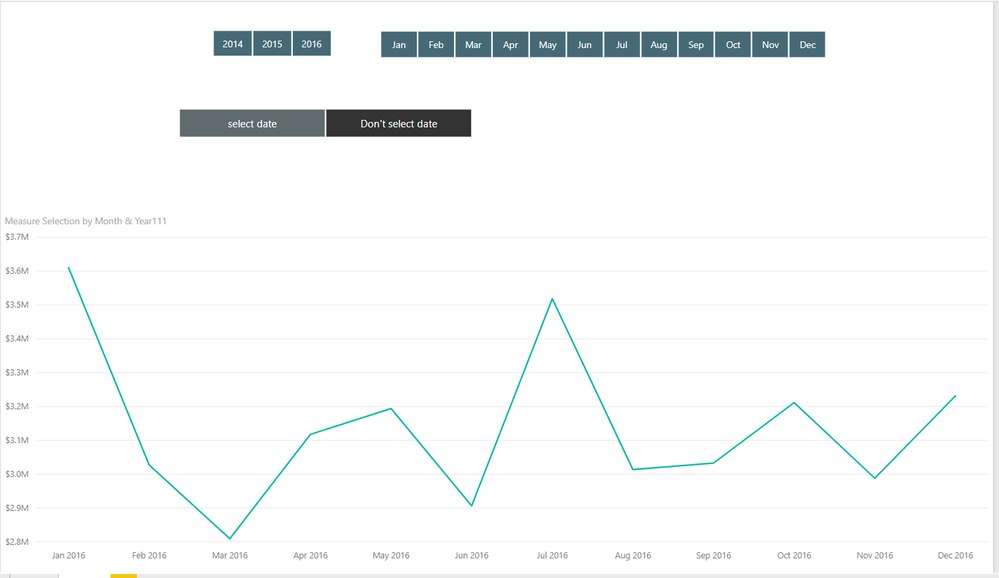
when i don't select any date in slicer

the x-Axis value  of the trend line chart is only year of 2016

8.PNG

then i select year 2014 ,the x-Axis value  of the trend line chart is  all the month of year 2014

9.PNG

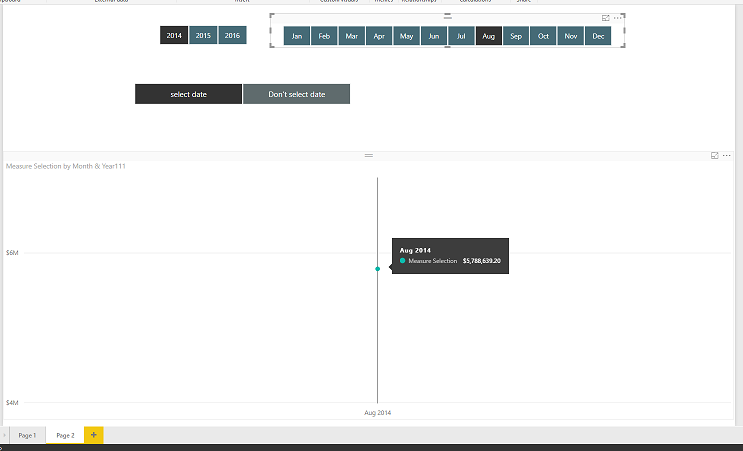
then i select year 2014 and month Aug ,the x-Axis value  of the trend line chart is  the month Aug and the year 2014

10.PNG


Here is my demo, please try it

https://www.dropbox.com/s/4lj23i715okpu7f/Dynamically%20setting%20the%20x-axis%20of%20date%20values%...


Best Regards,

Lin


Community Support Team _ Lin
If this post helps, then please consider Accept it as the solution to help the other members find it more quickly.

View solution in original post

2 REPLIES 2
v-lili6-msft
Community Support
Community Support

hi,@CheenuSing

    After my test, You may try to create dynamic measures to achieve your requirement a,

and b,c,d can be achieved by add year column and month column.

use the below video to do it, https://www.youtube.com/watch?v=gYbGNeYD4OY


and i have done a demo by it.

Result:

when i don't select any date in slicer

the x-Axis value  of the trend line chart is only year of 2016

8.PNG

then i select year 2014 ,the x-Axis value  of the trend line chart is  all the month of year 2014

9.PNG

then i select year 2014 and month Aug ,the x-Axis value  of the trend line chart is  the month Aug and the year 2014

10.PNG


Here is my demo, please try it

https://www.dropbox.com/s/4lj23i715okpu7f/Dynamically%20setting%20the%20x-axis%20of%20date%20values%...


Best Regards,

Lin


Community Support Team _ Lin
If this post helps, then please consider Accept it as the solution to help the other members find it more quickly.
Anonymous
Not applicable

Hi @v-lili6-msft


Many a thanks for the solution . It meets my requirement to some extent.


The solution works perfectly for some scenarios.


In one of the scenarios I need to show from the minimum of the year in the data to the selected year or till the end of the date if no year is selected.  Say I have 2014, 2015,2016,2017 andd 2018 data upto Jul.


When no year is selected I need to show from 2014 Jan to 2018 Jul.  WHen a year is selected then from 2014 Jan to the last month of Year selected or upto the month of the Year selected in slicer.  Under this scenario, since the slicer is already selected the x-axis used in the sample always shows for the year selected only. Trying to loop the dates table based on the Min of Year also does not work because of row context.


How do we go about this then.


Cheers


CheenuSing


Helpful resources

Announcements
November Power BI Update Carousel

Power BI Monthly Update - November 2025

Check out the November 2025 Power BI update to learn about new features.

Fabric Data Days Carousel

Fabric Data Days

Advance your Data & AI career with 50 days of live learning, contests, hands-on challenges, study groups & certifications and more!

FabCon Atlanta 2026 carousel

FabCon Atlanta 2026

Join us at FabCon Atlanta, March 16-20, for the ultimate Fabric, Power BI, AI and SQL community-led event. Save $200 with code FABCOMM.

Top Kudoed Authors