Join us at FabCon Atlanta from March 16 - 20, 2026, for the ultimate Fabric, Power BI, AI and SQL community-led event. Save $200 with code FABCOMM.
Register now!The Power BI Data Visualization World Championships is back! Get ahead of the game and start preparing now! Learn more
Hi All,
I wanted to select the dates dynamically depending upon which month it is.
I.e. - for example, currently it is March 2023 so in the date slicer historical dates till March 2023 must be selected.
As a super user you should stop using slicers. 🙂 Use the filter pane.
Hi @truptis
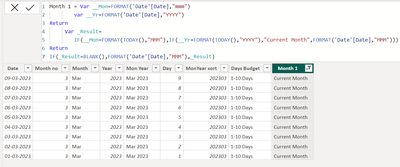
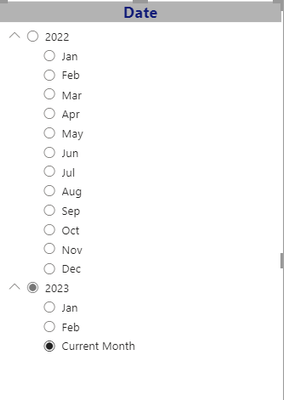
For current Month want move slicer automatically created one Calculated Column in that column you need to set one text Name like "Current Month " or Any other name is your Wish. we can achieve this way only .I'm Achieve .
If have helpful to you Give kudos and accepeted a solution.
Thanks,
Thennarasu
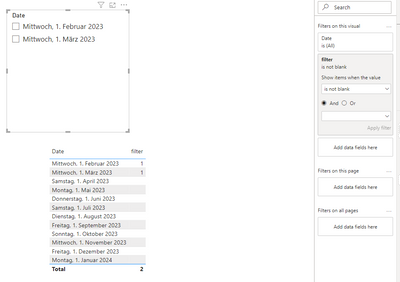
You can create a measure and filter your slicer with this measure: "IS NOT BLANK ()"
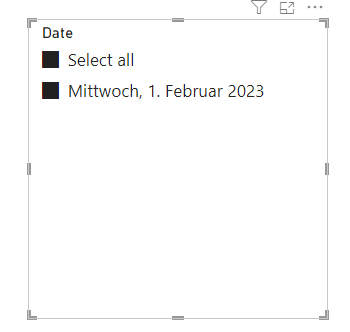
If you show "select all" in the options and set it active all shown dates are selected for default.
Proud to be a Super User!
The Power BI Data Visualization World Championships is back! Get ahead of the game and start preparing now!
| User | Count |
|---|---|
| 38 | |
| 36 | |
| 33 | |
| 31 | |
| 28 |
| User | Count |
|---|---|
| 129 | |
| 88 | |
| 79 | |
| 68 | |
| 63 |