Don't miss your chance to take the Fabric Data Engineer (DP-600) exam for FREE! Find out how by watching the DP-600 session on-demand now through April 28th.
Learn moreJoin the FabCon + SQLCon recap series. Up next: Power BI, Real-Time Intelligence, IQ and AI, and Data Factory take center stage. All sessions are available on-demand after the live show. Register now
Hello,
I have a table with name of report, date of creation and creator.
I would like to group creator. I need them to keep their name if they create 5% or more of the total pool of report. If they creadted less than 5% of report, they have to by group in "Other"
I can group them manualy but I will have to check evrey month if they are ine the right category
Do you know a way to do so dynamically?
Thank in advance,
Emmanuelle
Solved! Go to Solution.
Hi @Anonymous,
I would suggest that you create a table with only the creator names. This can be done by clicking Create Table and enter the following formula:
Creators = DISTINCT(Reports[Creator])
(assuming your table is called Reports.) Now establish a relationship between Creators and Reports on the Creator field.
Next step is to define a calculated new column called Group in the Creators table:
Group = VAR C = Creators[Creator] RETURN IF(CALCULATE(COUNTROWS(Reports),Reports[Creator] = C)/COUNTROWS(Reports) > 0.05,
C,
"Other")
In your table visual you can now use Creators[Group] instead of Reports[Creator] and you should get the desired result.
@Anonymous you can use a switch statement probably to derive it, however can you show me what your data looks like? otherwise it will be hard to show you how to write it
Proud to be a Super User!
Hi Vanessa,
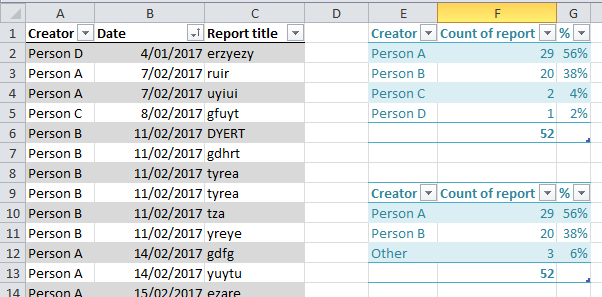
My data look like that
I have the creator name, the date of creation and the raport title
I would like to group C and D because they produce less then 5% of the report total
Hi @Anonymous,
I would suggest that you create a table with only the creator names. This can be done by clicking Create Table and enter the following formula:
Creators = DISTINCT(Reports[Creator])
(assuming your table is called Reports.) Now establish a relationship between Creators and Reports on the Creator field.
Next step is to define a calculated new column called Group in the Creators table:
Group = VAR C = Creators[Creator] RETURN IF(CALCULATE(COUNTROWS(Reports),Reports[Creator] = C)/COUNTROWS(Reports) > 0.05,
C,
"Other")
In your table visual you can now use Creators[Group] instead of Reports[Creator] and you should get the desired result.
Perfect, thank you very much
Check out the April 2026 Power BI update to learn about new features.
If you have recently started exploring Fabric, we'd love to hear how it's going. Your feedback can help with product improvements.
A new Power BI DataViz World Championship is coming this June! Don't miss out on submitting your entry.
| User | Count |
|---|---|
| 48 | |
| 40 | |
| 38 | |
| 20 | |
| 17 |
| User | Count |
|---|---|
| 68 | |
| 65 | |
| 30 | |
| 26 | |
| 25 |