FabCon is coming to Atlanta
Join us at FabCon Atlanta from March 16 - 20, 2026, for the ultimate Fabric, Power BI, AI and SQL community-led event. Save $200 with code FABCOMM.
Register now!- Power BI forums
- Get Help with Power BI
- Desktop
- Service
- Report Server
- Power Query
- Mobile Apps
- Developer
- DAX Commands and Tips
- Custom Visuals Development Discussion
- Health and Life Sciences
- Power BI Spanish forums
- Translated Spanish Desktop
- Training and Consulting
- Instructor Led Training
- Dashboard in a Day for Women, by Women
- Galleries
- Data Stories Gallery
- Themes Gallery
- Contests Gallery
- QuickViz Gallery
- Quick Measures Gallery
- Visual Calculations Gallery
- Notebook Gallery
- Translytical Task Flow Gallery
- TMDL Gallery
- R Script Showcase
- Webinars and Video Gallery
- Ideas
- Custom Visuals Ideas (read-only)
- Issues
- Issues
- Events
- Upcoming Events
The Power BI Data Visualization World Championships is back! Get ahead of the game and start preparing now! Learn more
- Power BI forums
- Forums
- Get Help with Power BI
- Desktop
- Re: Dynamically Exclude 10 Percent of an Asset's H...
- Subscribe to RSS Feed
- Mark Topic as New
- Mark Topic as Read
- Float this Topic for Current User
- Bookmark
- Subscribe
- Printer Friendly Page

- Mark as New
- Bookmark
- Subscribe
- Mute
- Subscribe to RSS Feed
- Permalink
- Report Inappropriate Content
Dynamically Exclude 10 Percent of an Asset's Highest Values
Hi all,
I am attempting to create a dynamic measure that returns an asset’s highest value after 10% of the asset’s highest values are removed.
For instance, I have a table like the one below. Asset A1 has 20 rows associated with it, while A2 has 10. I would like my measure to return the 18th value for A1 (188) and the 9th value for A2 (193).
Unordered Ordered
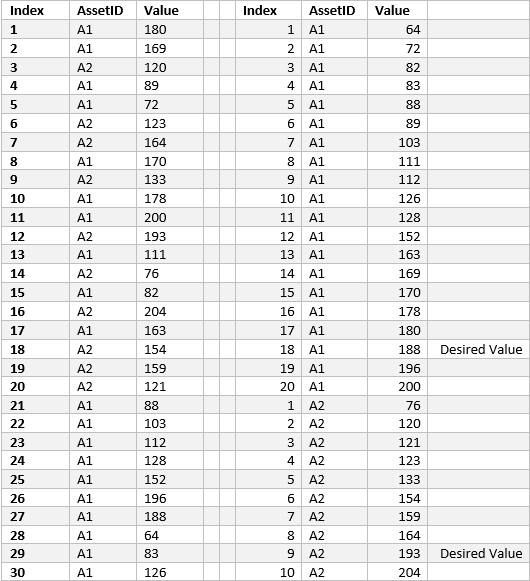
Currently, I am attempting to countrows then, using the TOPN and EXCPET functions, return a temporary table where the MAX value is the number I’m trying to get at. I'm missing something because my measure doesn't return anything.
My current code looks like this:
90PercentofTime =

VAR sampleSize = COUNTROWS(SampleData)

VAR tenPercent = .10

RETURN

CALCULATE(

    MAX(SampleData[Value]),

    EXCEPT(

        TOPN(sampleSize*tenPercent, SampleData), SampleData))
Any help would be greatly appreciated.
Thank you!
Solved! Go to Solution.


- Mark as New
- Bookmark
- Subscribe
- Mute
- Subscribe to RSS Feed
- Permalink
- Report Inappropriate Content
Hi @
ttry like this:
Measure =
IF(
    HASONEVALUE( SampleData[AssetID] ),
    VAR Top10Perc = PERCENTILE.INC(SampleData[Value], 0.9 )
    RETURN
    CALCULATE(
        MAX( SampleData[Value] ),
        SampleData[Value] < Top10Perc
    )
)
Did I answer your question correctly? Mark my answer as a solution!
Proud to be a Datanaut!
- Mark as New
- Bookmark
- Subscribe
- Mute
- Subscribe to RSS Feed
- Permalink
- Report Inappropriate Content
Hi @
ttry like this:
Measure =
IF(
    HASONEVALUE( SampleData[AssetID] ),
    VAR Top10Perc = PERCENTILE.INC(SampleData[Value], 0.9 )
    RETURN
    CALCULATE(
        MAX( SampleData[Value] ),
        SampleData[Value] < Top10Perc
    )
)
Did I answer your question correctly? Mark my answer as a solution!
Proud to be a Datanaut!
- Mark as New
- Bookmark
- Subscribe
- Mute
- Subscribe to RSS Feed
- Permalink
- Report Inappropriate Content
I think that got it. Thank you!


- Mark as New
- Bookmark
- Subscribe
- Mute
- Subscribe to RSS Feed
- Permalink
- Report Inappropriate Content
Try:
Measure = calculate (max (value), allexcept (table1, AssetID))
- Mark as New
- Bookmark
- Subscribe
- Mute
- Subscribe to RSS Feed
- Permalink
- Report Inappropriate Content
Hi Omega, thanks for the suggestion. I think this is in the right direction, but I still need to know how many of an asset's highest values to exclude to equal 10% of its data (rows). Maybe adding TOPN in before or after MAX?
- Mark as New
- Bookmark
- Subscribe
- Mute
- Subscribe to RSS Feed
- Permalink
- Report Inappropriate Content
If I understood this correctly, basically you are trying to apply the following:
- Find the max value at assetID level
- How much I need to decrease from this asset to equal 10%
Right?
- Mark as New
- Bookmark
- Subscribe
- Mute
- Subscribe to RSS Feed
- Permalink
- Report Inappropriate Content
That's correct. For instance, in the table above, asset A1 has 20 rows of data associated with it, so 10% of A1's rows would equal 2. Therefore I want to exlude the top 2 highest values from A1's data so that I'm left with 188 as A1's highest value. The same applied to A2, however since there are only 10 rows of data, I would only exlude 1 row. The highest value for A2 would then be 193. Does that make sense?
Helpful resources

Power BI Dataviz World Championships
The Power BI Data Visualization World Championships is back! Get ahead of the game and start preparing now!

Power BI Monthly Update - December 2025
Check out the December 2025 Power BI Holiday Recap!

FabCon Atlanta 2026
Join us at FabCon Atlanta, March 16-20, for the ultimate Fabric, Power BI, AI and SQL community-led event. Save $200 with code FABCOMM.

| User | Count |
|---|---|
| 41 | |
| 38 | |
| 36 | |
| 30 | |
| 28 |


| User | Count |
|---|---|
| 128 | |
| 88 | |
| 79 | |
| 67 | |
| 62 |


