cancel
Showing results for 
Search instead for 
Did you mean: 

Learn from the best! Meet the four finalists headed to the FINALS of the Power BI Dataviz World Championships! Register now

Reply
Anonymous
Not applicable

Dynamic visual based on filter condition.

Hi,

I have following data

Owner   Salary    Pipeline

A            1000     Product 

A             100      Service

B             100      Product

B             60        Service

c              60       Service

c              10       Product

i have a slicer Using Pipeline column values.

My requirement is when i select the service Pipeline(slicer) the dashboard need to show all owner details(A,b,c).

When am select the product pipeline the dashboard need to show B and c owner data only.

How can i achieve this one?


Note: A is a super admin for product pipeline., so want  exclude the owner A.


1 REPLY 1
mkeisha
Helper I
Helper I

Hi,

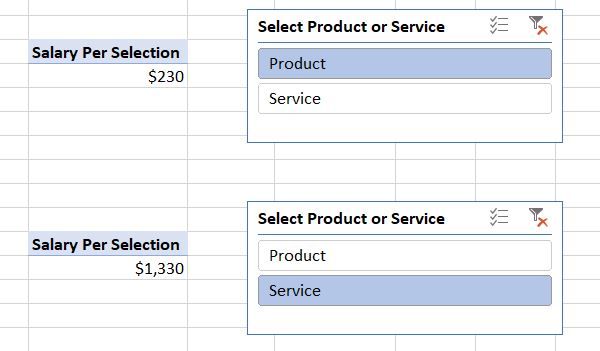
I created the following in PowerPivot for ease of explanation.  As you can see, when the slicer is selected for either Product or Service, the pivot table returns the correct value as follows:

Capture3.JPG


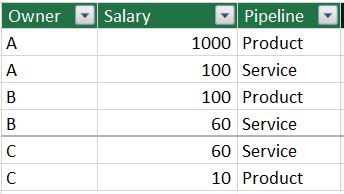
In order to do this, I took your data and created a Salary table:

Salary Table.JPG

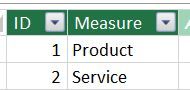
I also created a Selector table and did NOT join it to the Salary table:

Selector Table.JPG


The Measure field is actually my slicer, and I renamed the display header caption to "Select Product or Service."  This table is important when the SWITCH measure is used, described later.


I also created the following measures:


Selected Value = min(Selector[ID])

Total Salary = sum(Salary[Salary])

Total Salary Excluding Owner A = CALCULATE([Total Salary], Salary[Owner]="B" ||

                                                                          Salary[Owner]="C")


And the most important measure using the SWITCH function is as follows:

Salary per Selection =SWITCH([Selected Value],
	1,[Total Salary Excluding Owner A],
	2,[Total Salary])

Hope this helps!


Helpful resources

Announcements
Join our Fabric User Panel

Join our Fabric User Panel

Share feedback directly with Fabric product managers, participate in targeted research studies and influence the Fabric roadmap.

February Power BI Update Carousel

Power BI Monthly Update - February 2026

Check out the February 2026 Power BI update to learn about new features.