Join us at FabCon Atlanta from March 16 - 20, 2026, for the ultimate Fabric, Power BI, AI and SQL community-led event. Save $200 with code FABCOMM.
Register now!The Power BI Data Visualization World Championships is back! Get ahead of the game and start preparing now! Learn more
Hi,
I have one issue and I'm hoping someone can help me with this.
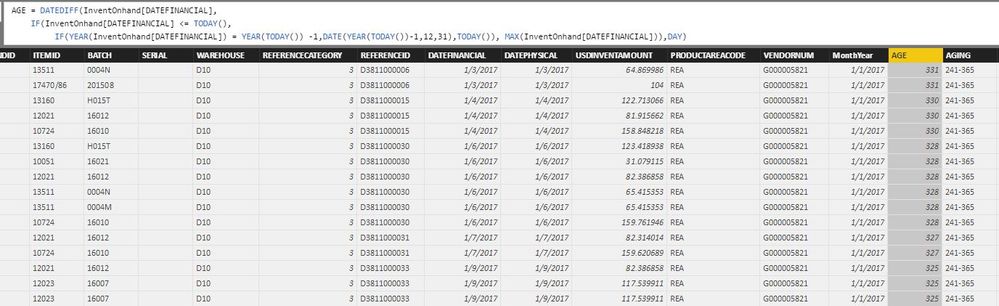
I need calculate age day of items in inventory based on date financial available, up to selected date in filter date and group it on the calcuclated column AGING:
AGING = IF(InventOnhand[AGE] < 121, "0-120", IF(InventOnhand[AGE] < 241, "121-240", IF(InventOnhand[AGE] < 366, "241-365", ">365")))
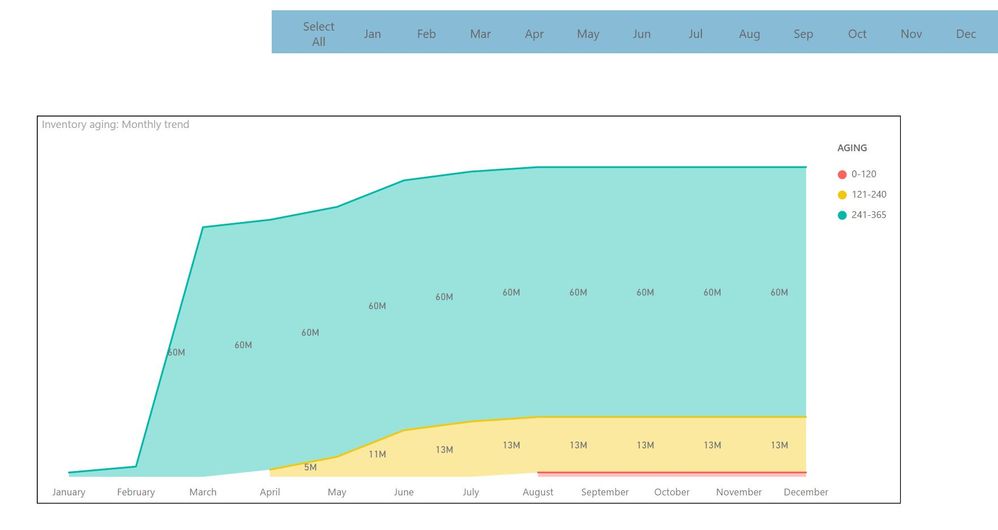
Like image below, i set default calculate to today and i want to change it to last date of selected month in dashboard. Final result i want is calculate total amount based on age group and show it in chart like next image.
I was try set it in measure and it work but the measure not allow add it to legend of the chart only allow calculated column, and the calculated column is not working on selected month in dashboard.
Any help would be appreciated, or also feel free to tell me provide a simpler solution.
Regards.
Solved! Go to Solution.
Hi @vquang92, I can see your dilemma.
On a strategic level, you can try creating a static lookup table for AGING bands with these columns:
AGING FromDays ToDays
0-120 0 120
121-240 121 240
241-365 241 365
>365 366 999999
And add the AGING column from this static table to the legend.
After that, create a measure to sum up your inventory values by "looking up" Inventory[AGE] in this table using the FILTER function.
You're right, in order to respond to dynamic slicers and filters on the report, you must use a measure and not a calculated column.
Hi @vquang92, I can see your dilemma.
On a strategic level, you can try creating a static lookup table for AGING bands with these columns:
AGING FromDays ToDays
0-120 0 120
121-240 121 240
241-365 241 365
>365 366 999999
And add the AGING column from this static table to the legend.
After that, create a measure to sum up your inventory values by "looking up" Inventory[AGE] in this table using the FILTER function.
You're right, in order to respond to dynamic slicers and filters on the report, you must use a measure and not a calculated column.
The Power BI Data Visualization World Championships is back! Get ahead of the game and start preparing now!
| User | Count |
|---|---|
| 41 | |
| 38 | |
| 36 | |
| 30 | |
| 28 |
| User | Count |
|---|---|
| 128 | |
| 88 | |
| 79 | |
| 67 | |
| 62 |