cancel
Showing results for 
Search instead for 
Did you mean: 

The FabCon + SQLCon recap series starts April 14th at 8am Pacific. If you’re tracking where AI is going inside Fabric, this first session is a can't miss. Register now

Reply
Anonymous
Not applicable

Dynamic time hierarchy Filter selection

Hi Power BI Community,


I'm suddenly view a report with the period filter selection.

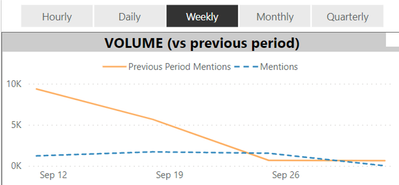
When you choose the period in the filter pannel, line chart wil be reflected.

How can we archive this, assume we have data in lowest level (data by daily or hourly)?

View by daily

Thai_Nguyen96_0-1633423715703.png

View by weekly

Thai_Nguyen96_1-1633423730061.png


1 ACCEPTED SOLUTION
Icey
Community Support
Community Support

Hi @Anonymous ,


There is another way to achieve your requirements. You can try to allow a user to make a slicer selection that dynamically updates the x-axis. Here are some blogs for your reference:

Dynamic X axis on charts - Power BI - RADACAD;

Dynamic Attributes In A Power BI Report - P3 Adaptive;

Solved: Dynamic change in X Axis - Microsoft Power BI Community.


Best Regards,

Icey


If this post helps, then please consider Accept it as the solution to help the other members find it more quickly.

View solution in original post

2 REPLIES 2
Icey
Community Support
Community Support

Hi @Anonymous ,


There is another way to achieve your requirements. You can try to allow a user to make a slicer selection that dynamically updates the x-axis. Here are some blogs for your reference:

Dynamic X axis on charts - Power BI - RADACAD;

Dynamic Attributes In A Power BI Report - P3 Adaptive;

Solved: Dynamic change in X Axis - Microsoft Power BI Community.


Best Regards,

Icey


If this post helps, then please consider Accept it as the solution to help the other members find it more quickly.

amitchandak
Super User
Super User

@Anonymous , You need to use bookmark for this


refer

https://blog.crossjoin.co.uk/2018/04/20/dynamically-changing-a-chart-axis-in-power-bi-using-bookmarks-and-buttons/
https://radacad.com/bookmarks-and-buttons-making-power-bi-charts-even-more-interactive

Share with Power BI Enthusiasts: Full Power BI Video (20 Hours) YouTube
Microsoft Fabric Series 60+ Videos YouTube
Microsoft Fabric Hindi End to End YouTube

Helpful resources

Announcements
New to Fabric survey Carousel

New to Fabric Survey

If you have recently started exploring Fabric, we'd love to hear how it's going. Your feedback can help with product improvements.

Power BI DataViz World Championships carousel

Power BI DataViz World Championships - June 2026

A new Power BI DataViz World Championship is coming this June! Don't miss out on submitting your entry.

Join our Fabric User Panel

Join our Fabric User Panel

Share feedback directly with Fabric product managers, participate in targeted research studies and influence the Fabric roadmap.

March Power BI Update Carousel

Power BI Community Update - March 2026

Check out the March 2026 Power BI update to learn about new features.