
Join us at FabCon Atlanta from March 16 - 20, 2026, for the ultimate Fabric, Power BI, AI and SQL community-led event. Save $200 with code FABCOMM.
Register now!The Power BI Data Visualization World Championships is back! Get ahead of the game and start preparing now! Learn more
| Property Name | Location | Property Type | Year Built | Size RSF | Leased Percentage | Acquisition Date | Owner | Property Management Company | Leasing Company |
| 2020 K Street FINAL | NULL | NULL | NULL | 399726 | 0.672303028 | NULL | NULL | NULL | NULL |
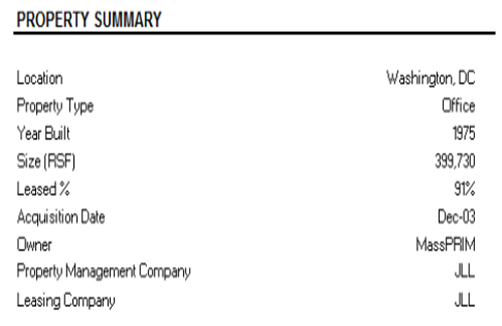
I want the output as below
I want the data above populated as the image here. any help would be greatly appreciated.
Solved! Go to Solution.
Hi @104731,
I try to reproduce your scenario and get expected result.
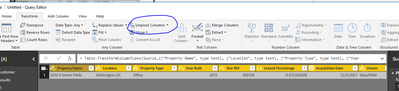
1. I create the following sample table based on your screenshot.
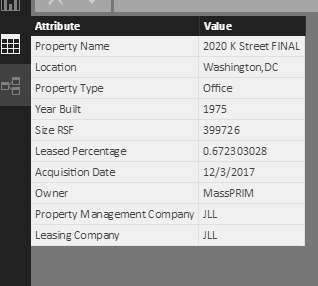
2. Right click table->Quey Edit, select all columns in the table->unpivot columns->Apply&Close, you will get the following table.step1
step2
get the table after unpivot columns
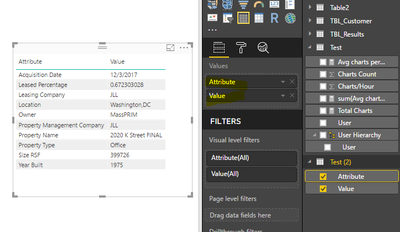
Finally, create a table visual to display your result as follows.
Best Regards,
Angelia
Hi @104731,
I try to reproduce your scenario and get expected result.
1. I create the following sample table based on your screenshot.
2. Right click table->Quey Edit, select all columns in the table->unpivot columns->Apply&Close, you will get the following table.step1
step2
get the table after unpivot columns
Finally, create a table visual to display your result as follows.
Best Regards,
Angelia
Hi @104731,
I think you can use the "matrix" visual for your problem.
(documentation)
https://powerbi.microsoft.com/en-us/documentation/powerbi-desktop-matrix-visual/
Regards,
L.Meijdam
The Power BI Data Visualization World Championships is back! Get ahead of the game and start preparing now!
Check out the November 2025 Power BI update to learn about new features.
| User | Count |
|---|---|
| 59 | |
| 43 | |
| 42 | |
| 23 | |
| 17 |
| User | Count |
|---|---|
| 190 | |
| 122 | |
| 96 | |
| 66 | |
| 47 |