Join us at FabCon Atlanta from March 16 - 20, 2026, for the ultimate Fabric, Power BI, AI and SQL community-led event. Save $200 with code FABCOMM.
Register now!Get Fabric Certified for FREE during Fabric Data Days. Don't miss your chance! Request now
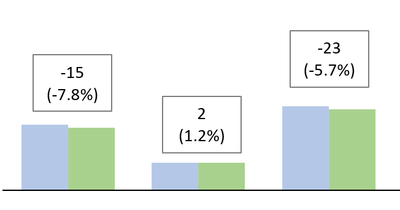
I have a clustered column chart that shows data for two years (in blue and green) and each cluster corresponds to a different deparment.
Is there a way to add some kind of text box (or similar) on top of the bars indicating the delta between the two? I want to explicitely show the delta (and percentage) between the two years. (See below).
Solved! Go to Solution.
Hello @zervino ,
check this out https://youtu.be/RaHi6yc02Tc?si=7RKPn_w1lH21v86c
Proud to be a Super User! | |
Hi @zervino ,
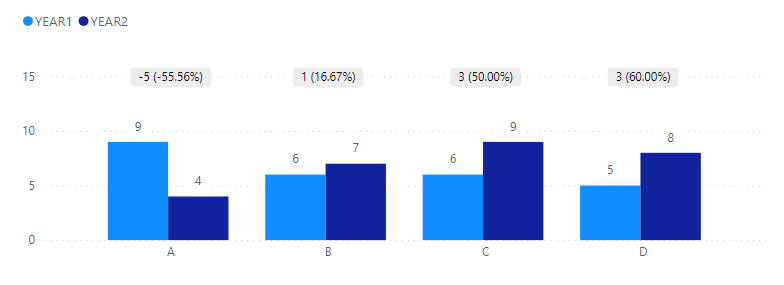
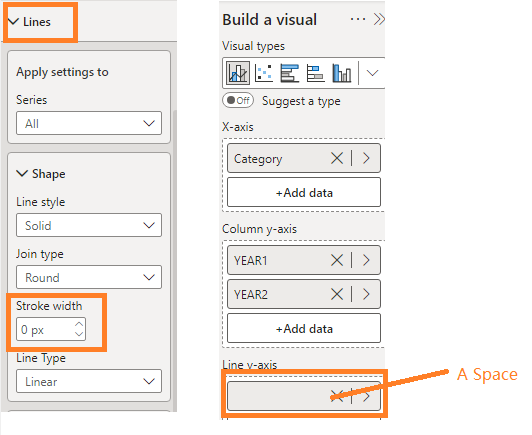
I tried to make one with line and clustered bar charts.
Unfortunately it does not recognize line breaks. Please check the example file.
Diff =
VAR _Diff = [YEAR2] - [YEAR1]
VAR _Rate = FORMAT( DIVIDE(_Diff,[YEAR1]),"Percent")
RETURN
_Diff & UNICHAR(10) & "(" & _Rate & ")"
Best Regards,
Gao
Community Support Team
If there is any post helps, then please consider Accept it as the solution to help the other members find it more quickly.
If I misunderstand your needs or you still have problems on it, please feel free to let us know. Thanks a lot!
How to get your questions answered quickly -- How to provide sample data in the Power BI Forum -- China Power BI User Group
Hi @zervino ,
I tried to make one with line and clustered bar charts.
Unfortunately it does not recognize line breaks. Please check the example file.
Diff =
VAR _Diff = [YEAR2] - [YEAR1]
VAR _Rate = FORMAT( DIVIDE(_Diff,[YEAR1]),"Percent")
RETURN
_Diff & UNICHAR(10) & "(" & _Rate & ")"
Best Regards,
Gao
Community Support Team
If there is any post helps, then please consider Accept it as the solution to help the other members find it more quickly.
If I misunderstand your needs or you still have problems on it, please feel free to let us know. Thanks a lot!
How to get your questions answered quickly -- How to provide sample data in the Power BI Forum -- China Power BI User Group
Hello @zervino ,
check this out https://youtu.be/RaHi6yc02Tc?si=7RKPn_w1lH21v86c
Proud to be a Super User! | |
Check out the November 2025 Power BI update to learn about new features.
Advance your Data & AI career with 50 days of live learning, contests, hands-on challenges, study groups & certifications and more!