This time we’re going bigger than ever. Fabric, Power BI, SQL, AI and more. We're covering it all. You won't want to miss it.
Learn moreLevel up your Power BI skills this month - build one visual each week and tell better stories with data! Get started
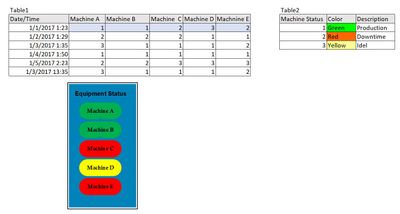
I am new in PowerBi tools. i am working in Manfacturing Project and the target to desgine dashbord showing Machine status . each machin have shape with dynamic color changes based on machine status value . i searched a lot but didn't get clear idea on how to do it !!
Table1 : log all machine status code with date/time
Table 2: have machine color status and description .
How to make dynamic shape where the fil color change based on code (1 &2&3) (Green,Red,Yellow )
Solved! Go to Solution.
Hey,
I'm wondering it the Visio visual that is available in the marketplace could be what you are lookng for.
Please keep in mind, that the current visual is still in preview, and all machines have to be drawn in the visio drawing, meaning, if there is a new machine in your data there will be no "new machine" in your visio drawing automatically.
Maybe this is what you are looking for
Regards
Tom
Hey,
I'm wondering it the Visio visual that is available in the marketplace could be what you are lookng for.
Please keep in mind, that the current visual is still in preview, and all machines have to be drawn in the visio drawing, meaning, if there is a new machine in your data there will be no "new machine" in your visio drawing automatically.
Maybe this is what you are looking for
Regards
Tom
Check out the April 2026 Power BI update to learn about new features.
Sign up to receive a private message when registration opens and key events begin.
If you have recently started exploring Fabric, we'd love to hear how it's going. Your feedback can help with product improvements.
| User | Count |
|---|---|
| 30 | |
| 24 | |
| 23 | |
| 17 | |
| 16 |
| User | Count |
|---|---|
| 61 | |
| 35 | |
| 30 | |
| 23 | |
| 22 |