cancel
Showing results for 
Search instead for 
Did you mean: 

Get Fabric certified for FREE! Don't miss your chance! Learn more

Reply
rcyber
Resolver I
Resolver I

Dynamic rank issue

Hi all!

I'm trying to create the Pareto chart based on multiple slicers.

I have two columns for slicing. They are named "Area" and "Exp Category". And I have the "USD" column. It contains amounts I want to calculate and show in my Pareto chart.


It works fine for slicing by Area field if I use this formula to calculate Rank of Amounts:


Rank CC Area = RANKX(ALLSELECTED(Data[Area]); 
		CALCULATE(SUM(Data[USD]);
		ALLEXCEPT(Data; Data[Area])))


2018-03-19_10-30-32.png


But I want to add the second slicer by "Exp Category".

I added slicer by "Exp Category" field and then I added the "Exp Category" field to ALLEXCEPT section of formula:


Rank CC Area = RANKX(ALLSELECTED(Data[Area]); 
		CALCULATE(SUM(Data[USD]);
		ALLEXCEPT(Data; Data[Area]; Data[Exp Category])))

But it calculates strange values:2018-03-19_10-35-02.png


I guess it happens because I should replace ALLSELECTED(Data[Area]) with something. It must be anything like ALLSELECTED(ALLEXCEPT(Data[Area]; Data[Area]; Data[Exp Category])). But it does not work.

My pbix file is here.

I'll be grateful for any help.


Thanks in advance,

Alexander.


6 REPLIES 6
Zubair_Muhammad
Community Champion
Community Champion

Hi @rcyber


Try adjusting the Rank formula as follows


Rank CC Area =
RANKX (
    SUMMARIZE ( ALLSELECTED ( Data ), Data[Area], Data[Exp Category] ),
    CALCULATE (
        SUM ( Data[USD] ),
        ALLEXCEPT ( Data, Data[Area], Data[Exp Category] )
    )
)

@rcyber


And Cumulative Area as follows


Cumulative Area Total =
VAR rr = [Rank CC Area]
RETURN
    (
        CALCULATE (
            SUM ( Data[USD] ),
            FILTER (
                SUMMARIZE ( ALLSELECTED ( data ), Data[Area], Data[Exp Category] ),
                [Rank CC Area] <= rr
            )
        )
    )

@Zubair_Muhammad,

Thanks a lot for quick help.

It works good and calculates rank correctly.


But it's not exactly what I want co create.

The SUMMARIZE function calculates subtotals with filtering by Data[Area] and Data[Exp Categories] fields.

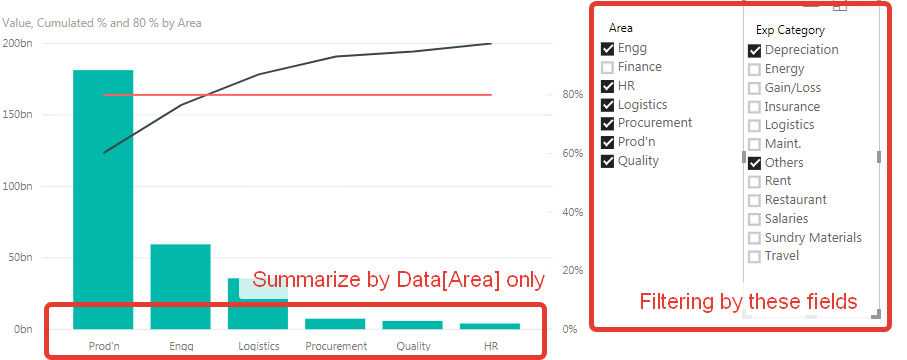
But I want to calculate (and rank next) subtotals grouping by Data[Area] and filtering Data[Area] and Data[Exp Categories] both.

I want to create the report like this:2018-03-20_14-35-50.png


I hope you understand what I mean.


Thanks in advance,

Alexander.

Hi @rcyber


I will look into it and get back to you


Do you have any ideas about my question?

Best regards,
Alexander.


Hi @rcyber


My apologies for late reply...


Please try this revised MEASURE.


File attached here as well


Rank CC Area =
RANKX (
    ALLSELECTED ( Data[Area] ),
    CALCULATE ( SUM ( Data[USD] ) ),
    ,
    DESC,
    DENSE
)


Cumulative Area Total =
VAR rr = [Rank CC Area]
RETURN
    (
        CALCULATE (
            SUM ( Data[USD] ),
            FILTER ( ALLSELECTED ( Data[Area] ), [Rank CC Area] <= rr )
        )
    )


Helpful resources

Announcements
Sticker Challenge 2026 Carousel

Join our Community Sticker Challenge 2026

If you love stickers, then you will definitely want to check out our Community Sticker Challenge!

January Power BI Update Carousel

Power BI Monthly Update - January 2026

Check out the January 2026 Power BI update to learn about new features.

FabCon Atlanta 2026 carousel

FabCon Atlanta 2026

Join us at FabCon Atlanta, March 16-20, for the ultimate Fabric, Power BI, AI and SQL community-led event. Save $200 with code FABCOMM.