cancel
Showing results for 
Search instead for 
Did you mean: 

We've captured the moments from FabCon & SQLCon that everyone is talking about, and we are bringing them to the community, live and on-demand. Starts on April 14th. Register now

Reply
TaroGulati
Helper III
Helper III

Dynamic quarter value

Hi everyone, 


I am looking for some suggestions related to dynamic quarter values.


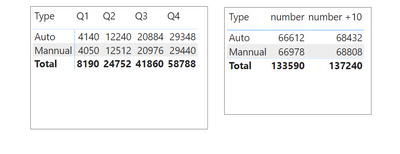
TaroGulati_0-1632300512027.png


I have two values one is number and other is number+10.

I am trying to present "number value" for the passed months and "number+10 values" for the current and future month.


for example current month is September so i am expecting results like this:

Q1 & Q2 can simply show "number values" because they are passed months. 

Q3 should be: July (number)+August(number)+september(number+10).

Q4 can simply show the "number +10 values" because they are future months.  


Link to PBIX file: https://1drv.ms/u/s!AoMB6moPXeKTfJdOhekejk6dhpI?e=cUzgSq


Is it possible to do this with the help of measures?


Thank you very much in advance. 


1 ACCEPTED SOLUTION
v-henryk-mstf
Community Support
Community Support

Hi @TaroGulati ,


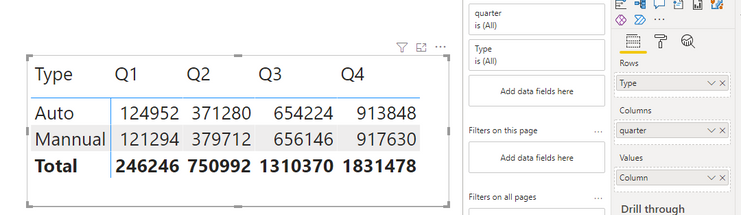
Try the following formula, replace it with the number originally created, and put it into the value in the matrix visual:


Column = 
IF (
    QUARTER ( Sheet2[Date] ) < QUARTER ( TODAY () ),
    CALCULATE ( SUM ( Sheet2[Value] ), ALLEXCEPT ( Sheet2, Sheet2[month] ) ),
    CALCULATE ( SUM ( Sheet2[value +10] ), ALLEXCEPT ( Sheet2, Sheet2[month] ) )
)


vhenrykmstf_0-1632899408256.png


If the problem is still not resolved, please provide detailed error information and let me know immediately. Looking forward to your reply.


Best Regards,
Henry


If this post helps, then please consider Accept it as the solution to help the other members find it more quickly.

View solution in original post

6 REPLIES 6
v-henryk-mstf
Community Support
Community Support

Hi @TaroGulati ,


Try the following formula, replace it with the number originally created, and put it into the value in the matrix visual:


Column = 
IF (
    QUARTER ( Sheet2[Date] ) < QUARTER ( TODAY () ),
    CALCULATE ( SUM ( Sheet2[Value] ), ALLEXCEPT ( Sheet2, Sheet2[month] ) ),
    CALCULATE ( SUM ( Sheet2[value +10] ), ALLEXCEPT ( Sheet2, Sheet2[month] ) )
)


vhenrykmstf_0-1632899408256.png


If the problem is still not resolved, please provide detailed error information and let me know immediately. Looking forward to your reply.


Best Regards,
Henry


If this post helps, then please consider Accept it as the solution to help the other members find it more quickly.

lbendlin
Super User
Super User

since none of your values are dependent on user interactions you can simplify the solution greatly by using calculated columns.


see attached.

Hi @lbendlin,


Thanks for your suggestion. I opened the file and it is showing the same result as it was showing to me. values for Q3 are wrong it must be a sum of July (number), August(number) and September(Number+10).


Thanks

I must have misunderstood the requirement then - are you saying you want to add 10 to each transaction, or to the summarized value for the currrent and future months?

Hi,


my meaning was to use normal values for the passed months and vlues +10 for the current and future months. 


so Q1 & Q2 are not a problem because they belongs to past months. 

Q3 is the mix of past and current month, so i want the sum of values for July, August and Values+10 for September. 


Thanks

@amitchandak & @Greg_Deckler , do you have any suggestion for this issue. 


Thanks in advance. 

Helpful resources

Announcements
New to Fabric survey Carousel

New to Fabric Survey

If you have recently started exploring Fabric, we'd love to hear how it's going. Your feedback can help with product improvements.

Power BI DataViz World Championships carousel

Power BI DataViz World Championships - June 2026

A new Power BI DataViz World Championship is coming this June! Don't miss out on submitting your entry.

Join our Fabric User Panel

Join our Fabric User Panel

Share feedback directly with Fabric product managers, participate in targeted research studies and influence the Fabric roadmap.

March Power BI Update Carousel

Power BI Community Update - March 2026

Check out the March 2026 Power BI update to learn about new features.