cancel
Showing results forย 
Search instead forย 
Did you mean:ย 

The Power BI Data Visualization World Championships is back! Get ahead of the game and start preparing now! Learn more

Reply
JuanDtM23
Helper II
Helper II

Dynamic meter goal

I have the following table with the estimated goals and maximos values several indicators:

JuanDtM23_6-1598110992908.png

the results of the indicators can be found in the following table:

JuanDtM23_4-1598110744674.png

the "result_Ind_Imp" column is the result of the indicator.

When creating the speedometer I associate the columns as shown.

In which I associate the columns "Tolerance" and "level 5_Imp" to a speedometer as seen:

JuanDtM23_1-1598110477391.png

the idea is that the target and the maximum value change each time the indicator name is selected in the data segmentation by indicator name, but it does not:

JuanDtM23_7-1598111148653.pngJuanDtM23_8-1598111170774.png

Any idea how I can do this?

Thank you in advance.

2 ACCEPTED SOLUTIONS
MFelix
Super User
Super User

Hello @JuanDtM23

You must have a dimension table that makes the relationship between these two tables, which will make filtering and pivotchart possible.

Remember to use the dimension table indicator name in yourt visualizations and not the other tables, otherwise it will not calculate accordingly.


Regards

Miguel Fรฉlix


Did I answer your question? Mark my post as a solution!

Proud to be a Super User!

Check out my blog: Power BI em Portuguรชs


View solution in original post

Anonymous
Not applicable

Hello @JuanDtM23

You can create a relationship between the Impact Indicator column in the Table1 indicator and the Column indicator in Table2 directly.

I build two boards for a test.

Tabla1:

1.png

Table 2:

2.png

Relationship:

3.png

Create one slicer per Impact Indicator column in Table1 and the results are as follows.

Default:

4.png

Select a

5.png

Select b:

6.png

Or like the

You can download the pbix file from this link: Dynamic Meter Objective

Best regards

Rico Zhou

If this post helps,then consider Accepting it as the solution to help other members find it more quickly.

View solution in original post

4 REPLIES 4
Syndicate_Admin
Administrator
Administrator

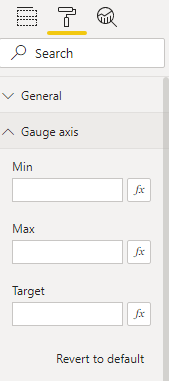
I have 5 speedometers in three views of a board and the problem is that I leave the size of the format the same in all, but as the metric changes, the size changes a bit and the report does not look homegeno. Will there be any way to leave the size fixed?

Hi @Anonymous ,


What you can do is to set the value directly on the options of the gauge chart:


MFelix_0-1628238387617.png

Another option is to add a measure with a fixed value to your target values.


Regards

Miguel Fรฉlix


Did I answer your question? Mark my post as a solution!

Proud to be a Super User!

Check out my blog: Power BI em Portuguรชs


Anonymous
Not applicable

Hello @JuanDtM23

You can create a relationship between the Impact Indicator column in the Table1 indicator and the Column indicator in Table2 directly.

I build two boards for a test.

Tabla1:

1.png

Table 2:

2.png

Relationship:

3.png

Create one slicer per Impact Indicator column in Table1 and the results are as follows.

Default:

4.png

Select a

5.png

Select b:

6.png

Or like the

You can download the pbix file from this link: Dynamic Meter Objective

Best regards

Rico Zhou

If this post helps,then consider Accepting it as the solution to help other members find it more quickly.

MFelix
Super User
Super User

Hello @JuanDtM23

You must have a dimension table that makes the relationship between these two tables, which will make filtering and pivotchart possible.

Remember to use the dimension table indicator name in yourt visualizations and not the other tables, otherwise it will not calculate accordingly.


Regards

Miguel Fรฉlix


Did I answer your question? Mark my post as a solution!

Proud to be a Super User!

Check out my blog: Power BI em Portuguรชs


Helpful resources

Announcements
Power BI DataViz World Championships

Power BI Dataviz World Championships

The Power BI Data Visualization World Championships is back! Get ahead of the game and start preparing now!

December 2025 Power BI Update Carousel

Power BI Monthly Update - December 2025

Check out the December 2025 Power BI Holiday Recap!

FabCon Atlanta 2026 carousel

FabCon Atlanta 2026

Join us at FabCon Atlanta, March 16-20, for the ultimate Fabric, Power BI, AI and SQL community-led event. Save $200 with code FABCOMM.