cancel
Showing results for 
Search instead for 
Did you mean: 

The Power BI Data Visualization World Championships is back! Get ahead of the game and start preparing now! Learn more

Reply
kkalyanrr
Helper V
Helper V

Dynamic measures( Sum and Difference) for based on Slicer selection

Hello,

I'm trying to achieve the following result from the given dataset, can you help me with the DAX.
When I select "Income"in the slicer, we should get the sum of the amount values.
When I select "Income" and any of the these "Expenses"/"Other Expenses"/"COst of Sales", we should get difference in the amount value.
When I select any of these("Expense"/"Other Expense"/"Cost of Sales") and any of these"Expense"/"Other Expense"/"Cost of Sales" , again we should get the sum of the respective amounts.

Thanks.


CategoryNameGLDateAmount
Income01-Jul-19-1,994.24
Expenses01-Jul-19236.64
Other Expenses01-Jul-1928,338.00
Cost of Sales01-Jul-1914,789.34
Income01-Jul-1931,858.65
Expenses01-Aug-193,10,951.91
Other Expenses01-Aug-19-46,357.47
Cost of Sales01-Aug-1919,582.30
Income01-Aug-19324.16
Expenses01-Aug-1950000
Other Expenses01-Aug-19-2,699.24
Cost of Sales01-Aug-19260.47
Income01-Aug-19-1,451.85
Expenses01-Jul-195,730.00
Other Expenses01-Aug-193,038.00
Cost of Sales01-Jul-19200
Income01-Sep-192000
Expenses01-Sep-19-2,24,941.14
Other Expenses01-Sep-19659.48
Cost of Sales01-Sep-1965,577.28
Income01-Sep-1913,482.88
Expenses01-Sep-196,658.00
Other Expenses01-Sep-19-1,083.40
Cost of Sales01-Sep-19-2,699.24
Income01-Sep-19253
Expenses01-Aug-195,910.00
Other Expenses01-Sep-1965,577.28
Cost of Sales01-Sep-1913,482.88
1 ACCEPTED SOLUTION
Anonymous
Not applicable

Hi @kkalyanrr ,


Please try this measure after adding a new table for slicer:

Measure =
VAR _all =
    ALLSELECTED ( forSlicer[Type] )
VAR countSele =
    COUNTROWS ( FILTER ( 'forSlicer', 'forSlicer'[Type] IN _all ) )
VAR _income =
    CALCULATE (
        SUM ( 'Table'[Amount] ),
        FILTER ( 'Table', 'Table'[CategoryName] = "Income" )
    )
VAR _sum =
    CALCULATE (
        SUM ( 'Table'[Amount] ),
        FILTER ( 'Table', 'Table'[CategoryName] IN _all )
    )
RETURN
    IF (
        countSele = 1
            && "Income" IN _all,
        _income,
        IF ( countSele >= 2 && "Income" IN _all, _income * 2 - _sum, _sum )
    )


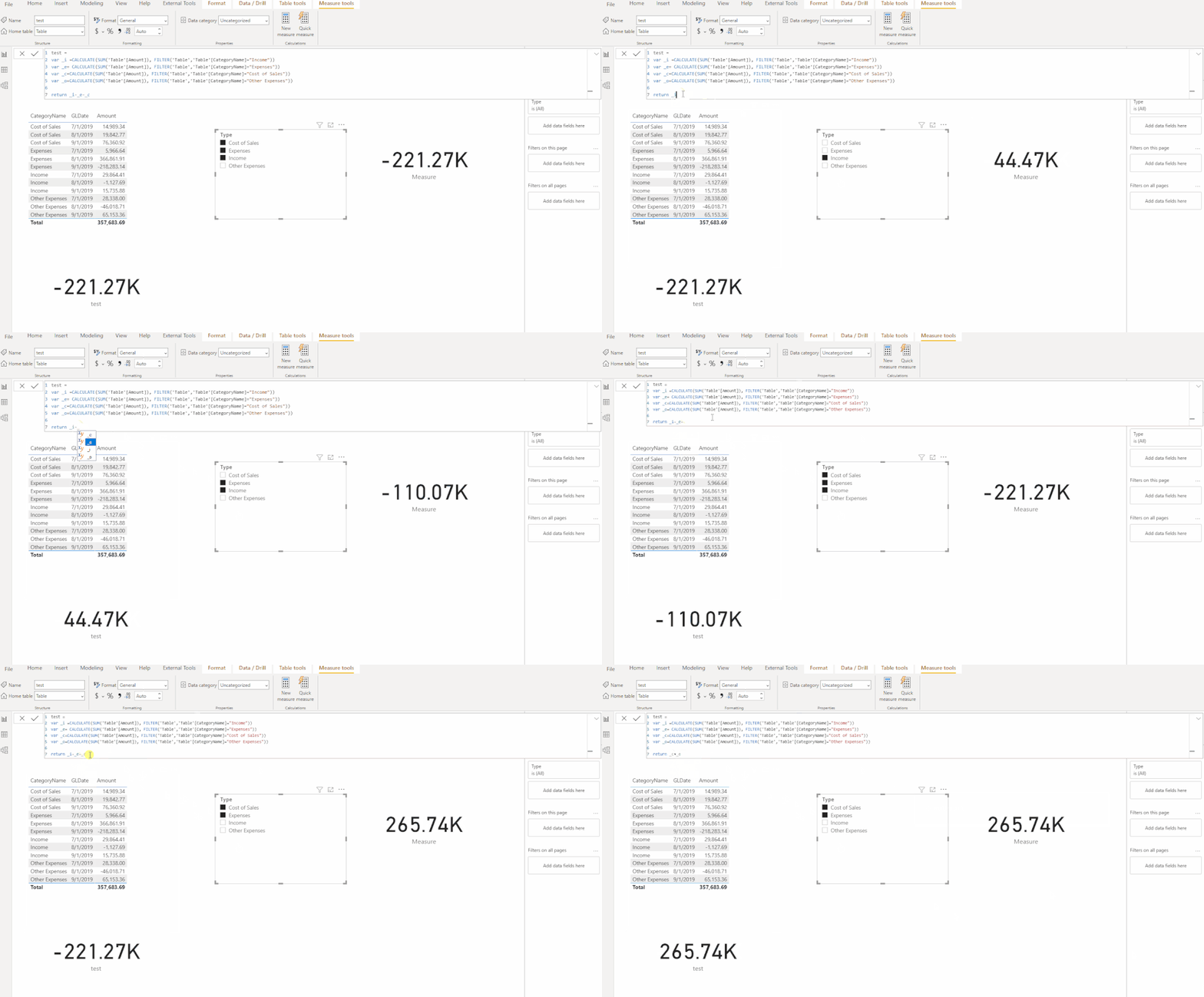
My final output looks like this : ( measure in the lower left corner is  just for test)


11.23.3.1.gif


Here is the pbix file.


Did I answer your question ? Please mark my reply as solution. Thank you very much.
If not, please upload some insensitive data samples and expected output.


Best Regards,
Eyelyn Qin

View solution in original post

2 REPLIES 2
Anonymous
Not applicable

Hi @kkalyanrr ,


Please try this measure after adding a new table for slicer:

Measure =
VAR _all =
    ALLSELECTED ( forSlicer[Type] )
VAR countSele =
    COUNTROWS ( FILTER ( 'forSlicer', 'forSlicer'[Type] IN _all ) )
VAR _income =
    CALCULATE (
        SUM ( 'Table'[Amount] ),
        FILTER ( 'Table', 'Table'[CategoryName] = "Income" )
    )
VAR _sum =
    CALCULATE (
        SUM ( 'Table'[Amount] ),
        FILTER ( 'Table', 'Table'[CategoryName] IN _all )
    )
RETURN
    IF (
        countSele = 1
            && "Income" IN _all,
        _income,
        IF ( countSele >= 2 && "Income" IN _all, _income * 2 - _sum, _sum )
    )


My final output looks like this : ( measure in the lower left corner is  just for test)


11.23.3.1.gif


Here is the pbix file.


Did I answer your question ? Please mark my reply as solution. Thank you very much.
If not, please upload some insensitive data samples and expected output.


Best Regards,
Eyelyn Qin

amitchandak
Super User
Super User

@kkalyanrr , Try a measure like.

measure =
var _1 = countx(filter(allselected(Table),Table[Category] ="Income"),Table[Category])
var _2 = countx(filter(allselected(Table),Table[Category] <> "Income"),Table[Category])
return
if(isblank(_1) || isblank(_2), Sum(Table[Amount]), calculate(sumx(Table, if(Table[Category] ="Income", Table[Amount],-1* Table[Amount]))))


Better to have a category an independent slicer

Share with Power BI Enthusiasts: Full Power BI Video (20 Hours) YouTube
Microsoft Fabric Series 60+ Videos YouTube
Microsoft Fabric Hindi End to End YouTube

Helpful resources

Announcements
Power BI DataViz World Championships

Power BI Dataviz World Championships

The Power BI Data Visualization World Championships is back! Get ahead of the game and start preparing now!

December 2025 Power BI Update Carousel

Power BI Monthly Update - December 2025

Check out the December 2025 Power BI Holiday Recap!

FabCon Atlanta 2026 carousel

FabCon Atlanta 2026

Join us at FabCon Atlanta, March 16-20, for the ultimate Fabric, Power BI, AI and SQL community-led event. Save $200 with code FABCOMM.