Join us at FabCon Atlanta from March 16 - 20, 2026, for the ultimate Fabric, Power BI, AI and SQL community-led event. Save $200 with code FABCOMM.
Register now!Get Fabric Certified for FREE during Fabric Data Days. Don't miss your chance! Request now
Hi All
So, I have been struggling with how to resolve a problem.
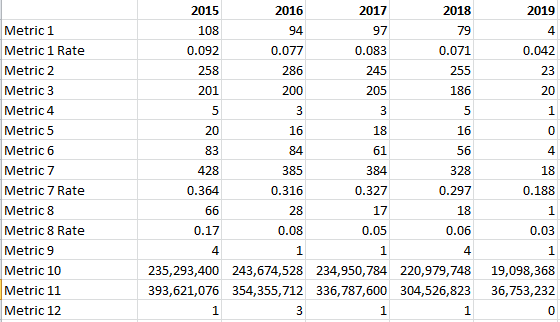
I have a set of data, made up of individual measures on rows, with period in columns (2015-2019)......what I am trying to do is make the value in the 2019 column be a projected/annualised value, rather than the actual 2019 value. This is because some of the data in 2019 is incomplete/placeholder/estimate, so I want 2019 column value to be a refined calculated value instead.
Data table is similar to this:
......to further complicate, possibly, the rows marked as 'rate' - e.g. Metric 7 Rate - are calculated baseed on other rows' values.
Appreciate any help/guidance 🙂
Solved! Go to Solution.
Hi @kevpuk,
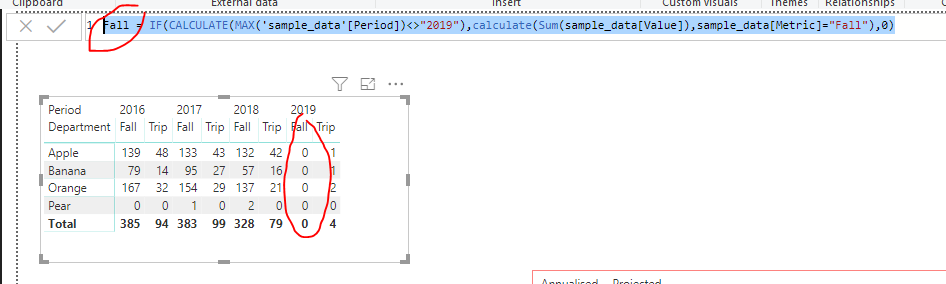
Could you mean to calculate the [Fall] and [Trip] measure with sample data for 2016, 2017, 2018 and use another measure for 2019?
If so, could you have tried with IF function?
Fall = IF(CALCULATE(MAX('sample_data'[Period])<>"2019"),calculate(Sum(sample_data[Value]),sample_data[Metric]="Fall"),0)
(You could replace the 0 in the formula to the measure of calculating "2019")
Regards,
Daniel He
Hi @kevpuk,
Could you please offer your sample file to have a test and post your desired result if possible?
Regards,
Daniel He
Hi
Thanks for your response.
I have created a simple sampl .pbix file......on the left hand side of the page are simple matrix visuals, with annual data from 2016-2019......to the right, with red borders around, I have created a couple of simple matrix visuals using measures to provide an 'annualised' view of the current year (simply, item count/days in year * 365).
https://1drv.ms/u/s!AqSWpWAD-qDBgu1E5Lif9Ne6lMwuvg
What I am trying to achieve is a method to make one visual that - in this case - would show actual numbers for 2016, 2017 and 2018, but would show the annualised value for 2019.
Thanks for taking the time to look at this 🙂
Hi @kevpuk,
Could you mean to calculate the [Fall] and [Trip] measure with sample data for 2016, 2017, 2018 and use another measure for 2019?
If so, could you have tried with IF function?
Fall = IF(CALCULATE(MAX('sample_data'[Period])<>"2019"),calculate(Sum(sample_data[Value]),sample_data[Metric]="Fall"),0)
(You could replace the 0 in the formula to the measure of calculating "2019")
Regards,
Daniel He
Hi Daniel
Well, that is elegant, nice and simple - thank-you very much 🙂
Check out the November 2025 Power BI update to learn about new features.
Advance your Data & AI career with 50 days of live learning, contests, hands-on challenges, study groups & certifications and more!