Get certified for free when you join Fabric Data Days 2026 and dive into Fabric, Power BI, SQL, AI, and other essential data skills.
Join nowData Days is here! Join us now for 60+ days of learning, challenges, and connection. Learn more
Hello;
can someone help me please?:
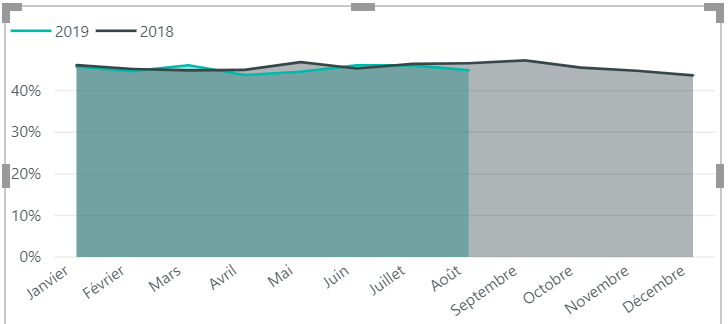
i'm working on this diagram and what i want to make a dianymic legend, like when my slicer is on 2018 as current year the year - 1 should display 2017 and if i select 2019 my previous year should display 2018
can someone has an idea of how to implement it?
i'm using SSAS 🙂 =D
Solved! Go to Solution.
Hi rayloubayi,
As I know, there is no method to change legend label dynamically. So one workaround is that you could try to use bookmark to achieve this goal. You could refrt to my sample(page 2) and Bookmarks and Buttons: Making Power BI Charts Even More Interactive for details.
Best Regards,
Zoe Zhi
If this post helps, then please consider Accept it as the solution to help the other members find it more quickly.
Hi rayloubayi,
As I know, there is no method to change legend label dynamically. So one workaround is that you could try to use bookmark to achieve this goal. You could refrt to my sample(page 2) and Bookmarks and Buttons: Making Power BI Charts Even More Interactive for details.
Best Regards,
Zoe Zhi
If this post helps, then please consider Accept it as the solution to help the other members find it more quickly.
Don't miss out on Data Days, June 15 through August 7. Learn Fabric, Power BI, SQL, AI and more.
Check out the May 2026 Power BI update to learn about new features.
| User | Count |
|---|---|
| 23 | |
| 23 | |
| 21 | |
| 17 | |
| 14 |
| User | Count |
|---|---|
| 58 | |
| 50 | |
| 37 | |
| 29 | |
| 24 |