cancel
Showing results for 
Search instead for 
Did you mean: 

Learn from the best! Meet the four finalists headed to the FINALS of the Power BI Dataviz World Championships! Register now

Reply
amalsp_ha
Frequent Visitor

Dynamic inventory ageing

Hi All,


I am tring to calculate the Inventory ageing dynamically. I have a table with all the transactions (purchases and sales). I want to calculate the balance of the purchase as at a date and age this into buckets. I have got to a stage where I have got the balance of the purchase (M_Balance in the attached pbix) as at a date and the age of the remaing quantity (M_Age in the attached pbix). What I want to do is the group this into buckets in a column chart. Can anyone help with this?


The work I have done upto now is in the pbix at the following link. 

https://1drv.ms/u/s!Ap4-j7F8BaMh90Zk2O4jkeOg42Vn?e=cGtTKN


Thanks


Amal

2 REPLIES 2
Anonymous
Not applicable

Hi  @amalsp_ha ,

You can group by the defined range for each [Bucket] by creating a computed column as follows.

Bucket_left =
IF(
   'Age_Bucket'[SortOrder] = 0 ,0,
    IF(
        'Age_Bucket'[SortOrder]=9,VALUE( RIGHT('Age_Bucket'[Bucket],3))+1,
    VALUE(
LEFT('Age_Bucket'[Bucket],
LEFT(
SEARCH("-",'Age_Bucket'[Bucket])-2)))))
Bucket_right =
IF(
   'Age_Bucket'[SortOrder] = 0 ,0,
    IF(
        'Age_Bucket'[SortOrder]=9,10000,
    VALUE(
RIGHT('Age_Bucket'[Bucket],
LEFT(
SEARCH("-",'Age_Bucket'[Bucket])-2)))))
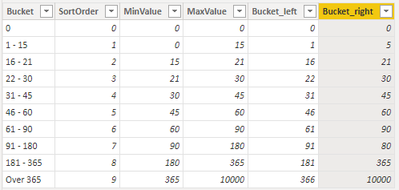
vyangliumsft_0-1656403601443.png

Then you can use the SUMMARIZE() function to create a virtual table from the data in the visual table, and then use the selectcolumn() function in the virtual table to treat [M_balance] in the virtual table as a column data

Then go to the table Age_Bucket to compare with [Bucket_left] and [Bucket_right] to count.

SELECTCOLUMNS function (DAX) - DAX | Microsoft Docs

SUMMARIZE function (DAX) - DAX | Microsoft Docs


Best Regards,

Liu Yang

If this post helps, then please consider Accept it as the solution to help the other members find it more quickly.

Hi,


Thanks for the reply. Could you do this in the attached file and show me. 


Amal

Helpful resources

Announcements
Power BI DataViz World Championships carousel

Power BI DataViz World Championships - June 2026

A new Power BI DataViz World Championship is coming this June! Don't miss out on submitting your entry.

Join our Fabric User Panel

Join our Fabric User Panel

Share feedback directly with Fabric product managers, participate in targeted research studies and influence the Fabric roadmap.

March Power BI Update Carousel

Power BI Community Update - March 2026

Check out the March 2026 Power BI update to learn about new features.