Get certified for free when you join Fabric Data Days 2026 and dive into Fabric, Power BI, SQL, AI, and other essential data skills.
Join nowJuly 7 - July 17 | Round 2 of the Power BI Dataviz World Championships. Don't miss your chance! Learn more
Hello,
I'm wondering what could be a possible way to filter the data that is visualised in the matrix?
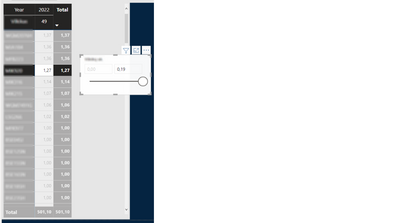
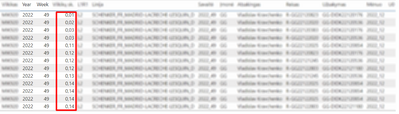
In this case, I have aggregated values displayed in matrix and slicer allows to filter only the detailed values (which appears in "Show data point as a table", second picture picture):
Current matrix and slicer:
"Show data point as a table" result. The sum of these detailed values is 1,27
So all in all, I need the slicer to be able to filter the values that are displayed in the matrix (range from 1,00 to 1,27 in this case), without losing the other (blurred) columns
Solved! Go to Solution.
Hi @DomantasK
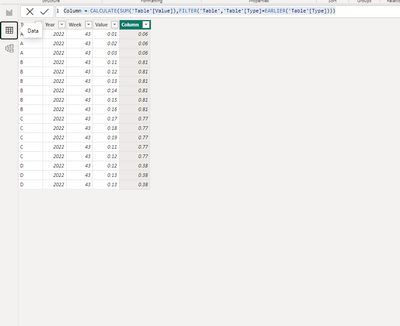
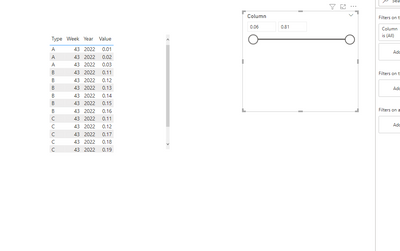
I think you can create a sum column of the value, then put it to the slicer.
e.g
Column = CALCULATE(SUM('Table'[Value]),FILTER('Table','Table'[Type]=EARLIER('Table'[Type])))
Best Regards!
Yolo Zhu
If this post helps, then please consider Accept it as the solution to help the other members find it more quickly.
Hi @DomantasK
I think you can create a sum column of the value, then put it to the slicer.
e.g
Column = CALCULATE(SUM('Table'[Value]),FILTER('Table','Table'[Type]=EARLIER('Table'[Type])))
Best Regards!
Yolo Zhu
If this post helps, then please consider Accept it as the solution to help the other members find it more quickly.
Join us in Barcelona for FabCon and SQLCon, the Fabric, Power BI, SQL, and AI community event. Save €200 with code FABCMTY200.
Join Fabric Data Days 2026: 60 days of free live/on-demand sessions, challenges, study groups, and certification opportunities.
| User | Count |
|---|---|
| 22 | |
| 22 | |
| 18 | |
| 17 | |
| 13 |
| User | Count |
|---|---|
| 63 | |
| 50 | |
| 46 | |
| 41 | |
| 39 |