cancel
Showing results for 
Search instead for 
Did you mean: 

Learn from the best! Meet the four finalists headed to the FINALS of the Power BI Dataviz World Championships! Register now

Reply
fbottazzoli
Advocate V
Advocate V

Dynamic filter through QueryString parameters in URL

Hi all,

I have a PowerBI report that is published on the web (we have PowerBI Pro license).


In my report there is a filter visual that allows me to filter based on Customer Code field. In the report I have a filter visual that also allows me to filter by this field. 


Filtering through Query String works well but I have a question: is it possible to remove the filter that is applied through QueryString by using some functionality in the report? Or the only way is to remove the QueryString part from the URL?


Thank you in advance.

Francesca 

2 REPLIES 2
dax
Community Support
Community Support

Hi fbottazzoli,

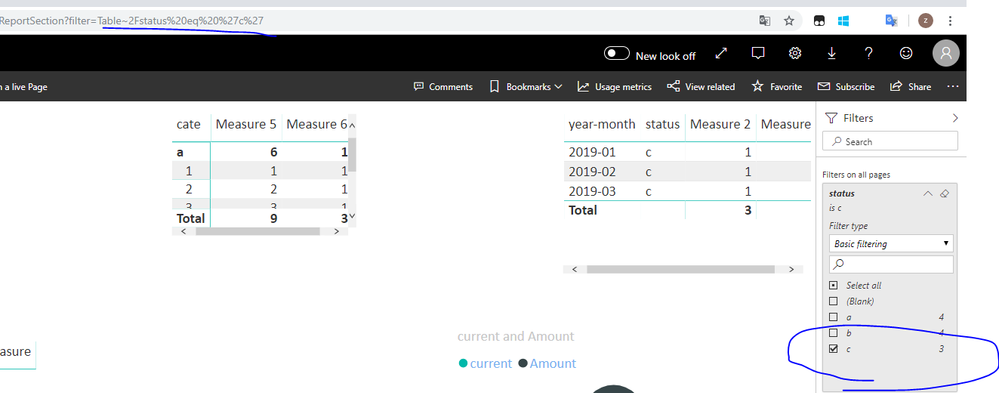
If you don't want to use query string parameters in the URL, I think you could use filter pane in report directly.

455.PNG

If this is not what you want, please correct me, and explain your requirement in details.


Best Regards,
Zoe Zhi

If this post helps, then please consider Accept it as the solution to help the other members find it more quickly.

Hi Zoe,

My goal is to access the report through web-page pre-filtered with a given customer code. However, I would like the user the possibility of removing that filter and navigating the report in its full version or applying other filters.

Thank you

Francesca 

Helpful resources

Announcements
Join our Fabric User Panel

Join our Fabric User Panel

Share feedback directly with Fabric product managers, participate in targeted research studies and influence the Fabric roadmap.

February Power BI Update Carousel

Power BI Monthly Update - February 2026

Check out the February 2026 Power BI update to learn about new features.

FabCon Atlanta 2026 carousel

FabCon Atlanta 2026

Join us at FabCon Atlanta, March 16-20, for the ultimate Fabric, Power BI, AI and SQL community-led event. Save $200 with code FABCOMM.