Join us at FabCon Atlanta from March 16 - 20, 2026, for the ultimate Fabric, Power BI, AI and SQL community-led event. Save $200 with code FABCOMM.
Register now!The Power BI Data Visualization World Championships is back! Get ahead of the game and start preparing now! Learn more
PBI Community,
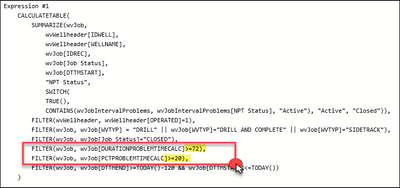
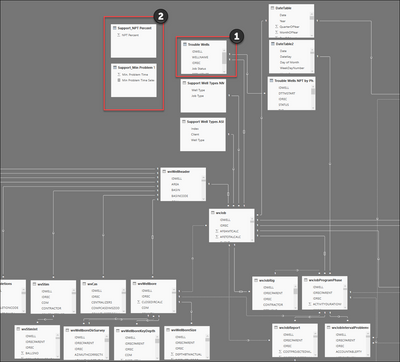
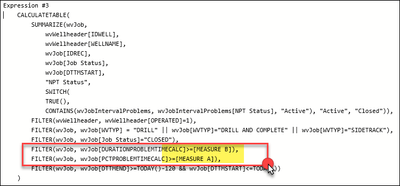
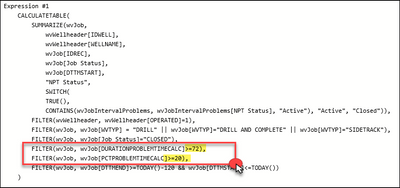
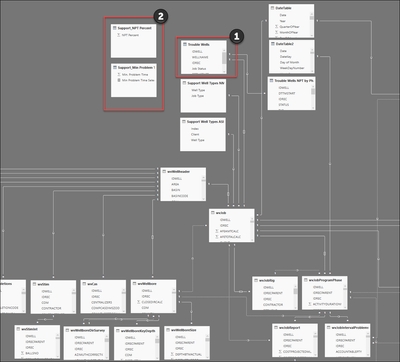
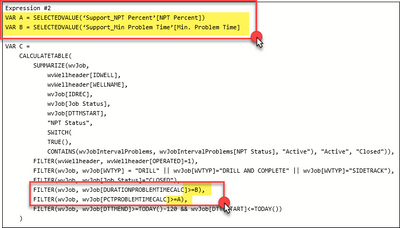
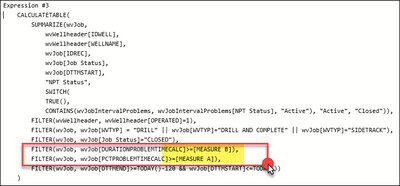
I have ran into a little hiccup with a report I have put together and am looking for some support. I have created a table with a DAX expression and am using this table to essentially replace my upper most parent table in my data model. I have incorporated a series of filter expressions in the table expression (see screenshot #1) that contains static values that allows me to reduce the overall context (number of rows). I am now attempting to improve the functionality of the report by changing these static values to dynamic however I am not getting the response I was looking for. I have create a few supporting tables (see screenshot #2, button #2) and have referenced these support tables in several ways, as filter arguments, and the table context just seems to reset to a larger number of rows; see screenshots #3 and #4 as reference.
I have used these technique before but within measures (not new DAX tables) so I am wondering whether I am seeing a limitation when try to embed variables/measures inside the table expression. Does anyone see anything wrong here that I am missing?
Thanks in advance for the support!
Screenshot #1
Screenshot #2
Screenshot #3
Screenshot #4
PBI Community,
I have ran into a little hiccup with a report I have put together and am looking for some support. I have written a table expression to create a custom table named "OE Troble Wells" and am essentially using this table to replace my upper most parent tables in my data model. I have incorporated a series of filter expression in the table expression (see screenshot #1) that contains static values that allows me to reduce the overall context (number of rows). I am now attempting to improve the functionality of the report by changing these static values to dynamic however I am not getting the response I was looking for. I have create a few supporting tables (see screenshot #2, button #2) and have referenced these support tables in several ways, as filter arguments, and the table context just seems to reset to a larger number of rows; see screenshots #3 and #4 as reference.
I have used these technique before but within measures (not new DAX tables) so I am wondering whether I am seeing a limitation when try to embed variables/measures inside the calculatetable / filter expression. Does anyone see anything wrong here that I am missing?
Thanks in advance for the support!
Screenshot #1
Screenshot #2
Screenshot #3
Screenshot #4
Hi @JoeRobert06
Calculated table doesn't support to change with dynamic values.
Maybe you could consider parameter in Power Query.
If you have any problem, pleas elet me know.
Best Regards
Maggie
Juanli
I got to thinking about this a little more and am wondering if you can provide clarity.
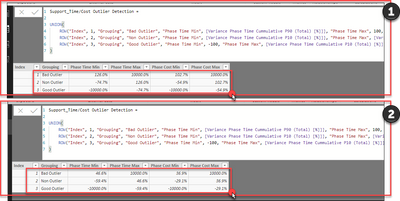
Please see below screenshot #1 as a reference. I have embedded measures into calculated tables before. Below I am generating a measure that is calculating a measure from the table in my previous post. If I was to go in and manually change the filter arguments for that table, the below calculated table "Support_time/cost outlier detection" is automatically adjusted as well. In my mind, I should be able to accomplish the same thing in my original post.
I think the issue here is that with my original example, i am wrapping the dynamic measure (or selection) with the filter function whereas my 2nd example, i am just simiply calling upon the dynamic measure as a constant value (not within a filter function). For some reason, the filter function does not recognize this constant value and returns a "null" value.
I have found another linked below that is very similiar to my problem and so I am curious to see what the response will be (linked below).
Link - Post title: Help with dax filter function using measures as arguments
Screenshot #1
Thanks Juanli for the response!
I adjust the report so that I can adjust the original datasource with a parameter which will ultimately filter down my calculated table
The Power BI Data Visualization World Championships is back! Get ahead of the game and start preparing now!
| User | Count |
|---|---|
| 56 | |
| 45 | |
| 35 | |
| 34 | |
| 21 |
| User | Count |
|---|---|
| 143 | |
| 122 | |
| 100 | |
| 80 | |
| 57 |