Get certified for free when you join Fabric Data Days 2026 and dive into Fabric, Power BI, SQL, AI, and other essential data skills.
Join nowJuly 7 - July 17 | Round 2 of the Power BI Dataviz World Championships. Don't miss your chance! Learn more
Pros,
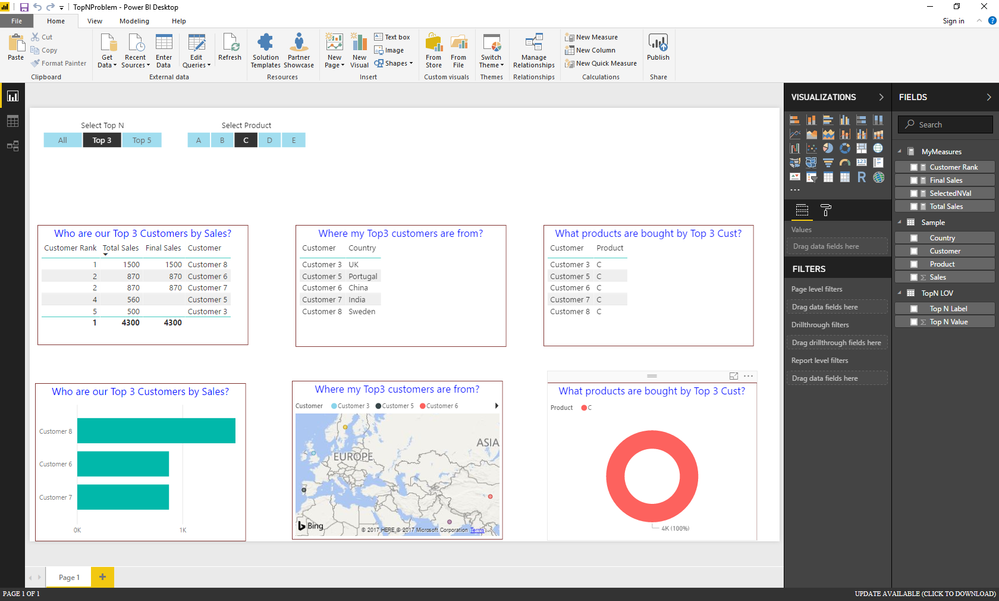
I am trying to build a dashboard with a set of visuals where the dashboard need to answer the following questions.
Visual 1: Who are my Top 5/10 customers by a measure (THis is accomplished)
Visual 2: Where my Top N customers are from (Preferably on a map, to plot only data points of customers who are in First visual)
Visual 3: What products are bought by my Top N customers? (Any visual that can restrict the data based on first visual)
I have uploaded the PBIX file in this lication.
https://drive.google.com/open?id=17G4GEJzPWcjOMh9Zy-AME0ugSQF0ZXEZ
Solved! Go to Solution.
Hi @natg,
Based on my test, you can firstly use the formula below to create the measure to calculate the [Custom Rank], then you should be able to use the [Final Sales] measure to apply visual level filters([Final Sales] is greater than 0) on the visuals of the three answers to get the expected result in your scenario.
Customer Rank =
RANKX (
ALL ( 'Sample'[Customer] ),
CALCULATE ( [Total Sales], ALLEXCEPT ( 'Sample', 'Sample'[Customer] ) ),
,
DESC
)
Here is the modified pbix file for your reference. ![]()
Regards
Hi @natg,
Based on my test, you can firstly use the formula below to create the measure to calculate the [Custom Rank], then you should be able to use the [Final Sales] measure to apply visual level filters([Final Sales] is greater than 0) on the visuals of the three answers to get the expected result in your scenario.
Customer Rank =
RANKX (
ALL ( 'Sample'[Customer] ),
CALCULATE ( [Total Sales], ALLEXCEPT ( 'Sample', 'Sample'[Customer] ) ),
,
DESC
)
Here is the modified pbix file for your reference. ![]()
Regards
Hi @v-ljerr-msft,
Thanks for the help. Looks like need to spend more time understanding how the all except works in this case.
When I applied the product filter, the visuals are fine and working as expected. Whereas the rank index values were incorrect in the table.
Once I included Product also as another clause in the all except option, it looked fine. Many thanks for the help.
Customer Rank =
RANKX (
ALL ( 'Sample'[Customer] ),
CALCULATE ( [Total Sales], ALLEXCEPT ( 'Sample', 'Sample'[Customer], 'Sample'[Product] ) ),
,
DESC
)
Join us in Barcelona for FabCon and SQLCon, the Fabric, Power BI, SQL, and AI community event. Save €200 with code FABCMTY200.
Join Fabric Data Days 2026: 60 days of free live/on-demand sessions, challenges, study groups, and certification opportunities.
| User | Count |
|---|---|
| 23 | |
| 22 | |
| 18 | |
| 17 | |
| 13 |
| User | Count |
|---|---|
| 63 | |
| 44 | |
| 42 | |
| 40 | |
| 39 |