Learn from the best! Meet the four finalists headed to the FINALS of the Power BI Dataviz World Championships! Register now
Hey Guys
Im a PBI noob. And this is my first post...so be kind ![]()
Im not sure if the question was asked before...but, here goes.
I have a relative period slicer:
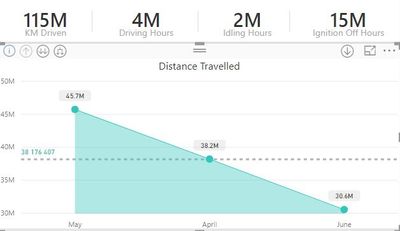
What I would like to achieve is this...
So, is this do-able without using the date hierarchy? Im basically looking for a dynamic date hierarchy on the x-axis.
Looking at the images below. If I just use dates, it looks a mess (for this quarter), but then looks pretty if I use the Month hierarchy. I dont want the users to use the hierarchy though cos they will have to drill down again when moving to last week.
Fugly
Pretty
All you help will be appreciated ![]()
@naidoode Yes it is doable..
Can you please share some sample data, So that I can easily give an update on this.
Oooh...that was quick 😉
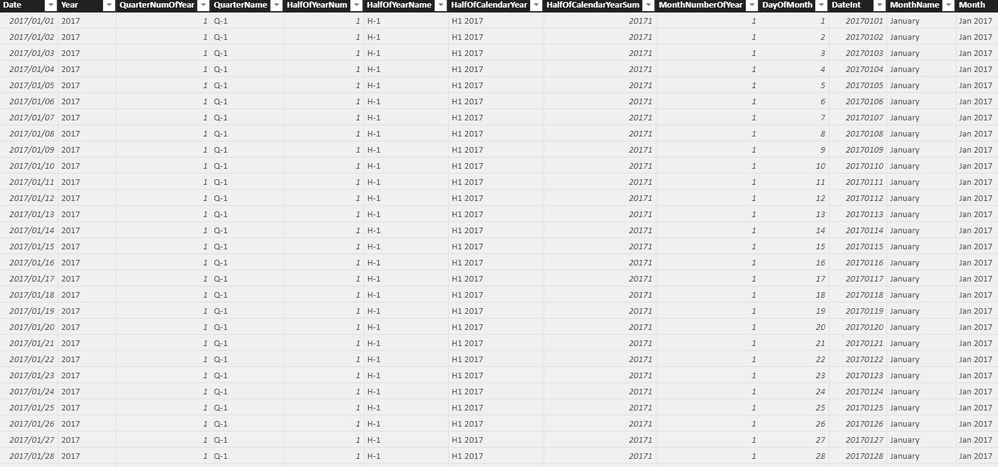
Hmmmm....I dont have an option to attach a file...but it seems like I can paste. Would this be fine? I also have a date table (screenshot below)
The reportdate field has a record per driver, per vehicle, per date for 1 year
| ReportDate | DriverID | AccountId | VehicleId | Distance | MaxSpeed | AvgSpeed | DrivingDuration | StopDuration | NumOfStops | IdlingDuration | GeoEvents |
| 2018-06-25 | 30 | 1 | 6930 | 28 | 71 | 23 | 4247 | 82153 | 2 | 539 | 8 |
| 2018-06-25 | 32 | 1 | 6939 | 88 | 119 | 58 | 5459 | 73817 | 5 | 249 | 0 |
| 2018-06-25 | 61 | 1507 | 7778 | 14 | 67 | 4 | 10112 | 7235 | 14 | 9354 | 167 |
| 2018-06-25 | 70 | 1507 | 11619 | 1 | 22 | 1 | 3204 | 5516 | 6 | 3158 | 26 |
| 2018-06-25 | 74 | 1507 | 7710 | 124 | 73 | 25 | 17582 | 8502 | 12 | 9927 | 138 |
| 2018-06-25 | 77 | 1507 | 7688 | 0 | 10 | 0 | 199 | 1225 | 1 | 199 | 75 |
| 2018-06-25 | 77 | 1507 | 7700 | 126 | 107 | 33 | 13723 | 43560 | 11 | 6440 | 73 |
| 2018-06-25 | 78 | 1507 | 14223 | 0 | 0 | 0 | 638 | 634 | 3 | 638 | 32 |
| 2018-06-25 | 78 | 1507 | 6979 | 0 | 0 | 0 | 3710 | 919 | 2 | 3710 | 14 |
| 2018-06-25 | 80 | 1507 | 7637 | 1 | 14 | 6 | 515 | 1206 | 1 | 515 | 40 |
| 2018-06-25 | 80 | 1507 | 11622 | 1 | 18 | 0 | 3713 | 5953 | 4 | 3713 | 52 |
| 2018-06-25 | 80 | 1507 | 11540 | 0 | 12 | 0 | 717 | 1343 | 2 | 717 | 42 |
| 2018-06-25 | 80 | 1507 | 11531 | 1 | 13 | 2 | 1211 | 4030 | 2 | 1211 | 37 |
| 2018-06-25 | 80 | 1507 | 6987 | 1 | 11 | 12 | 292 | 1513 | 1 | 292 | 46 |
| 2018-06-25 | 81 | 1507 | 11615 | 2 | 13 | 2 | 3360 | 4304 | 2 | 3360 | 22 |
| 2018-06-25 | 81 | 1507 | 7563 | 1 | 15 | 1 | 2160 | 1401 | 1 | 2160 | 33 |
| 2018-06-25 | 81 | 1507 | 7030 | 2 | 14 | 1 | 3709 | 5653 | 6 | 3709 | 25 |
| 2018-06-25 | 81 | 1507 | 7424 | 1 | 19 | 0 | 5215 | 27222 | 4 | 5215 | 15 |
| 2018-06-25 | 81 | 1507 | 7604 | 0 | 7 | 0 | 215 | 2128 | 1 | 215 | 60 |
| 2018-06-25 | 84 | 1507 | 6958 | 37 | 86 | 16 | 8318 | 11112 | 6 | 6215 | 41 |
| 2018-06-25 | 88 | 1507 | 7458 | 0 | 0 | 0 | 1275 | 3663 | 1 | 1275 | 117 |
| 2018-06-25 | 88 | 1507 | 7032 | 156 | 111 | 22 | 25061 | 44456 | 9 | 16730 | 108 |
| 2018-06-25 | 88 | 1507 | 7699 | 1 | 16 | 2 | 1592 | 14710 | 2 | 1592 | 26 |
| 2018-06-25 | 91 | 1507 | 11517 | 1 | 10 | 1 | 1921 | 9935 | 4 | 1921 | 29 |
| 2018-06-25 | 92 | 1507 | 7563 | 0 | 8 | 0 | 240 | 3633 | 1 | 240 | 33 |
| 2018-06-25 | 92 | 1507 | 6962 | 0 | 0 | 0 | 592 | 0 | 0 | 592 | 11 |
| 2018-06-25 | 92 | 1507 | 7173 | 0 | 0 | 0 | 240 | 6 | 0 | 240 | 19 |
| 2018-06-25 | 92 | 1507 | 10205 | 0 | 16 | 0 | 119 | 21694 | 1 | 119 | 43 |
| 2018-06-25 | 94 | 1507 | 7158 | 201 | 86 | 35 | 20505 | 27205 | 17 | 7854 | 28 |
@naidoode Try this in power query.
I just took ReportDate and DrivingDuration columns from your data.
let
Source = Table.FromRows(Json.Document(Binary.Decompress(Binary.FromText("bdLLDcQgDATQXnJOJM8Y86klSv9tLE602pj1hcPT4A/iPDcK+iH1oG37Vljadu2LWrERtUyFAIysk5VSotLDzfoShvNYCoujtlnpzeiTq/aIzbs1SNR74Hn+0J4tZlSjerOG98LlqQoCQX0FDsbrjqr13V+fVsSqcg8gI6o/gTEMW78VEuyK/q9gywqYVCRhG0x0MMmySPIXsvtpEhhJUkzmtNcH", BinaryEncoding.Base64), Compression.Deflate)), let _t = ((type text) meta [Serialized.Text = true]) in type table [ReportDate = _t, DrivingDuration = _t]),
#"Changed Type1" = Table.TransformColumnTypes(Source,{{"ReportDate", type date}, {"DrivingDuration", type number}}),
#"Added Custom" = Table.AddColumn(#"Changed Type1", "This Week", each if Date.IsInCurrentWeek([ReportDate]) then [ReportDate] else null),
#"Added Custom1" = Table.AddColumn(#"Added Custom", "Last Week", each if Date.IsInPreviousWeek([ReportDate]) then [ReportDate] else null),
#"Added Custom2" = Table.AddColumn(#"Added Custom1", "This Month", each if Date.IsInCurrentMonth([ReportDate]) then [ReportDate] else null),
#"Added Custom3" = Table.AddColumn(#"Added Custom2", "This Qrtr", each if Date.IsInCurrentQuarter([ReportDate]) then [ReportDate] else null),
#"Added Custom4" = Table.AddColumn(#"Added Custom3", "This Year", each if Date.IsInCurrentYear([ReportDate]) then [ReportDate] else null),
#"Changed Type" = Table.TransformColumnTypes(#"Added Custom4",{{"This Week", type text}, {"Last Week", type text}, {"This Month", type text}, {"This Qrtr", type text}, {"This Year", type text}}),
#"Replaced Value" = Table.ReplaceValue(#"Changed Type",null,"NA",Replacer.ReplaceValue,{"This Week", "Last Week", "This Month", "This Qrtr", "This Year"}),
#"Unpivoted Columns" = Table.UnpivotOtherColumns(#"Replaced Value", {"ReportDate", "DrivingDuration"}, "Attribute", "Value"),
#"Renamed Columns" = Table.RenameColumns(#"Unpivoted Columns",{{"Attribute", "Type"}, {"Value", "Date"}}),
#"Replaced Value1" = Table.ReplaceValue(#"Renamed Columns","NA",null,Replacer.ReplaceValue,{"Date"}),
#"Changed Type2" = Table.TransformColumnTypes(#"Replaced Value1",{{"Date", type date}})
in
#"Changed Type2"
Make Type as slicer and put Date column in x axis of bar chart and DrivingDuration in values.
I have no clue what to do with this ![]()
But, thanks for all the effort my friend. I will try and figure it out
Thanks for the help bro. I will try it out in the morning (its 19:30 pm here) and let you know
A new Power BI DataViz World Championship is coming this June! Don't miss out on submitting your entry.
Share feedback directly with Fabric product managers, participate in targeted research studies and influence the Fabric roadmap.
| User | Count |
|---|---|
| 46 | |
| 34 | |
| 27 | |
| 15 | |
| 15 |
| User | Count |
|---|---|
| 59 | |
| 58 | |
| 39 | |
| 22 | |
| 20 |