
Learn from the best! Meet the four finalists headed to the FINALS of the Power BI Dataviz World Championships! Register now
Hi,
Using Live Connection, I have a standard dynamic dim_date table, including full datetime, week number, days name, etc.. The table adds the current day each day using ETL process, so the max date is always today.
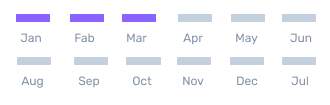
I'm trying to figure out a measure that will allow me something like that for days:
and like that for months:
Meaning for example if today is Wednesday June 5th, then in the days M-W will be highlighted, and in months JAN-JUN will be highlighted.
And suggestions how this can be accomplished?
Thank you!
Solved! Go to Solution.
Hi @Anonymous ,
Sorry for the delay.
The data is not filtered at all. No matter what selection the user makes and what other visuals are preset, these visuals will only be affected by today's date.
How do you create the date slicer in power bi currently?
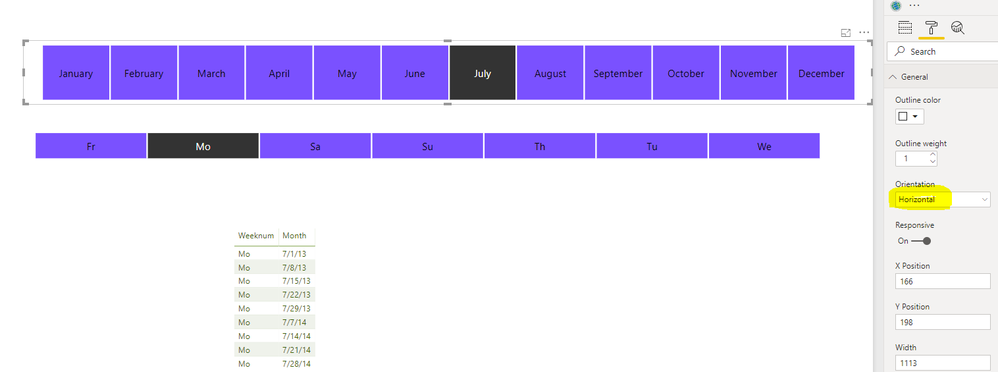
If you want to create the similar date slicer to your first reply, you could create the date slicer like below.
If you still need help, please share a dummy pbix file which can reproduce the scenario, so that we can help further investigate on it? You can upload it to OneDrive and post the link here. Do mask sensitive data before uploading.
Best Regards,
Cherry
Hi @Anonymous ,
I have a little confused about your requirement.
From your image, what date visual do you use ? Is this a custom visual in power bi?
In addition, how do you filter the date you want to highlight in this visual?
Best Regards,
Cherry
Hi,
Currently I am not using any visual, my image is just something created by our UX designer.
I need to create something similar in PBI, using whatever visuals available.
The data is not filtered at all. No matter what selection the user makes and what other visuals are preset, these visuals will only be affected by today's date.
Hope this clarrifies.
Thank you
Hi @Anonymous ,
Sorry for the delay.
The data is not filtered at all. No matter what selection the user makes and what other visuals are preset, these visuals will only be affected by today's date.
How do you create the date slicer in power bi currently?
If you want to create the similar date slicer to your first reply, you could create the date slicer like below.
If you still need help, please share a dummy pbix file which can reproduce the scenario, so that we can help further investigate on it? You can upload it to OneDrive and post the link here. Do mask sensitive data before uploading.
Best Regards,
Cherry
A new Power BI DataViz World Championship is coming this June! Don't miss out on submitting your entry.
Share feedback directly with Fabric product managers, participate in targeted research studies and influence the Fabric roadmap.
| User | Count |
|---|---|
| 50 | |
| 34 | |
| 32 | |
| 18 | |
| 17 |
| User | Count |
|---|---|
| 64 | |
| 64 | |
| 41 | |
| 27 | |
| 24 |