FabCon is coming to Atlanta
Join us at FabCon Atlanta from March 16 - 20, 2026, for the ultimate Fabric, Power BI, AI and SQL community-led event. Save $200 with code FABCOMM.
Register now!- Power BI forums
- Get Help with Power BI
- Desktop
- Service
- Report Server
- Power Query
- Mobile Apps
- Developer
- DAX Commands and Tips
- Custom Visuals Development Discussion
- Health and Life Sciences
- Power BI Spanish forums
- Translated Spanish Desktop
- Training and Consulting
- Instructor Led Training
- Dashboard in a Day for Women, by Women
- Galleries
- Data Stories Gallery
- Themes Gallery
- Contests Gallery
- QuickViz Gallery
- Quick Measures Gallery
- Visual Calculations Gallery
- Notebook Gallery
- Translytical Task Flow Gallery
- TMDL Gallery
- R Script Showcase
- Webinars and Video Gallery
- Ideas
- Custom Visuals Ideas (read-only)
- Issues
- Issues
- Events
- Upcoming Events
The Power BI Data Visualization World Championships is back! It's time to submit your entry. Live now!
- Power BI forums
- Forums
- Get Help with Power BI
- Desktop
- Dynamic date time range for line plot
- Subscribe to RSS Feed
- Mark Topic as New
- Mark Topic as Read
- Float this Topic for Current User
- Bookmark
- Subscribe
- Printer Friendly Page

- Mark as New
- Bookmark
- Subscribe
- Mute
- Subscribe to RSS Feed
- Permalink
- Report Inappropriate Content
Dynamic date time range for line plot
I have a hourly price data, below is a sample:
Eventdatetime Price
7/1/2019 0:00 22
7/1/2019 1:00 24
7/1/2019 2:00 24
7/1/2019 3:00 23
7/1/2019 4:00 23
7/1/2019 5:00 25
7/1/2019 6:00 28
I created a simple line plot of price time series and I have a slicer (between dates) to control the number of days to be viewed.
Is it possible to plot, two days ( 48 hours) at a time ? Yes, I can use the slicer for this but the goal is to allow the user to select a day ( using a slicer with list of all dates) and the plot should show hourly prices for selected day and the next day.
Thanks!
Solved! Go to Solution.


- Mark as New
- Bookmark
- Subscribe
- Mute
- Subscribe to RSS Feed
- Permalink
- Report Inappropriate Content
Hi @anandgovindaraj ,
You need to do the following steps:
- Create a calendar table to use as filter (this table must not be related with the dataset)
- Add the following measure:
Price over 2 days =
VAR SelectedDate =
    MAX ( DimDate[Date] )
VAR Number_of_days = 1 //Used to create number of days to show in chart if want to show 3 days number should be 2
RETURN
CALCULATE (
        SUM ( EventDate[Price] );
        FILTER (
            ALL ( EventDate[Eventdatetime].[Date] );
            EventDate[Eventdatetime].[Date] >= SelectedDate
                && EventDate[Eventdatetime].[Date] <= SelectedDate + Number_of_days
        )
    )
- Create a slicer with the calendar table
- And a chart with the EventDatetime and the previous measure.
Final result below:
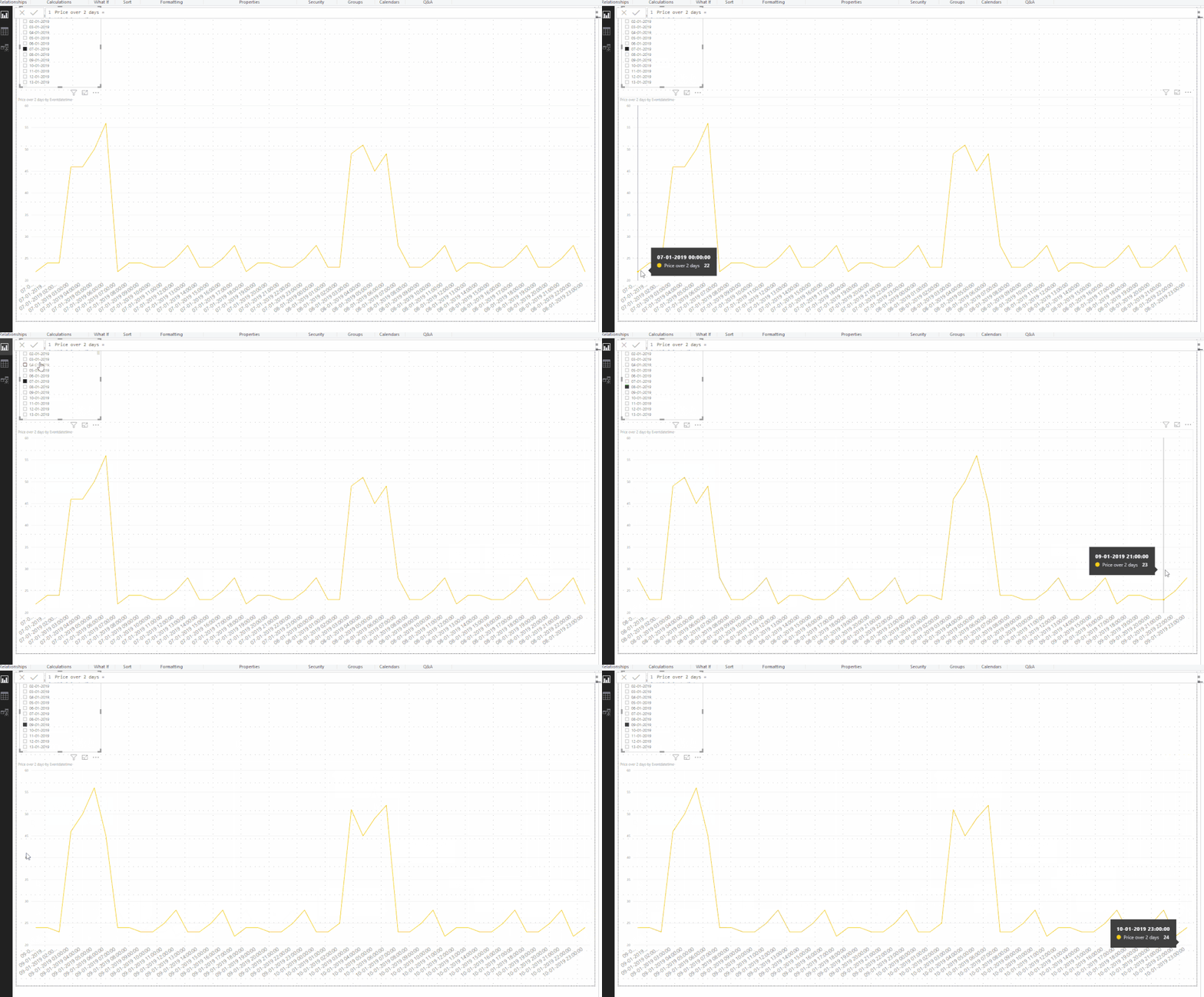
See attach PBIX file.
Regards,
MFelix
Regards
Miguel Félix
Did I answer your question? Mark my post as a solution!
Proud to be a Super User!
Check out my blog: Power BI em Português
- Mark as New
- Bookmark
- Subscribe
- Mute
- Subscribe to RSS Feed
- Permalink
- Report Inappropriate Content
@anandgovindaraj solution attached, just add a simple measure as below, and create a date table for slicer.
Total Price =
CALCULATE( SUM( Table1[ Price] ),
DATESBETWEEN( Table1[Eventdatetime ].[Date],
MIN( 'Calendar'[Date] ),
NEXTDAY( 'Calendar'[Date] ) ))
Subscribe to the @PowerBIHowTo YT channel for an upcoming video on List and Record functions in Power Query!!
Learn Power BI and Fabric - subscribe to our YT channel - Click here: @PowerBIHowTo
If my solution proved useful, I'd be delighted to receive Kudos. When you put effort into asking a question, it's equally thoughtful to acknowledge and give Kudos to the individual who helped you solve the problem. It's a small gesture that shows appreciation and encouragement! ❤
Did I answer your question? Mark my post as a solution. Proud to be a Super User! Appreciate your Kudos 🙂
Feel free to email me with any of your BI needs.
- Mark as New
- Bookmark
- Subscribe
- Mute
- Subscribe to RSS Feed
- Permalink
- Report Inappropriate Content
Thanks!
- Mark as New
- Bookmark
- Subscribe
- Mute
- Subscribe to RSS Feed
- Permalink
- Report Inappropriate Content
Hi @anandgovindaraj ,
You need to do the following steps:
- Create a calendar table to use as filter (this table must not be related with the dataset)
- Add the following measure:
Price over 2 days =
VAR SelectedDate =
    MAX ( DimDate[Date] )
VAR Number_of_days = 1 //Used to create number of days to show in chart if want to show 3 days number should be 2
RETURN
CALCULATE (
        SUM ( EventDate[Price] );
        FILTER (
            ALL ( EventDate[Eventdatetime].[Date] );
            EventDate[Eventdatetime].[Date] >= SelectedDate
                && EventDate[Eventdatetime].[Date] <= SelectedDate + Number_of_days
        )
    )
- Create a slicer with the calendar table
- And a chart with the EventDatetime and the previous measure.
Final result below:
See attach PBIX file.
Regards,
MFelix
Regards
Miguel Félix
Did I answer your question? Mark my post as a solution!
Proud to be a Super User!
Check out my blog: Power BI em Português- Mark as New
- Bookmark
- Subscribe
- Mute
- Subscribe to RSS Feed
- Permalink
- Report Inappropriate Content
@anandgovindaraj solution attached, just add a simple measure as below, and create a date table for slicer.
Total Price =
CALCULATE( SUM( Table1[ Price] ),
DATESBETWEEN( Table1[Eventdatetime ].[Date],
MIN( 'Calendar'[Date] ),
NEXTDAY( 'Calendar'[Date] ) ))
Subscribe to the @PowerBIHowTo YT channel for an upcoming video on List and Record functions in Power Query!!
Learn Power BI and Fabric - subscribe to our YT channel - Click here: @PowerBIHowTo
If my solution proved useful, I'd be delighted to receive Kudos. When you put effort into asking a question, it's equally thoughtful to acknowledge and give Kudos to the individual who helped you solve the problem. It's a small gesture that shows appreciation and encouragement! ❤
Did I answer your question? Mark my post as a solution. Proud to be a Super User! Appreciate your Kudos 🙂
Feel free to email me with any of your BI needs.

Helpful resources


| User | Count |
|---|---|
| 49 | |
| 37 | |
| 33 | |
| 22 | |
| 18 |


| User | Count |
|---|---|
| 130 | |
| 100 | |
| 56 | |
| 37 | |
| 37 |


