cancel
Showing results for 
Search instead for 
Did you mean: 

Next up in the FabCon + SQLCon recap series: The roadmap for Microsoft SQL and Maximizing Developer experiences in Fabric. All sessions are available on-demand after the live show. Register now

Reply
iDataDrew
Advocate IV
Advocate IV

Dynamic date range/line chart...

I've created a dynamic measure of # of days.  When you select the number of days you want, the report compares the current value to the value in the past (the # of days in the past).  I have no problem with this.  However, I'm trying to add a line chart to the report that also updates based on the days selection.  So if someone selected 30 days in the past, then the date range in the line chart should update to only show 30 days (max date - 30 days).  I've seen this done before and I've written the formula the exact same way I saw it, but for some reason the line chart (or table) is not updating properly.  All the dates in the table still show.  Here's how I'm writing the measure (I'm not including the dynamic aspect here for the sake of simplicity):


[Trend Value] = CALCULATE( [Total Value], FILTER( Dates, Dates[Date] >= MAX(Dates[Date]) - 30))


If you created a table with the Date field in it and then added this Trend Value measure to it, shouldn't the table adjust to only show the last 30 days?  You can see some sample data here.


Thank you.

1 ACCEPTED SOLUTION
Anonymous
Not applicable

Hi @iDataDrew,


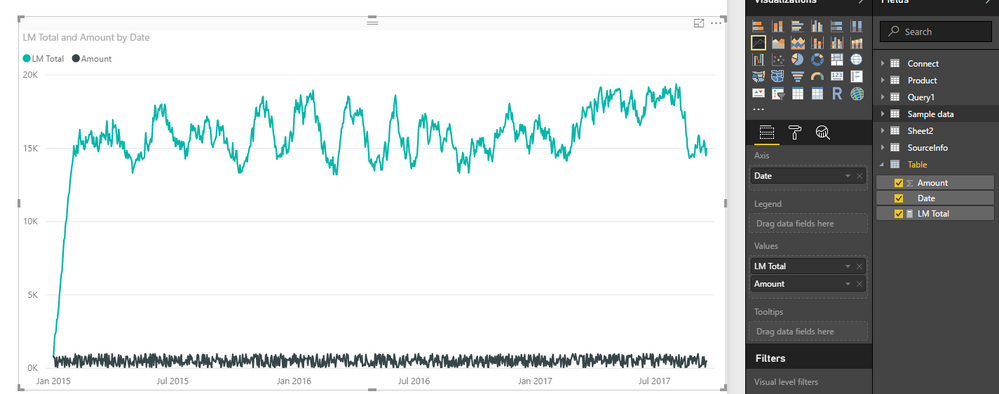
You can try to use below formula to get last month running total.

LM Total= 
var currentDate=MAX('Table'[Date])
return
CALCULATE(SUM('Table'[Amount]),FILTER(ALL('Table'),[Date]>=DATE(YEAR(currentDate),MONTH(currentDate)-1,DAY(currentDate))&&[Date]<=currentDate))

1.PNG


Please ensure your formula not contain any specific date filter which can broke the current filter.(all allexcept)


Regards,

Xiaoxin Sheng

View solution in original post

1 REPLY 1
Anonymous
Not applicable

Hi @iDataDrew,


You can try to use below formula to get last month running total.

LM Total= 
var currentDate=MAX('Table'[Date])
return
CALCULATE(SUM('Table'[Amount]),FILTER(ALL('Table'),[Date]>=DATE(YEAR(currentDate),MONTH(currentDate)-1,DAY(currentDate))&&[Date]<=currentDate))

1.PNG


Please ensure your formula not contain any specific date filter which can broke the current filter.(all allexcept)


Regards,

Xiaoxin Sheng

Helpful resources

Announcements
New to Fabric survey Carousel

New to Fabric Survey

If you have recently started exploring Fabric, we'd love to hear how it's going. Your feedback can help with product improvements.

Power BI DataViz World Championships carousel

Power BI DataViz World Championships - June 2026

A new Power BI DataViz World Championship is coming this June! Don't miss out on submitting your entry.

Join our Fabric User Panel

Join our Fabric User Panel

Share feedback directly with Fabric product managers, participate in targeted research studies and influence the Fabric roadmap.

March Power BI Update Carousel

Power BI Community Update - March 2026

Check out the March 2026 Power BI update to learn about new features.