cancel
Showing results for 
Search instead for 
Did you mean: 

The Power BI Data Visualization World Championships is back! Get ahead of the game and start preparing now! Learn more

Reply
jalaomar
Helper IV
Helper IV

Dynamic date filter

Hi BI experts,


Anyone who can support me with how to create a dynamic date filter as per the following request.


View Rolling 7 months in which 4 weeks in the past, current week and 26 weeks in the future?


also would be good to allow users to select their own custom date range but always have above as default.


anyone please?


1 ACCEPTED SOLUTION
Anonymous
Not applicable

Hi  @jalaomar ,

I created some data:

vyangliumsft_0-1675239120700.png


Here are the steps you can follow:

1. Enter data – Create table.
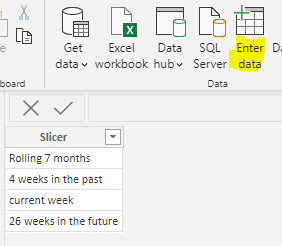
vyangliumsft_1-1675239120701.png

2. Create measure.

Rolling 7 months =
var _month=
DATEDIFF(
MAX('Table'[Date]),TODAY(),MONTH)
return
IF(
    _month>=1&&_month<=7,1,0)
4 weeks in the past =
var _week=
DATEDIFF(
MAX('Table'[Date]),TODAY(),Week)
return
IF(
    _week>=1&&_week<=4,1,0)
current week =
var _week=
DATEDIFF(
MAX('Table'[Date]),TODAY(),Week)
return
IF(
    _week=0,1,0)
26 weeks in the future =
var _week=
DATEDIFF(
TODAY(),MAX('Table'[Date]),Week)
return
IF(
    _week>=1&&_week<=26,1,0)
Flag =
SWITCH(
    TRUE(),
    MAX('Slicer Table'[Slicer])="Rolling 7 months",[Rolling 7 months],
    MAX('Slicer Table'[Slicer])="4 weeks in the past",[4 weeks in the past],
    MAX('Slicer Table'[Slicer])="current week",[current week],
    MAX('Slicer Table'[Slicer])="26 weeks in the future",[26 weeks in the future])
SumValue =
IF(
    MAX('Slicer Table'[Slicer])="Rolling 7 months",
    SUMX(FILTER(ALLSELECTED('Table'),
    MONTH('Table'[Date])=MONTH(MAX('Table'[Date]))&&'Table'[Date]<=MAX('Table'[Date])),[Rand]),
    MAX('Table'[Rand]))

3. Place [Flag]in Filters, set is=1, apply filter.
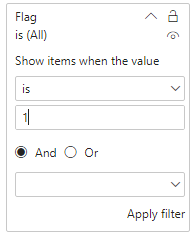
vyangliumsft_2-1675239120702.png

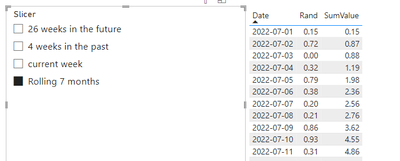
4. Result:

Rolling 7 month:

vyangliumsft_3-1675239120703.png

4 weeks in the past:

vyangliumsft_4-1675239120705.png


Best Regards,

Liu Yang

If this post helps, then please consider Accept it as the solution to help the other members find it more quickly

View solution in original post

2 REPLIES 2
Anonymous
Not applicable

Hi  @jalaomar ,

I created some data:

vyangliumsft_0-1675239120700.png


Here are the steps you can follow:

1. Enter data – Create table.

vyangliumsft_1-1675239120701.png

2. Create measure.

Rolling 7 months =
var _month=
DATEDIFF(
MAX('Table'[Date]),TODAY(),MONTH)
return
IF(
    _month>=1&&_month<=7,1,0)
4 weeks in the past =
var _week=
DATEDIFF(
MAX('Table'[Date]),TODAY(),Week)
return
IF(
    _week>=1&&_week<=4,1,0)
current week =
var _week=
DATEDIFF(
MAX('Table'[Date]),TODAY(),Week)
return
IF(
    _week=0,1,0)
26 weeks in the future =
var _week=
DATEDIFF(
TODAY(),MAX('Table'[Date]),Week)
return
IF(
    _week>=1&&_week<=26,1,0)
Flag =
SWITCH(
    TRUE(),
    MAX('Slicer Table'[Slicer])="Rolling 7 months",[Rolling 7 months],
    MAX('Slicer Table'[Slicer])="4 weeks in the past",[4 weeks in the past],
    MAX('Slicer Table'[Slicer])="current week",[current week],
    MAX('Slicer Table'[Slicer])="26 weeks in the future",[26 weeks in the future])
SumValue =
IF(
    MAX('Slicer Table'[Slicer])="Rolling 7 months",
    SUMX(FILTER(ALLSELECTED('Table'),
    MONTH('Table'[Date])=MONTH(MAX('Table'[Date]))&&'Table'[Date]<=MAX('Table'[Date])),[Rand]),
    MAX('Table'[Rand]))

3. Place [Flag]in Filters, set is=1, apply filter.

vyangliumsft_2-1675239120702.png

4. Result:

Rolling 7 month:

vyangliumsft_3-1675239120703.png

4 weeks in the past:

vyangliumsft_4-1675239120705.png


Best Regards,

Liu Yang

If this post helps, then please consider Accept it as the solution to help the other members find it more quickly

@Anonymous 

Super! Many thanks!


Mvh

Jala

Helpful resources

Announcements
Power BI DataViz World Championships

Power BI Dataviz World Championships

The Power BI Data Visualization World Championships is back! Get ahead of the game and start preparing now!

December 2025 Power BI Update Carousel

Power BI Monthly Update - December 2025

Check out the December 2025 Power BI Holiday Recap!

FabCon Atlanta 2026 carousel

FabCon Atlanta 2026

Join us at FabCon Atlanta, March 16-20, for the ultimate Fabric, Power BI, AI and SQL community-led event. Save $200 with code FABCOMM.

Top Solution Authors