Join us at FabCon Atlanta from March 16 - 20, 2026, for the ultimate Fabric, Power BI, AI and SQL community-led event. Save $200 with code FABCOMM.
Register now!The Power BI Data Visualization World Championships is back! Get ahead of the game and start preparing now! Learn more
By passing parameters and renaming using power query, I am setting the column name dynamically:
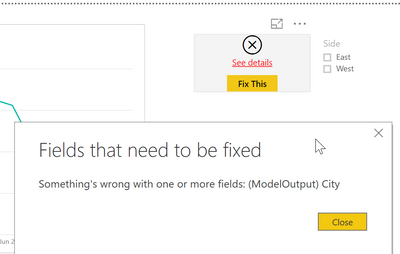
#"Renamed Columns" = Table.RenameColumns(ModelOutput1,{{"Dimension1", Dimension1}, {"Dimension2", Dimension2}})However visuals associated with this column name are giving error if I change the parameter value (from what was its initial value):
Is there a way that I can use parameters for a column name and still have the column consumed in a visual?
Solved! Go to Solution.
No, thats not possible.
The column name is the identifier of your column. Different name -> different column. The data model has no idea/connection to what has been done in the query editor.
Imke Feldmann (The BIccountant)
If you liked my solution, please give it a thumbs up. And if I did answer your question, please mark this post as a solution. Thanks!
How to integrate M-code into your solution -- How to get your questions answered quickly -- How to provide sample data -- Check out more PBI- learning resources here -- Performance Tipps for M-queries
No, thats not possible.
The column name is the identifier of your column. Different name -> different column. The data model has no idea/connection to what has been done in the query editor.
Imke Feldmann (The BIccountant)
If you liked my solution, please give it a thumbs up. And if I did answer your question, please mark this post as a solution. Thanks!
How to integrate M-code into your solution -- How to get your questions answered quickly -- How to provide sample data -- Check out more PBI- learning resources here -- Performance Tipps for M-queries
The Power BI Data Visualization World Championships is back! Get ahead of the game and start preparing now!
| User | Count |
|---|---|
| 37 | |
| 33 | |
| 32 | |
| 31 | |
| 26 |
| User | Count |
|---|---|
| 134 | |
| 96 | |
| 78 | |
| 67 | |
| 65 |