cancel
Showing results for 
Search instead for 
Did you mean: 

The FabCon + SQLCon recap series starts April 14th at 8am Pacific. If you’re tracking where AI is going inside Fabric, this first session is a can't miss. Register now

Reply
WardWarrior
New Member

Dynamic chart showing multiple values from multiple slicer selection

Hi,


I have a table:

Table1=

Date | Attribute | Value


I have 18 attributes, i am trying to have a dynamic chart that can show the sum of multiple attributes selected in the slicer.


I have found an article that gets me close, however when selecting multiple values on the slicer it sums the outcomes together instead of showing each individually.


https://www.fourmoo.com/2017/08/08/power-bi-how-disconnected-slicers-can-enrich-transform-your-analy...


1) created a disconnected slicer with the 18 attributes.

2) created measure to sum values in table 1. 'Test' = SUMX(Table1, Values)

3) Created a measure as below, however my result is a summed total of more than one measure instead of two seperate values.


Distance (Selected) =
// This Variable is looking for the selected value from the Disconnected Slicer
// If nothing is selected then display "No Activity Selected"
VAR ActivitySelected = SELECTEDVALUE(Activity[Activity],"No Activity Selected")
// Now using an IF statement, we can then pass through the required values.
RETURN
// If nothing has been selected then return the entire distance
IF(ActivitySelected = "No Activity Selected",
        [Distance],
// Else if a value is selected the pass that value to the calculate below
CALCULATE(
            [Distance],
            Activities[Activity Type] =
 ActivitySelected
 )
)

 Any help is much appreciated 🙂

1 ACCEPTED SOLUTION

Hi @WardWarrior,


Based on your description, you want to select multiple values in a slicer simultaneously, right?


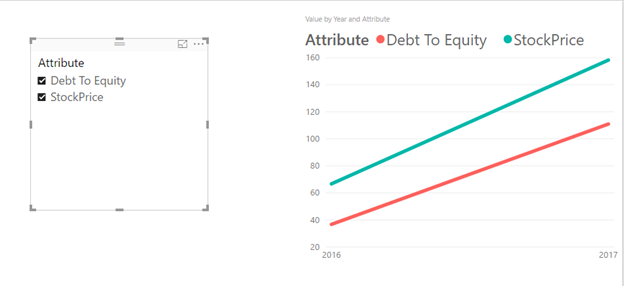
You can use “slicer” visual and select multiple values to filter line chart, you can download attached pbix file to have a look. 


q3.png


If above result doesn't meet your requirement, please clarify desired results based on sample data. 


Best Regards,
Qiuyun Yu 

Community Support Team _ Qiuyun Yu
If this post helps, then please consider Accept it as the solution to help the other members find it more quickly.

View solution in original post

4 REPLIES 4
Ashish_Mathur
Super User
Super User

Hi,


Share some data and show the expected result.


Regards,
Ashish Mathur
http://www.ashishmathur.com
https://www.linkedin.com/in/excelenthusiasts/

Thanks Ashish,

The expected result is to have a dynamic graph like the below examples (line graph etc) that is linked to the slicer.

The slicer allows one or more sets of data to be presented, i am having difficulty getting the 2nd set of data to display.


This is what my data looks like;

DateAttributeValue
01/08/2017StockPrice48.72
01/05/2017StockPrice49.81
01/02/2017StockPrice59.70
01/11/2016StockPrice66.68
01/08/2017Debt To Equity40.91
01/05/2017Debt To Equity38.26
01/02/2017Debt To Equity31.75
01/11/2016Debt To Equity36.70


Thanks

Hi @WardWarrior,


Based on your description, you want to select multiple values in a slicer simultaneously, right?


You can use “slicer” visual and select multiple values to filter line chart, you can download attached pbix file to have a look. 


q3.png


If above result doesn't meet your requirement, please clarify desired results based on sample data. 


Best Regards,
Qiuyun Yu 

Community Support Team _ Qiuyun Yu
If this post helps, then please consider Accept it as the solution to help the other members find it more quickly.

Hi,


I cannot understand your question.  Someone else who does will help you.


Regards,
Ashish Mathur
http://www.ashishmathur.com
https://www.linkedin.com/in/excelenthusiasts/

Helpful resources

Announcements
New to Fabric survey Carousel

New to Fabric Survey

If you have recently started exploring Fabric, we'd love to hear how it's going. Your feedback can help with product improvements.

Power BI DataViz World Championships carousel

Power BI DataViz World Championships - June 2026

A new Power BI DataViz World Championship is coming this June! Don't miss out on submitting your entry.

Join our Fabric User Panel

Join our Fabric User Panel

Share feedback directly with Fabric product managers, participate in targeted research studies and influence the Fabric roadmap.

March Power BI Update Carousel

Power BI Community Update - March 2026

Check out the March 2026 Power BI update to learn about new features.