Join us at FabCon Atlanta from March 16 - 20, 2026, for the ultimate Fabric, Power BI, AI and SQL community-led event. Save $200 with code FABCOMM.
Register now!The Power BI Data Visualization World Championships is back! Get ahead of the game and start preparing now! Learn more
Hi All,
Thanks Advanced !!!
Here i explain my Doubt and Question please help .
Goal : Create Line chart, [ with Month wise sales ]
Prob is :
I have slicer with month, when i have select single month in slicer , i want to show in X-Axis Week instead of Month.
Is it Possible ?
Is there any way to create calculated field ?
Am waiting
![]()
@ankitpatira
Solved! Go to Solution.
Hi @Baskar,
Based on my research, the line chart X-axis value can't be changed based on the number of checked values in a slicer. So I'm afraid your requirement can't be achieved currently.
If you have any question, please feel free to ask.
Best Regards,
Qiuyun Yu
Hi @Baskar,
Based on my research, the line chart X-axis value can't be changed based on the number of checked values in a slicer. So I'm afraid your requirement can't be achieved currently.
If you have any question, please feel free to ask.
Best Regards,
Qiuyun Yu
Hi Baskar,
You can do something like that...
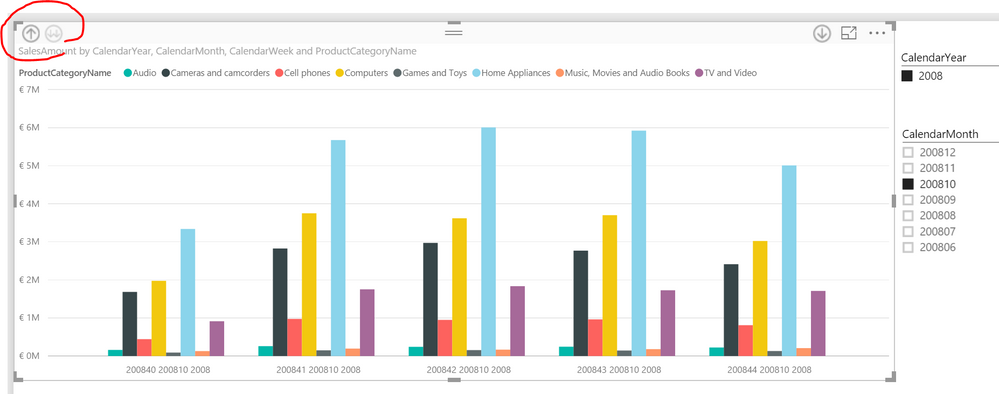
If you create a hierarchy in your date dimension table (e.g. year - month - week) you can use the drilldown option of the chart to get to the week level.
Hi @waltheed if I use pre calculated Avg. then do you have any idea how it is possible thru drill down weekly.
The Power BI Data Visualization World Championships is back! Get ahead of the game and start preparing now!
| User | Count |
|---|---|
| 38 | |
| 37 | |
| 33 | |
| 32 | |
| 29 |
| User | Count |
|---|---|
| 132 | |
| 88 | |
| 82 | |
| 68 | |
| 64 |