Get Fabric or SQL Certified for Free.
Get certified for free when you join Fabric Data Days 2026 and dive into Fabric, Power BI, SQL, AI, and other essential data skills.
Join now- Power BI forums
- Get Help with Power BI
- Desktop
- Service
- Report Server
- Power Query
- Mobile Apps
- Developer
- DAX Commands and Tips
- Custom Visuals Development Discussion
- Health and Life Sciences
- Power BI Spanish forums
- Translated Spanish Desktop
- Training and Consulting
- Instructor Led Training
- Dashboard in a Day for Women, by Women
- Galleries
- Data Stories Gallery
- Themes Gallery
- Contests Gallery
- QuickViz Gallery
- Quick Measures Gallery
- Visual Calculations Gallery
- Notebook Gallery
- Translytical Task Flow Gallery
- TMDL Gallery
- R Script Showcase
- Webinars and Video Gallery
- Ideas
- Custom Visuals Ideas (read-only)
- Issues
- Issues
- Events
- Upcoming Events
July 7 - July 17 | Round 2 of the Power BI Dataviz World Championships. Don't miss your chance! Learn more
- Power BI forums
- Forums
- Get Help with Power BI
- Desktop
- Re: Dynamic calculation
- Subscribe to RSS Feed
- Mark Topic as New
- Mark Topic as Read
- Float this Topic for Current User
- Bookmark
- Subscribe
- Printer Friendly Page


- Mark as New
- Bookmark
- Subscribe
- Mute
- Subscribe to RSS Feed
- Permalink
- Report Inappropriate Content
Dynamic calculation
Ive got a visual based on a few measurements and when I use the slider the outcome for those measurements should change.
But here is my problem.
Ive got a datasheet with dates in them, adresses and average length per adres so basically I got this type of data
| Adres | Completion date | Average Length |
| 1 | 01-04-22 | 10 |
| 2 | 10-04-22 | 10 |
| 3 | 10 | |
| 4 | 10 |
When I set my slider (or change it) it should calculate again based on the new data for example
When I do not enter a date range it should give the following result when I calculate the adresses
Result should be: 2
But when I set my slider to daterange 01-04-22 through 01-04-22 the result should be 1
Aantal HP plastic Gereed = Countrows(
    Filter(
        'Civiel/HAS planning',
        'Civiel/HAS planning'[gesloten]<>BLANK()
        &&'Civiel/HAS planning'[activiteit]="Civiel"
        )
    )
- Mark as New
- Bookmark
- Subscribe
- Mute
- Subscribe to RSS Feed
- Permalink
- Report Inappropriate Content
Does anyone have any ideas or is this just one of those problems with NO solution to it ?


- Mark as New
- Bookmark
- Subscribe
- Mute
- Subscribe to RSS Feed
- Permalink
- Report Inappropriate Content
@RonaldvdH , try something like this
Aantal HP plastic Gereed = if(isfiltered('Civiel/HAS planning'[Completion date]) Countrows(
Filter(
'Civiel/HAS planning',
'Civiel/HAS planning'[gesloten]<>BLANK()
&&'Civiel/HAS planning'[activiteit]="Civiel"
&& not(isblank('Civiel/HAS planning'[Completion date]))
)
) , Countrows(
Filter(
'Civiel/HAS planning',
'Civiel/HAS planning'[gesloten]<>BLANK()
&&'Civiel/HAS planning'[activiteit]="Civiel"
&& (isblank('Civiel/HAS planning'[Completion date]))
) ) )
- Mark as New
- Bookmark
- Subscribe
- Mute
- Subscribe to RSS Feed
- Permalink
- Report Inappropriate Content
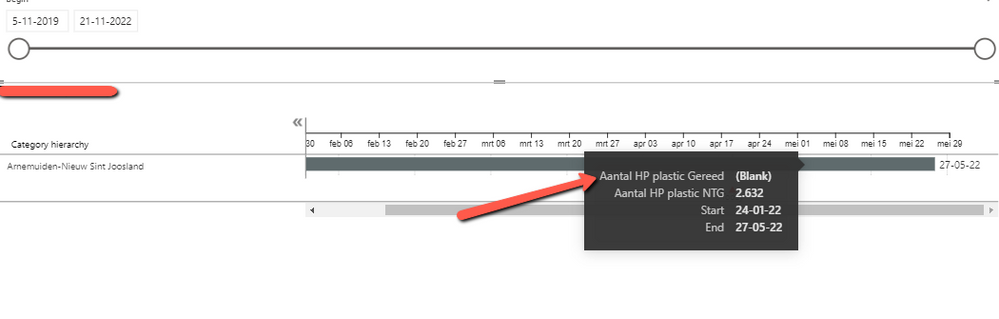
@amitchandak thanks for your help thus far but we are not there yet. It seems that it works when I set my slider to change the period but when I do NOT select anythin it should show all but now it return a BLANK value
Aantal HP plastic Gereed = if(ISFILTERED('Civiel/HAS planning'[begin]),
Countrows(
    Filter(
    'Civiel/HAS planning',
    'Civiel/HAS planning'[begin]<>BLANK()
        &&'Civiel/HAS planning'[activiteit]="Civiel"
        && not(isblank('Civiel/HAS planning'[gesloten]))
    )
) ,
Countrows(
    Filter(
    'Civiel/HAS planning',
    'Civiel/HAS planning'[gesloten]<>BLANK()
        &&'Civiel/HAS planning'[activiteit]="Civiel"
        && (isblank('Civiel/HAS planning'[gesloten]))
        )
    )
)
- Mark as New
- Bookmark
- Subscribe
- Mute
- Subscribe to RSS Feed
- Permalink
- Report Inappropriate Content
- Mark as New
- Bookmark
- Subscribe
- Mute
- Subscribe to RSS Feed
- Permalink
- Report Inappropriate Content
- Mark as New
- Bookmark
- Subscribe
- Mute
- Subscribe to RSS Feed
- Permalink
- Report Inappropriate Content
- Mark as New
- Bookmark
- Subscribe
- Mute
- Subscribe to RSS Feed
- Permalink
- Report Inappropriate Content
@RonaldvdH , Try this
Aantal HP plastic Gereed = if(isfiltered('Civiel/HAS planning'[Completion date]) Countrows(
Filter(
'Civiel/HAS planning',
'Civiel/HAS planning'[gesloten]<>BLANK()
&&'Civiel/HAS planning'[activiteit]="Civiel"
&& not(isblank('Civiel/HAS planning'[Completion date]))
)
) , Countrows(
Filter(
'Civiel/HAS planning',
'Civiel/HAS planning'[gesloten]<>BLANK()
&&'Civiel/HAS planning'[activiteit]="Civiel"
)
) ) )
I need data with all these columns with expected output sample to work on file
- Mark as New
- Bookmark
- Subscribe
- Mute
- Subscribe to RSS Feed
- Permalink
- Report Inappropriate Content
The outcome still isn't what I expected and I understand this is a difficult problem and it's hard to explain what I'm looking for but i'm gonna try explaining.
- I have a table with 10.000+ records, in this case addresses.
- If an address is planned they have a Startdate and an enddate
- There are also adresses with NO plandate (or enddate)
- Every address (when completed) has an date in the column Closeddate
- So I have adresses which:
Addresses which aren't planned at all (= startdate and enddate have no values)
Addresses that are planned (= startdate and enddate have values and NO Closeddate)
Addresses that are closed (= startdate and enddate have values and a Closeddate) - The slicer is based on the date in the column Startdate
The idea is that when I change the date in the slicer these measurements calculated (within the daterange) how many addresses have been completed.
The difficulty is that the daterange in the slicer has a beginning and an end and should only calculated/count the addresses that fit the filter within that range.
For example when I set the slicer to a daterange, let's say, between 01-04-22 and 25-04-22 it should only filter those adresses with an Enddate between that range. So if an address has an Enddate of 27-04-22 it should be counted, same goes for an address with an Enddate of 25-03-22
When I set the slicer to NO range so basically the min/max value of my datetable it should give the current status

Helpful resources

FabCon & SQLCon – Barcelona 2026
Join us in Barcelona for FabCon and SQLCon, the Fabric, Power BI, SQL, and AI community event. Save €200 with code FABCMTY200.

Data Days 2026
Join Data Days 2026: 60 days of free live/on-demand sessions, challenges, study groups, and certification opportunities.

Power BI DataViz World Championships - June 2026
A new Power BI DataViz World Championship is coming this June! Don't miss out on submitting your entry.

| User | Count |
|---|---|
| 29 | |
| 27 | |
| 26 | |
| 23 | |
| 16 |


| User | Count |
|---|---|
| 53 | |
| 46 | |
| 38 | |
| 30 | |
| 21 |


