Don't miss your chance to take the Fabric Data Engineer (DP-600) exam for FREE! Find out how by attending the DP-600 session on April 23rd (pacific time), live or on-demand.
Learn moreNext up in the FabCon + SQLCon recap series: The roadmap for Microsoft SQL and Maximizing Developer experiences in Fabric. All sessions are available on-demand after the live show. Register now
Hi,
I've got hourly data being generated for every day, with Date, Hour and a value. What I need is for a user to pick two dates, lets just call them Date A and Date B. Then I need to create a visualization in my report, which will be the result of subtracing the hourly values of Date B from Date A, showing the difference between the two values per hour.
I also need a column on the resulting table or visualization that shows the average for the values for each row.
If possible, the default selection should be the values for the last day minus the values for the day before.
Looking for possible ways of solving this requirement as I haven't dealt with anything similar before. Assuming two parameters need to be involved, but that's about it.
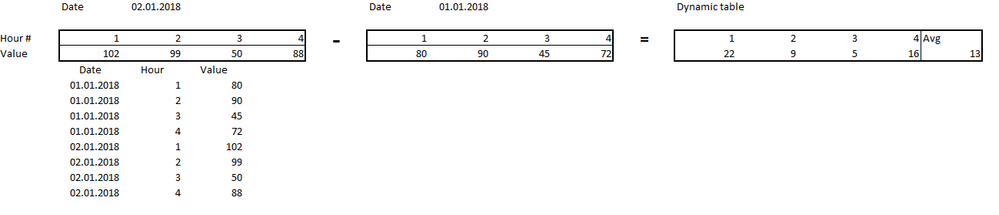
Attached an example of how the data might be structured for 4hours (bottom) and what the result would look like as a table or visualization.
Thanks in advance for any replies!
Solved! Go to Solution.
Hi @Anonymous,
Create a calendar table which is unrelated to fact data table. Like this:
Date Tab = CALENDAR(DATE(2018,1,1),DATE(2018,1,8))
New measures:
value1 =
VAR maxdate =
CALCULATE ( MAX ( TestData[Date] ), ALL ( TestData[Date] ) )
VAR mindate1 =
MIN ( 'Date Tab'[Date] )
VAR mindate2 =
CALCULATE (
MAX ( TestData[Date] ),
FILTER ( ALL ( TestData ), TestData[Date] < maxdate )
)
VAR cal1 =
CALCULATE (
SUM ( TestData[Value] ),
FILTER ( TestData, TestData[Date] = mindate1 )
)
VAR cal2 =
CALCULATE (
SUM ( TestData[Value] ),
FILTER ( TestData, TestData[Date] = mindate2 )
)
RETURN
IF ( ISFILTERED ( 'Date Tab'[Date] ), cal1, cal2 )
value2 =
VAR maxdate1 =
CALCULATE ( MAX ( TestData[Date] ), ALL ( TestData[Date] ) )
VAR maxdate2 =
MAX ( 'Date Tab'[Date] )
VAR cal1 =
CALCULATE (
SUM ( TestData[Value] ),
FILTER ( TestData, TestData[Date] = maxdate1 )
)
VAR cal2 =
CALCULATE (
SUM ( TestData[Value] ),
FILTER ( TestData, TestData[Date] = maxdate2 )
)
RETURN
IF ( ISFILTERED ( 'Date Tab'[Date] ), cal2, cal1 )
diff = [value2]-[value1]
Average Diff = AVERAGEX(VALUES(TestData[Hour]),[diff])
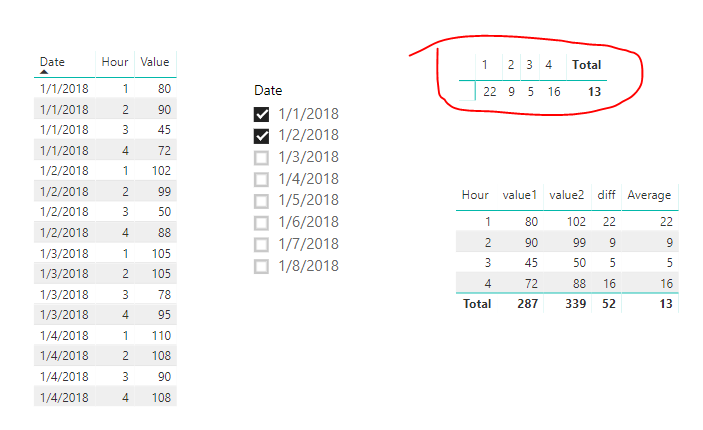
The highlighted Matrix (put [Hours] into Columns section of Matrix, put [Average Diff] into values section) is your desired output. The last column is the default total column by Matrix, it shows the average of values across all hours, but its column name cannot be changed. If you don't want it, you can use a Table visual, as shown in above image, at the bottom the highlighted Matrix.
Best regards,
Yuliana Gu
Hi @Anonymous,
Create a calendar table which is unrelated to fact data table. Like this:
Date Tab = CALENDAR(DATE(2018,1,1),DATE(2018,1,8))
New measures:
value1 =
VAR maxdate =
CALCULATE ( MAX ( TestData[Date] ), ALL ( TestData[Date] ) )
VAR mindate1 =
MIN ( 'Date Tab'[Date] )
VAR mindate2 =
CALCULATE (
MAX ( TestData[Date] ),
FILTER ( ALL ( TestData ), TestData[Date] < maxdate )
)
VAR cal1 =
CALCULATE (
SUM ( TestData[Value] ),
FILTER ( TestData, TestData[Date] = mindate1 )
)
VAR cal2 =
CALCULATE (
SUM ( TestData[Value] ),
FILTER ( TestData, TestData[Date] = mindate2 )
)
RETURN
IF ( ISFILTERED ( 'Date Tab'[Date] ), cal1, cal2 )
value2 =
VAR maxdate1 =
CALCULATE ( MAX ( TestData[Date] ), ALL ( TestData[Date] ) )
VAR maxdate2 =
MAX ( 'Date Tab'[Date] )
VAR cal1 =
CALCULATE (
SUM ( TestData[Value] ),
FILTER ( TestData, TestData[Date] = maxdate1 )
)
VAR cal2 =
CALCULATE (
SUM ( TestData[Value] ),
FILTER ( TestData, TestData[Date] = maxdate2 )
)
RETURN
IF ( ISFILTERED ( 'Date Tab'[Date] ), cal2, cal1 )
diff = [value2]-[value1]
Average Diff = AVERAGEX(VALUES(TestData[Hour]),[diff])
The highlighted Matrix (put [Hours] into Columns section of Matrix, put [Average Diff] into values section) is your desired output. The last column is the default total column by Matrix, it shows the average of values across all hours, but its column name cannot be changed. If you don't want it, you can use a Table visual, as shown in above image, at the bottom the highlighted Matrix.
Best regards,
Yuliana Gu
Amazing, thank you so much!
Ideally, I would have a region column, then the 24 columns for hours with values for each hour within each region, and finally a column for averaging the rows at the end. Would it be best to go for a matrix setup with a category like that? The regions are also included in the original data tables, with values for each hour of course.
Region | Hour 1 | Hour 2 | Hour 3 | Hour 4 .... | Average
Region 1
Region 2
Region 3
If you have recently started exploring Fabric, we'd love to hear how it's going. Your feedback can help with product improvements.
A new Power BI DataViz World Championship is coming this June! Don't miss out on submitting your entry.
Share feedback directly with Fabric product managers, participate in targeted research studies and influence the Fabric roadmap.
| User | Count |
|---|---|
| 48 | |
| 43 | |
| 39 | |
| 19 | |
| 17 |
| User | Count |
|---|---|
| 69 | |
| 63 | |
| 32 | |
| 30 | |
| 23 |