cancel
Showing results for 
Search instead for 
Did you mean: 

Try your skills in the Power BI Dataviz World Championship! Round one ends June 26. Join now

Reply
PowerRon
Post Patron
Post Patron

Dynamic X-axis

Hi,


I have a simple dataset with two attributes:

  1. date
  2. number of transactions


I would like to have a bar chart with 'number of transactions' on Y-axis and 'date' on X-axis.
I need a slicer with three options:

  1. years - when selecting this it will show my data in years. So the X-axis only shows years.
  2. 13 months - when selecting this it will show the data of the last 13 months. The X-axis show year and month
  3. 31 days - when selecting this it will show the data of the last 31 days. The X-axis shows month and daynumber

I have been breaking my head in thinking, also in field parameters, but don't know how to do it.

Is there someone that can help me, give me a direction or is there a blog or youtube video that explains something like this in detail?

Thanks
Ron

1 ACCEPTED SOLUTION
Anonymous
Not applicable

Hi @PowerRon ,


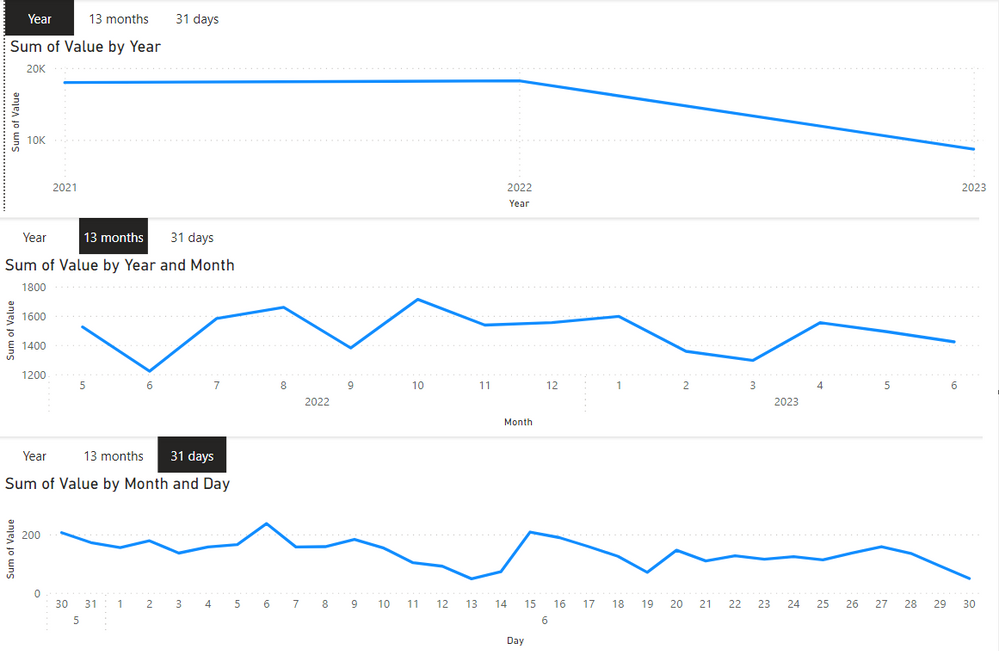
Consider designing three visuals, using bookmarks to switch their visibility and visual filters.

Output:

vcgaomsft_0-1690780931299.png

Please check the pbix file.


Best Regards,
Gao

Community Support Team


If there is any post helps, then please consider Accept it as the solution  to help the other members find it more quickly. If I misunderstand your needs or you still have problems on it, please feel free to let us know. Thanks a lot!

How to get your questions answered quickly --  How to provide sample data in the Power BI Forum

View solution in original post

4 REPLIES 4
PowerRon
Post Patron
Post Patron

Hi @Idrissshatila


this is not realy an answer to the question. I know the field parameters documentation


Anonymous
Not applicable

Hi @PowerRon ,


Consider designing three visuals, using bookmarks to switch their visibility and visual filters.

Output:

vcgaomsft_0-1690780931299.png

Please check the pbix file.


Best Regards,
Gao

Community Support Team


If there is any post helps, then please consider Accept it as the solution  to help the other members find it more quickly. If I misunderstand your needs or you still have problems on it, please feel free to let us know. Thanks a lot!

How to get your questions answered quickly --  How to provide sample data in the Power BI Forum

thnx @Anonymous this is a solution

Idrissshatila
Super User
Super User

Hello @PowerRon ,


yes you can learn more about field parameters through this microsoft documentation https://learn.microsoft.com/en-us/power-bi/create-reports/power-bi-field-parameters


SQLBI documentation https://www.sqlbi.com/articles/fields-parameters-in-power-bi/


If I answered your question, please mark my post as solution, Appreciate your Kudos 👍

Follow me on Linkedin


Did I answer your question? Mark my post as a solution! Appreciate your Kudos
Follow me on LinkedIn linkedIn
Vote for my Community Mobile App Idea

Proud to be a Super User!


Helpful resources

Announcements
Fabric Data Days is here Carousel

Data Days 2026

Don't miss out on Data Days, June 15 through August 7. Learn Fabric, Power BI, SQL, AI and more.

Power BI DataViz World Championships carousel

Power BI DataViz World Championships - June 2026

A new Power BI DataViz World Championship is coming this June! Don't miss out on submitting your entry.