cancel
Showing results for 
Search instead for 
Did you mean: 

The Power BI Data Visualization World Championships is back! Get ahead of the game and start preparing now! Learn more

Reply
Anonymous
Not applicable

Dynamic X-axis as per parameter selected

Hi,


I have three columns category,category1,category2 in my dataset.

how do I create a parameter to change x-axis dynamically 

When i select the category, the values should be based on category, if category 1 then values should be based on category 1


Thanks

1 ACCEPTED SOLUTION
v-frfei-msft
Community Support
Community Support

Hi @Anonymous ,


One sample for your reference, please check the following steps as below.


1. dupilicate the fact table, then tranpose and unpivot the table as below. M code for your reference.

let
    Source = Table.FromRows(Json.Document(Binary.Decompress(Binary.FromText("HcipFQAgDETBXlZjAqGavAiO/muAHzNiIrTUtOxzwJQttLnOwag73ODA6y7nHExlPg==", BinaryEncoding.Base64), Compression.Deflate)), let _t = ((type text) meta [Serialized.Text = true]) in type table [category = _t, category.1 = _t, category.2 = _t, value = _t]),
    #"Changed Type" = Table.TransformColumnTypes(Source,{{"category", type text}, {"category.1", type text}, {"category.2", type text}, {"value", Int64.Type}}),
    #"Demoted Headers" = Table.DemoteHeaders(#"Changed Type"),
    #"Changed Type1" = Table.TransformColumnTypes(#"Demoted Headers",{{"Column1", type text}, {"Column2", type text}, {"Column3", type text}, {"Column4", type any}}),
    #"Transposed Table" = Table.Transpose(#"Changed Type1"),
    #"Filtered Rows" = Table.SelectRows(#"Transposed Table", each ([Column1] <> "value")),
    #"Unpivoted Other Columns" = Table.UnpivotOtherColumns(#"Filtered Rows", {"Column1"}, "Attribute", "Value"),
    #"Removed Columns" = Table.RemoveColumns(#"Unpivoted Other Columns",{"Attribute"}),
    #"Renamed Columns" = Table.RenameColumns(#"Removed Columns",{{"Column1", "category type"}, {"Value", "category"}})
in
    #"Renamed Columns"

2. Create relationship between tables as below.
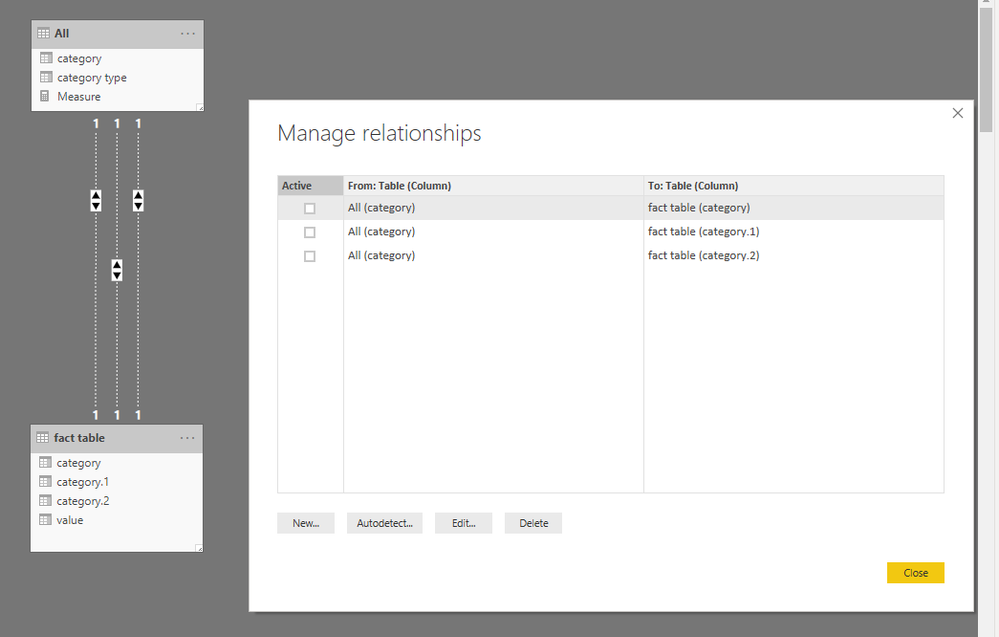
relat.PNG

3. To create a measure as below to make the goal achieved.

Measure = 
VAR c =
    CALCULATE (
        SUM ( 'fact table'[value] ),
        USERELATIONSHIP ( 'fact table'[category], 'All'[category] )
    )
VAR c1 =
    CALCULATE (
        SUM ( 'fact table'[value] ),
        USERELATIONSHIP ( 'fact table'[category.1], 'All'[category] )
    )
VAR c2 =
    CALCULATE (
        SUM ( 'fact table'[value] ),
        USERELATIONSHIP ( 'fact table'[category.2], 'All'[category] )
    )
VAR sele =
    SELECTEDVALUE ( 'All'[category type] )
RETURN
    IF (
        ISBLANK ( sele ),
        BLANK (),
        SWITCH ( sele, "category", c, "category.1", c1, "category.2", c2 )
    )
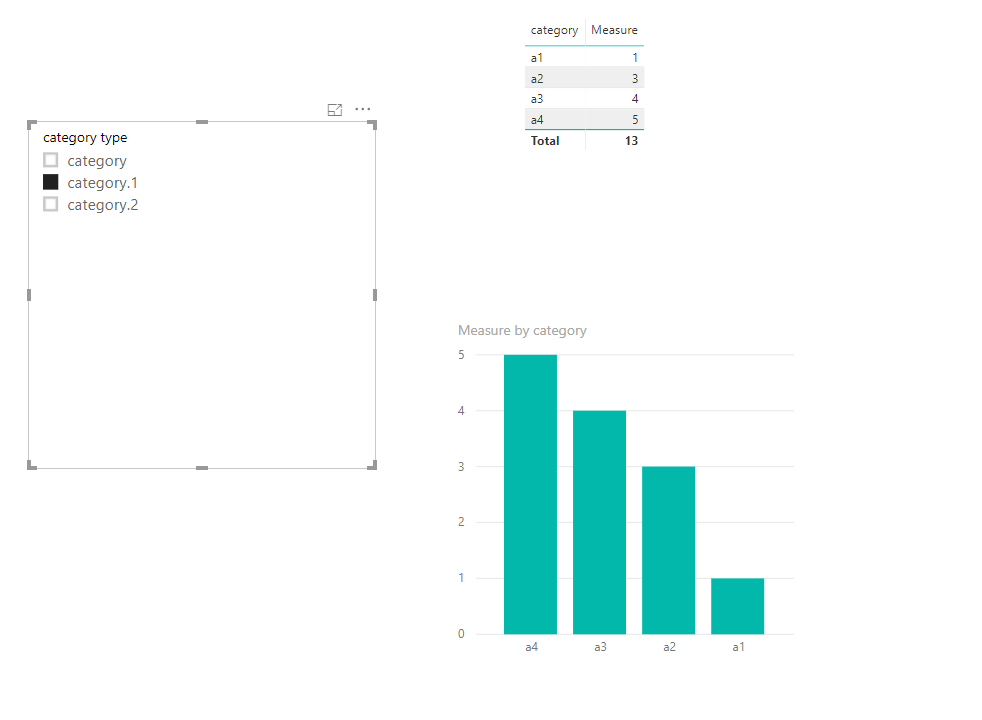
Capture.PNG


Community Support Team _ Frank
If this post helps, then please consider Accept it as the solution to help the others find it more quickly.

View solution in original post

2 REPLIES 2
v-frfei-msft
Community Support
Community Support

Hi @Anonymous ,


One sample for your reference, please check the following steps as below.


1. dupilicate the fact table, then tranpose and unpivot the table as below. M code for your reference.

let
    Source = Table.FromRows(Json.Document(Binary.Decompress(Binary.FromText("HcipFQAgDETBXlZjAqGavAiO/muAHzNiIrTUtOxzwJQttLnOwag73ODA6y7nHExlPg==", BinaryEncoding.Base64), Compression.Deflate)), let _t = ((type text) meta [Serialized.Text = true]) in type table [category = _t, category.1 = _t, category.2 = _t, value = _t]),
    #"Changed Type" = Table.TransformColumnTypes(Source,{{"category", type text}, {"category.1", type text}, {"category.2", type text}, {"value", Int64.Type}}),
    #"Demoted Headers" = Table.DemoteHeaders(#"Changed Type"),
    #"Changed Type1" = Table.TransformColumnTypes(#"Demoted Headers",{{"Column1", type text}, {"Column2", type text}, {"Column3", type text}, {"Column4", type any}}),
    #"Transposed Table" = Table.Transpose(#"Changed Type1"),
    #"Filtered Rows" = Table.SelectRows(#"Transposed Table", each ([Column1] <> "value")),
    #"Unpivoted Other Columns" = Table.UnpivotOtherColumns(#"Filtered Rows", {"Column1"}, "Attribute", "Value"),
    #"Removed Columns" = Table.RemoveColumns(#"Unpivoted Other Columns",{"Attribute"}),
    #"Renamed Columns" = Table.RenameColumns(#"Removed Columns",{{"Column1", "category type"}, {"Value", "category"}})
in
    #"Renamed Columns"

2. Create relationship between tables as below.

relat.PNG

3. To create a measure as below to make the goal achieved.

Measure = 
VAR c =
    CALCULATE (
        SUM ( 'fact table'[value] ),
        USERELATIONSHIP ( 'fact table'[category], 'All'[category] )
    )
VAR c1 =
    CALCULATE (
        SUM ( 'fact table'[value] ),
        USERELATIONSHIP ( 'fact table'[category.1], 'All'[category] )
    )
VAR c2 =
    CALCULATE (
        SUM ( 'fact table'[value] ),
        USERELATIONSHIP ( 'fact table'[category.2], 'All'[category] )
    )
VAR sele =
    SELECTEDVALUE ( 'All'[category type] )
RETURN
    IF (
        ISBLANK ( sele ),
        BLANK (),
        SWITCH ( sele, "category", c, "category.1", c1, "category.2", c2 )
    )

Capture.PNG


Community Support Team _ Frank
If this post helps, then please consider Accept it as the solution to help the others find it more quickly.
Anonymous
Not applicable

Thanks @v-frfei-msft 


It is works perfectly. 

Helpful resources

Announcements
Power BI DataViz World Championships

Power BI Dataviz World Championships

The Power BI Data Visualization World Championships is back! Get ahead of the game and start preparing now!

December 2025 Power BI Update Carousel

Power BI Monthly Update - December 2025

Check out the December 2025 Power BI Holiday Recap!

FabCon Atlanta 2026 carousel

FabCon Atlanta 2026

Join us at FabCon Atlanta, March 16-20, for the ultimate Fabric, Power BI, AI and SQL community-led event. Save $200 with code FABCOMM.