cancel
Showing results for 
Search instead for 
Did you mean: 

The Power BI Data Visualization World Championships is back! Get ahead of the game and start preparing now! Learn more

Reply
tomtang
Helper III
Helper III

Dynamic Waterfall Chart toggle between Budget/Forecast/Budget

Dear all,


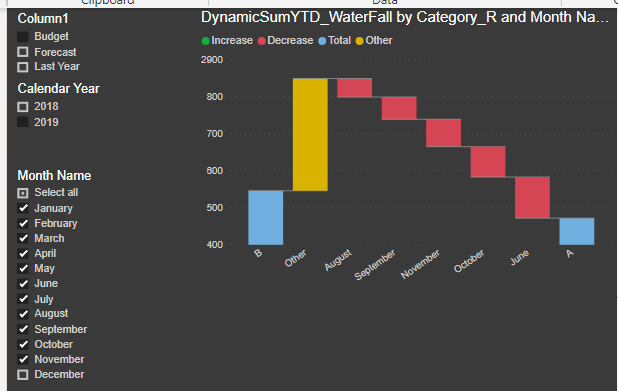
I am trying to create a dynamic waterfall chart allows the user to toggle between Forecast/Budget/Last Year comparing to this year Actual.


Sample as below chart.
 

Capture1.PNG


Forecast/Budget are working fine since these categories fall into the same year.

Below is my DAX for Forecast and Budget:


DynamicSumYTD_WaterFall =
VAR _SelectedCategory = SELECTEDVALUE(Par_Category[Column1],"Budget")

RETURN
SWITCH(_SelectedCategory,
"Forecast",
CALCULATE(TOTALYTD([Sum],'Date'[Date]),FILTER(VALUES(Fact_Sample[Category_R]),Fact_Sample[Category_R] IN {"A","F"})),
"Budget",
CALCULATE(TOTALYTD([Sum],'Date'[Date]),FILTER(VALUES(Fact_Sample[Category_R]),Fact_Sample[Category_R] IN {"A","B"})),
CALCULATE(TOTALYTD([Sum],'Date'[Date]),FILTER(VALUES(Fact_Sample[Category_R]),Fact_Sample[Category_R] IN {"A","B"}))
)


My difficulty is on "Last Year", with below DAX, I can successfully fetch both current year and last year Actual in one measure 


DynamicSumYTD_Waterfall_AvLY_v1 =

CALCULATE([Sum],
FILTER(
ALL('Date'[Date],'Date'[Calendar Year],'Date'[Month Number]),
'Date'[Month Number]<=VALUES('Date'[Month Number]) && ('Date'[Calendar Year] = VALUE('Date'[Calendar Year])-1 || 'Date'[Calendar Year] = VALUE('Date'[Calendar Year]))))
 
Capture2.PNG
 
So I revise the code with below trying to get rid of Forecast and Budget:
DynamicSumYTD_Waterfall_AvLY_v2 =

CALCULATE([Sum],
FILTER(
ALL('Date'[Date],'Date'[Calendar Year],'Date'[Month Number]),
'Date'[Month Number]<=VALUES('Date'[Month Number]) && ('Date'[Calendar Year] = VALUE('Date'[Calendar Year])-1 || 'Date'[Calendar Year] = VALUE('Date'[Calendar Year]))),EXCEPT(VALUES(Fact_Sample[Category_R]),{"F","B"}))
 
However, this DAX eventually can only show Actual current year.
 
Have attached my sample file in below link, please kindly take a look, thank you! 🙂
 
 
1 ACCEPTED SOLUTION
v-chuncz-msft
Community Support
Community Support

@tomtang 


You may add CALCULATETABLE.

CALCULATETABLE ( VALUES ( Fact_Sample[Category_R] ), ALL ( 'Date' ) ),


Community Support Team _ Sam Zha
If this post helps, then please consider Accept it as the solution to help the other members find it more quickly.

View solution in original post

3 REPLIES 3
v-chuncz-msft
Community Support
Community Support

@tomtang 


You may add CALCULATETABLE.

CALCULATETABLE ( VALUES ( Fact_Sample[Category_R] ), ALL ( 'Date' ) ),


Community Support Team _ Sam Zha
If this post helps, then please consider Accept it as the solution to help the other members find it more quickly.

@v-chuncz-msft 


Thanks for the response.


In my actual case, it's a bit more complicated than the sample, since I add the other dimension (column) in the waterfall chart (which is "Segment")


But I finally achieve my expectation with the following code from your suggestion, just share if someone else might need it.

(I still not quite sure how does it works, need some more study on CALCULATETABLE)


CALCULATE([USDsum],
FILTER(
ALL(Dim_Calendar[FullDateAlternateKey],Dim_Calendar[Year],Dim_Calendar[Month]),
Dim_Calendar[Month]<=VALUES(Dim_Calendar[Month]) &&
(Dim_Calendar[Year] = VALUE(Dim_Calendar[Year])-1 || Dim_Calendar[Year] = VALUE(Dim_Calendar[Year]))
),
EXCEPT(CALCULATETABLE(VALUES(Fact_BUCONSOL_Union[Category_R]),ALL(Dim_Calendar[FullDateAlternateKey],Dim_Calendar[Year],Dim_Calendar[Month])),{ "B","F"})
)
 
 
@v-chuncz-msft Thanks again and cheers!
tomtang
Helper III
Helper III

Haha, anyone can help?


Thanks a lot!

Helpful resources

Announcements
Power BI DataViz World Championships

Power BI Dataviz World Championships

The Power BI Data Visualization World Championships is back! Get ahead of the game and start preparing now!

December 2025 Power BI Update Carousel

Power BI Monthly Update - December 2025

Check out the December 2025 Power BI Holiday Recap!

FabCon Atlanta 2026 carousel

FabCon Atlanta 2026

Join us at FabCon Atlanta, March 16-20, for the ultimate Fabric, Power BI, AI and SQL community-led event. Save $200 with code FABCOMM.