
cancel
Showing results for 
Search instead for 
Did you mean: 

The Power BI Data Visualization World Championships is back! Get ahead of the game and start preparing now! Learn more

Reply
JRyan
Frequent Visitor

Dynamic Visual Title - Cannot Select Measure

Hi,


I've created a very simple measure:


TestTitle = "test"


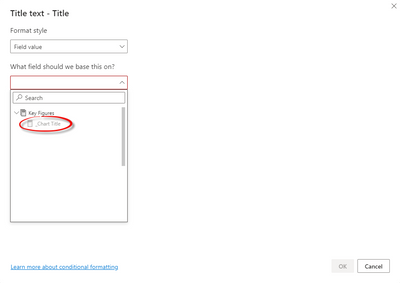
And am trying to use this as a dynamic title for a visual, however when I go to the Conditional Formatting options for the Title, I cannot select ANY measure I've created to use as the title.  I can select any column, but measures are all greyed out.


This should have been possible from April 2019, can anyone else do this?

5 REPLIES 5
PSEJR
Advocate I
Advocate I

Just came across this post in the search for a solution to the same challenge, and after figuring out a solution that does not involve having the measure in the shared dataset, I figured I would share that solution here for anyone else who comes across this.


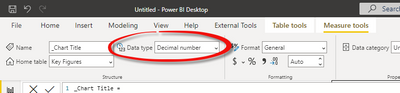
When creating the measure containing you dynamic title, it defaults to data type Decimal Number:

PSEJR_0-1657701387642.png

With that data type, the measure is greyed out:

PSEJR_1-1657701611732.png


However if the data type of the measure is changed to text, it is then possible to chose it:

PSEJR_2-1657701672870.png

PSEJR_3-1657701700264.png


I have tested it on both a live connection to AAS and PBI, and both works.

This works! It should be marked as the solution. Thanks @PSEJR !

amitchandak
Super User
Super User

@JRyan , You created a  test measure. So conditional formatting might have been disabled for that.


Create like

Measure =1 and check.

Any way not very clear what you want to achieve here

Share with Power BI Enthusiasts: Full Power BI Video (20 Hours) YouTube
Microsoft Fabric Series 60+ Videos YouTube
Microsoft Fabric Hindi End to End YouTube

Ok seems that I've sorted this out now (with the help of a colleague!)


Looks the Measure you create must be in the same pbix as the Dataset, i.e. you cannot create a Measure to use as a dynamic title in a Report that is linked to a Shared Dataset - it must be in the Shared Dataset itself.

Hi @JRyan


Correctly,glad that you have solved your issue,could you pls mark the reply as answered to close it?


Much appreciated.


Best Regards,
Kelly
Did I answer your question? Mark my post as a solution!

Helpful resources

Announcements
Power BI DataViz World Championships

Power BI Dataviz World Championships

The Power BI Data Visualization World Championships is back! Get ahead of the game and start preparing now!

December 2025 Power BI Update Carousel

Power BI Monthly Update - December 2025

Check out the December 2025 Power BI Holiday Recap!

FabCon Atlanta 2026 carousel

FabCon Atlanta 2026

Join us at FabCon Atlanta, March 16-20, for the ultimate Fabric, Power BI, AI and SQL community-led event. Save $200 with code FABCOMM.