Hi,
I am hoping that the new release of LINESTX function makes this request more reasonable. I would like to create a measure to be used as trend line (linear regression) on a the line visual. My x-axis is my date table that will have the normal granularity options (Date, Week, Month, QTR). The y-axis is a measure that is an aggregate from a sales table. The sales table provide transaction level details (all transactions each day).
The expected output would allow me filter the visual by fields in both the date table and sales table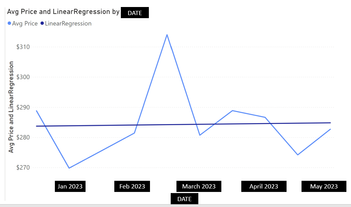 .
.
- Change X Axis to day, week, month, etc (Date Table)
- Change Y Axis to specific regions, customer codes, items (Sales Table)
Lastly, from my reading it does seem needed to be able to reflect a direction of the reggressional analysis and my date table does have those index fields in 'DateKey', 'YearMonthNumber', etc.
y-axis measure would be [Avg Unit Price]
Unit Price =
SUM( 'Sales History'[Unit Price BC] )

Invoices =
COUNTROWS( 'Sales History' )

Avg Unit Price =
DIVIDE( [Unit Price], [Invoices], 0 )
Attempts:
Trend =
VAR dateset =
    FILTER(
        SELECTCOLUMNS(
            ALLSELECTED( 'Sales History' ),
            "Known[X]", 'Sales History'[Invoice Date],
            "Known[Y]", [Avg Unit Price]
            ),
            NOT( ISBLANK( [Avg Unit Price] ) )
            )
VAR line =
    LINESTX(dateset, Known[Y], Known[X])
VAR slope =
    SELECTCOLUMNS( line, [Slope1] )
VAR Intercept =
    SELECTCOLUMNS( line, [Intercept] )
VAR x = SELECTEDVALUE( 'Sales History'[Invoice Date] )
VAR y = x * slope + Intercept
RETURN y

Trend2 =
VAR Known =
    FILTER (
        SELECTCOLUMNS (
            CALCULATETABLE ( VALUES ( 'Date'[Date] ), ALLSELECTED ('Date') ),
            "Known[X]", 'Date'[Date],
            "Known[Y]", [Avg Unit Price]
        ),
        AND ( NOT ( ISBLANK ( Known[X] ) ), NOT ( ISBLANK ( Known[Y] ) ) )
    )
VAR Count_Items =
    COUNTROWS ( Known )
VAR Sum_X =
    SUMX ( Known, Known[X] )
VAR Sum_X2 =
    SUMX ( Known, Known[X] ^ 2 )
VAR Sum_Y =
    SUMX ( Known, Known[Y] )
VAR Sum_XY =
    SUMX ( Known, Known[X] * Known[Y] )
VAR Average_X =
    AVERAGEX ( Known, Known[X] )
VAR Average_Y =
    AVERAGEX ( Known, Known[Y] )
VAR Slope =
    DIVIDE (
        Count_Items * Sum_XY - Sum_X * Sum_Y,
        Count_Items * Sum_X2 - Sum_X ^ 2
    )
VAR Intercept = Average_Y
    - Slope * Average_X
RETURN
    SUMX ( DISTINCT ( 'Date'[Date] ),
    Intercept + Slope * 'Date'[Date]
)
Related Articles:
https://www.sqlbi.com/articles/implementing-linear-regression-in-power-bi/
https://learn.microsoft.com/en-us/dax/linestx-function-dax
https://kerrykolosko.com/kpi-trend-indicators-on-core-visuals/
https://community.fabric.microsoft.com/t5/Desktop/DAX-to-create-a-Trend-line/m-p/400663#M183065


