cancel
Showing results for 
Search instead for 
Did you mean: 

The Power BI Data Visualization World Championships is back! Get ahead of the game and start preparing now! Learn more

Reply
Anonymous
Not applicable

Dynamic TopN with Other Sort Issue

I have a data set of inspections and was able to create a Top 20 measure to include the Top 20 and lump the remainder into an "Other" category. 


My issues is I sort the data and the "Other" category needs to sort at the end of the chart. I need highest to lowest except the Other category needs to be at the end. 


Capture.JPG


Top 20:

top 20 and other =
var top20 = CALCULATETABLE(TOPN(20,VALUES(Inspections[Issue]),CALCULATE(SUM(Inspections[# Found]))))
var other = ROW("Issue", "Other")
var allTheRest = CALCULATE(SUM(Inspections[# Found]), EXCEPT(VALUES(Inspections[Issue]),top20))
var theUnion = UNION(top20,other)
return
SUMX(
INTERSECT('Issue List',theUnion),
var currentIterator = 'Issue List'[Issue]
return
IF(
'Issue List'[Issue] <> "Other"
,CALCULATE(
SUM(Inspections[# Found])
,Inspections[Issue] = currentIterator
)
,allTheRest
)
)

5 REPLIES 5
Anonymous
Not applicable

@Anonymous,

You can use RANKX function to rank your category, for more details, please review the following similar blog. 

https://kohera.be/blog/power-bi/power-bi-ranking-group/

Alternatively, you can create measures following the guide in this blog. If you have question about the DAX, please share sample data of your table here.

Regards,
Lydia

Anonymous
Not applicable

Sorry for the delay in my response. I am swamped with work. Ugh. 


It is very similar to your blog. I downloaded your pbix file and played with it but it does not quite work for what I need. I need to display the results in a bar chart. When I change your table in the sample data to a bar chart it does not work the same. You lose the "Others". It does not let me use the Measure Country in the Axis for the bar chart. 

Anonymous
Not applicable

@Anonymous,

Could you please share sample data of your table here? I will  test it in my Desktop.

Regards,
Lydia

Anonymous
Not applicable

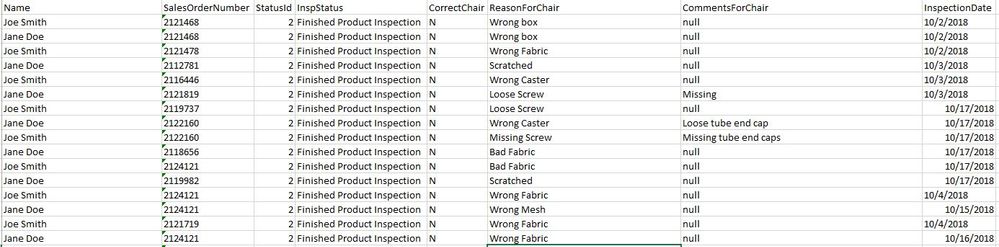
I am not sure how to share a file here so I have to show a picture. 


Capture.JPG

Anonymous
Not applicable

@Anonymous,

You can upload the file to OneDrive and post shared link of the file here.

Regards,
Lydia

Helpful resources

Announcements
Power BI DataViz World Championships

Power BI Dataviz World Championships

The Power BI Data Visualization World Championships is back! Get ahead of the game and start preparing now!

December 2025 Power BI Update Carousel

Power BI Monthly Update - December 2025

Check out the December 2025 Power BI Holiday Recap!

FabCon Atlanta 2026 carousel

FabCon Atlanta 2026

Join us at FabCon Atlanta, March 16-20, for the ultimate Fabric, Power BI, AI and SQL community-led event. Save $200 with code FABCOMM.