Join us at FabCon Atlanta from March 16 - 20, 2026, for the ultimate Fabric, Power BI, AI and SQL community-led event. Save $200 with code FABCOMM.
Register now!The Power BI Data Visualization World Championships is back! Get ahead of the game and start preparing now! Learn more
I have table contain only one column Title. Column values:
Title
Word 1
Word 4
Word 3
Word 1
Word 4
Word 2
How filter above table by dynamic TopN?
@Anonymous , Try like
Top 10 = CALCULATE([TotalTitle],TOPN(10,all('Content Catalog Search Result Report'[Title]),[TotalTitle],DESC),VALUES('Content Catalog Search Result Report'[Title]))
Here 10 can be variable or what if
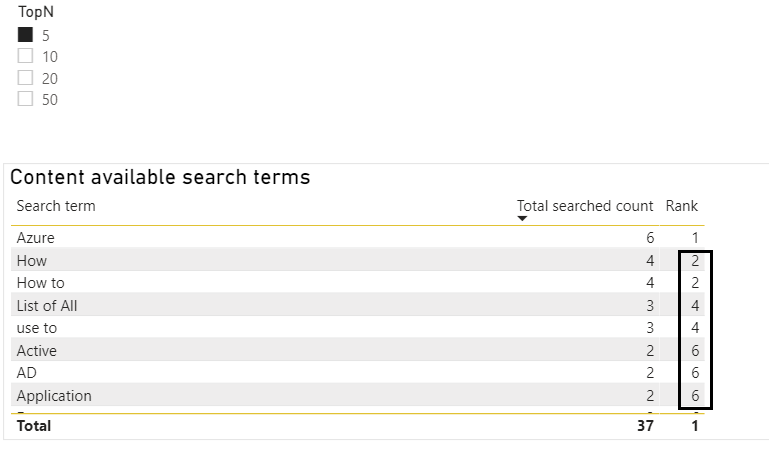
Thank you @amitchandak . But gives me duplicated Rank value for each duplicated count, see attach image.ank v
Hi @Anonymous,
Any rules that you want to rank your field values? If you only want to choose rows based on it row_number, I'd like to suggest you add an index column to your table. Then you can filter on the index field values to show correspond records.
Create Index Columns Using Power Query
Regards,
Xiaoxin Sheng
@Anonymous
I'm not too sure what your dataset includes. Is it a single column listing "Word 1", "Word 4", "Word 3" etc as individual values, or do you have 2 columns (one for "Word" and another for a value? If the latter, does that mean that there is a single ID value for "Word"?
To calculate TopN you can use either TopN or RANKX for the measure, depending on what you wish to see. If by "dynamic TopN" you mean you wish to select the TopN using a slicer, you will need to create a independent table listing the rank values you wish to filter by.
Please also provide a depiction of what you wish to see in the visual.
Proud to be a Super User!
Paul on Linkedin.
Yes. I have only single column in table with values "Word 1", "Word 4", "Word 3", "Word 1" etc. All values are repetitive, so I calculate total count of each Word.
Here I'm using TopN slicer and then use RANKX to rank each words.
When I use rankx it returns 1 in each row.
The Power BI Data Visualization World Championships is back! Get ahead of the game and start preparing now!
| User | Count |
|---|---|
| 38 | |
| 38 | |
| 36 | |
| 28 | |
| 28 |
| User | Count |
|---|---|
| 124 | |
| 89 | |
| 73 | |
| 66 | |
| 65 |