cancel
Showing results for 
Search instead for 
Did you mean: 

The Power BI Data Visualization World Championships is back! Get ahead of the game and start preparing now! Learn more

Reply
rizkus
Frequent Visitor

Dynamic Top 10 + Others

Hi guys, i need some help regarding creating a Top10 customers plus others.


CustomerAmountTypeYear
A100000Farm2020
B200000Fresh2021
C300000Mall2022


I want to create a column chart where i can show just the Top 10 customers with the highest amount, and the rest should be classified as others. I want it also to when i create the Type and Year slicer, it dynamically shows the Top 10 + Others based on the filter i applied to aswell.


Thank you so much for the help, really appreciate any input on this!

5 REPLIES 5
FreemanZ
Super User
Super User

hi @rizkus 

Your dataset is insufficient to reflect, not to mention, solve your problem. Consider expand it.

rizkus
Frequent Visitor

Any other suggestions/ input guys? much appreciated

rizkus
Frequent Visitor

Hi, thank you for the answers, but this doesnt solve the "others" part? preferably, since the data i have may contain the same customer name along different type and year. and how would this pan out in DAX? thank you

rizkus
Frequent Visitor

I have tried creating a rankx DAX formula as follows (My table name is "ALL")


Column = 

Var A = RANKX(ALL(ALL, [Amount] , , DESC)

return

IF(A <= 10, ALL[Customer], "Others")


However, that only return the top 10 of all and cant be dynamically seen (if i put in the filter of Type = Farm, or Year = 2020)


Any suggestion is appreciated, thanks!

Hi @rizkus,


In order to have the data to be filtered as Top N Customer with Highest to lowest Amount from table in Power BI, you can follow below steps:

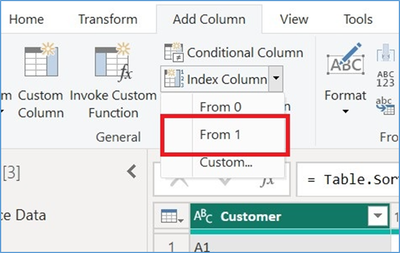
1. In power query sort the "Amount" column in Descending order, now create an index column as follows in this screenshot,
      

SamInogic_0-1675165996460.png


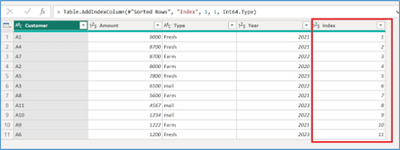
2. This option will add a Index starting from 1 for all record based on descending order with Amount column. Please refer to the below screenshot for the same.
SamInogic_1-1675166031198.png

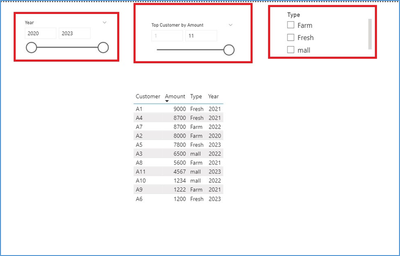
3. Now this index column can be used as a Slicer Visual as shown in the below screenshot. Consider we add the max Slicer Number is 11 as the Record Count is 10. (in this slicer you can add any number to find Top N records).


SamInogic_2-1675166057769.png


4. Now you also want to Filter Records with other Columns like "Type" which also can be acheived by the Range Slicer from 1 to N
SamInogic_3-1675166080958.png

5. Filter Records with other Columns like "Type" and “Year” to get result as shown in the below screenshot,

SamInogic_5-1675166116117.png


If this answer helps, please mark it as Accepted Solution so it would help others to find the solution.

Thanks!

Inogic Professional Service Division

An expert technical extension for your techno-functional business needs

Power Platform/Dynamics 365 CRM

Drop an email at crm@inogic.com

Service:  http://www.inogic.com/services/ 

Power Platform/Dynamics 365 CRM Tips and Tricks:  http://www.inogic.com/blog/

Inogic Professional Services: Power Platform/Dynamics 365 CRM
An expert technical extension for your techno-functional business needs
Service: https://www.inogic.com/services/
Tips and Tricks: https://www.inogic.com/blog/

Helpful resources

Announcements
Power BI DataViz World Championships

Power BI Dataviz World Championships

The Power BI Data Visualization World Championships is back! Get ahead of the game and start preparing now!

November Power BI Update Carousel

Power BI Monthly Update - November 2025

Check out the November 2025 Power BI update to learn about new features.

FabCon Atlanta 2026 carousel

FabCon Atlanta 2026

Join us at FabCon Atlanta, March 16-20, for the ultimate Fabric, Power BI, AI and SQL community-led event. Save $200 with code FABCOMM.