
This is best Fabric, Power BI, SQL and AI community event. How do we know? The last event sold out! Save €200 with code FABCMTY200.
Register nowA new Data Days event is coming soon! This time we’re going bigger than ever. Fabric, Power BI, SQL, AI and more. Don't miss out.
Hi All,
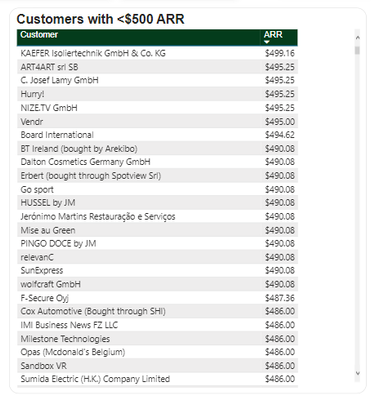
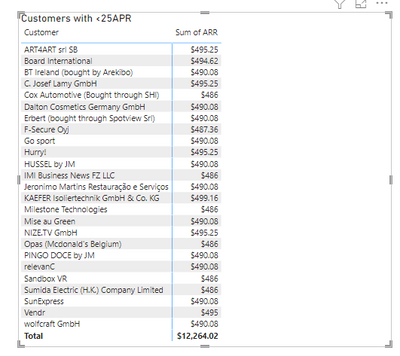
I have created a visual and want the count of customers also in the title eg. XYZ Customers with <500 ARR.
Is it possible to show this way?
Customer is nothing but the account. Any possibility I can show count of customers in my title?
Solved! Go to Solution.
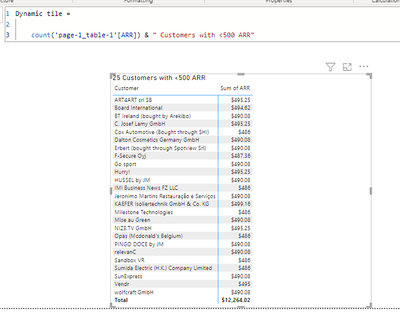
try this
1. Create new measure
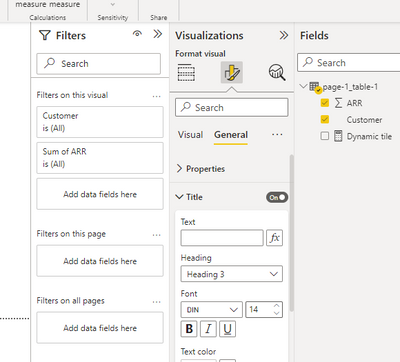
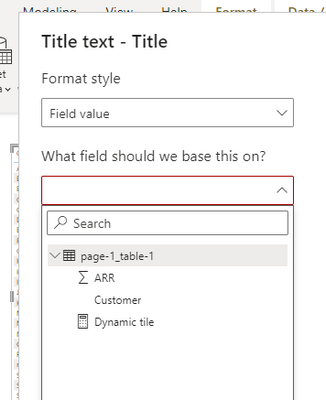
2. go to visualization>format>general>Title> text - fx
3. Select the Dynamic title measure and click OK
4. you will have below title
Thanks for the reply.
I want title like : 100 Customers with <500 ARR
Count should be in front of Customers.
try this
Thanks this resolved my issue.
Hi @Anonymous ,
You can refer below article:-
https://medium.com/@patilpoojaif/dynamic-title-in-power-bi-164903723c68
Best Regards,
Samarth
If this post helps, please consider accepting it as the solution to help the other members find it more quickly.
Appreciate your Kudos!!
Connect on Linkedin
Check out the May 2026 Power BI update to learn about new features.
Sign up to receive a private message when registration opens and key events begin.
If you have recently started exploring Fabric, we'd love to hear how it's going. Your feedback can help with product improvements.
| User | Count |
|---|---|
| 32 | |
| 25 | |
| 24 | |
| 24 | |
| 14 |
| User | Count |
|---|---|
| 61 | |
| 47 | |
| 27 | |
| 24 | |
| 19 |