Join us at FabCon Atlanta from March 16 - 20, 2026, for the ultimate Fabric, Power BI, AI and SQL community-led event. Save $200 with code FABCOMM.
Register now!The Power BI Data Visualization World Championships is back! Get ahead of the game and start preparing now! Learn more
Hi,
I want to create a dynamic title based on the selection of 3 different filters namely "Market Segment", "Service Line" and "Country".
Expected Output:
Any help on this would be appreciated!!
Solved! Go to Solution.
@Anonymous , Use single & and try
Measure = Selectevalue(slicer1) & "-" & Selectevalue(slicer2) & "-" & Selectevalue(slicer3)
Hi,
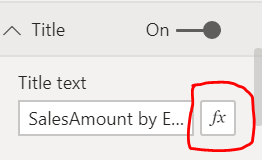
You can create a measure and pass the same in the conditional formatting under the title. Please refer to the below snapshot.
Measure can be like = Selectevalue(slicer1) && "-" && Selectevalue(slicer2) && "-" && Selectevalue(slicer3)
Appreciate a Kudos! 🙂
If this helps and resolves the issue, please mark it as a Solution! 🙂
Regards,
N V Durga Prasad
@nvprasad Thanks for the formula. Here's the error message that pooped up when i was trying to use it.
Error Message:
MdxScript(Model) (44, 65) Calculation error in measure 'Sheet1'[Title]: Cannot convert value '-' of type Text to type True/False.
The Power BI Data Visualization World Championships is back! Get ahead of the game and start preparing now!
| User | Count |
|---|---|
| 39 | |
| 37 | |
| 33 | |
| 32 | |
| 29 |
| User | Count |
|---|---|
| 133 | |
| 88 | |
| 85 | |
| 68 | |
| 64 |