Join us at FabCon Atlanta from March 16 - 20, 2026, for the ultimate Fabric, Power BI, AI and SQL community-led event. Save $200 with code FABCOMM.
Register now!The Power BI Data Visualization World Championships is back! Get ahead of the game and start preparing now! Learn more
Hi Folks,
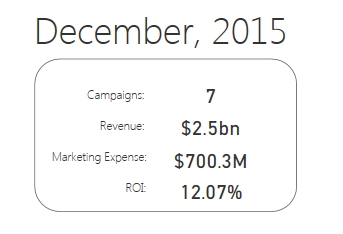
I need HELP. How can I create a dynamic textbox, I need to add variables (similar to the pic above)?
Thanks 🙂
Solved! Go to Solution.
Use a multi-row card visualization and measures like this:
Measure = IF(HASONEVALUE(DISTRICT[DISTRICT NAME]),VALUES(DISTRICT[DISTRICT NAME]),"")
This displays nothing if there is more than one value but otherwise displays the information. You would have multiple measurs like this and add them all to the multi-row card visualization. If you look up my Data Stories Gallery, Ohio Schools Report Card, you will find an example PBIX file that implements this.
Use a multi-row card visualization and measures like this:
Measure = IF(HASONEVALUE(DISTRICT[DISTRICT NAME]),VALUES(DISTRICT[DISTRICT NAME]),"")
This displays nothing if there is more than one value but otherwise displays the information. You would have multiple measurs like this and add them all to the multi-row card visualization. If you look up my Data Stories Gallery, Ohio Schools Report Card, you will find an example PBIX file that implements this.
The Power BI Data Visualization World Championships is back! Get ahead of the game and start preparing now!
| User | Count |
|---|---|
| 40 | |
| 36 | |
| 34 | |
| 31 | |
| 27 |
| User | Count |
|---|---|
| 135 | |
| 102 | |
| 67 | |
| 65 | |
| 56 |