cancel
Showing results for 
Search instead for 
Did you mean: 

The Power BI Data Visualization World Championships is back! Get ahead of the game and start preparing now! Learn more

Reply
FaisalImam
Helper I
Helper I

Dynamic Text on Button

Hi Team, 

Need help with DAX  for dynamic text on Button.


So we have a table 

gear id sop  confluence path
1batchhttps://....
4rfb 
8job https://....


I want a query that will follow these 4 conditions :

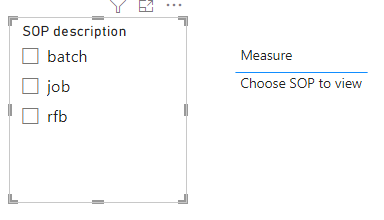
  1. If nothing is selected , that is by default ,  text should be " Choose SOP to view"
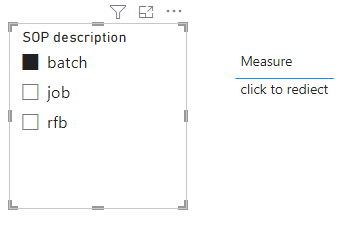
  2. If  one sop is select ,  text should be , "click to rediect "
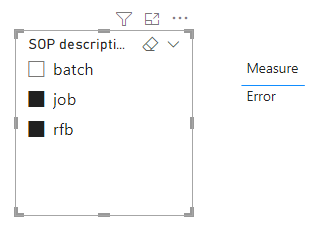
  3. If more than one is selected , text should be error
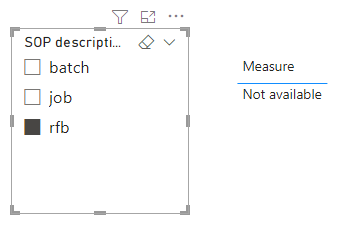
  4. if one is selected but confluence path is empty , text should be " not available"

Please note : Confluence path is Web url.

I tried many dax , the problem I am facing is condiotion 2 and 3 are not working together. 


my dax :


Dynamic Button Text =
SWITCH(
TRUE(),
HASONEFILTER('New Sops'[Confluence path]) == BLANK() , "Empty",
HASONEVALUE('New Sops'[SOP description]) ,
"click",
"Select sop first"
)
2 ACCEPTED SOLUTIONS
v-yanjiang-msft
Community Support
Community Support

Hi @FaisalImam ,

According to your description, here's my solution, create a measure.

Measure =
IF (
    ISFILTERED ( 'New Sops'[SOP description] ),
    IF (
        COUNTROWS ( VALUES ( 'New Sops'[SOP description] ) ) > 1,
        "Error",
        IF (
            MAX ( 'New Sops'[Confluence path] ) = BLANK (),
            "Not available",
            "click to rediect "
        )
    ),
    " Choose SOP to view"
)

Get the correct result.

vkalyjmsft_0-1664874300919.png

vkalyjmsft_1-1664874311894.png

vkalyjmsft_2-1664874320760.png

vkalyjmsft_3-1664874331833.png

I attach my sample below for your reference.


Best Regards,
Community Support Team _ kalyj

If this post helps, then please consider Accept it as the solution to help the other members find it more quickly.


View solution in original post

Hi @FaisalImam ,

In a measure, MAX usually used to return the current row, here it can return the correspongding [Confluence path]  to the selected [SOP description].

Best Regards,
Community Support Team _ kalyj

View solution in original post

4 REPLIES 4
v-yanjiang-msft
Community Support
Community Support

Hi @FaisalImam ,

According to your description, here's my solution, create a measure.

Measure =
IF (
    ISFILTERED ( 'New Sops'[SOP description] ),
    IF (
        COUNTROWS ( VALUES ( 'New Sops'[SOP description] ) ) > 1,
        "Error",
        IF (
            MAX ( 'New Sops'[Confluence path] ) = BLANK (),
            "Not available",
            "click to rediect "
        )
    ),
    " Choose SOP to view"
)

Get the correct result.

vkalyjmsft_0-1664874300919.png

vkalyjmsft_1-1664874311894.png

vkalyjmsft_2-1664874320760.png

vkalyjmsft_3-1664874331833.png

I attach my sample below for your reference.


Best Regards,
Community Support Team _ kalyj

If this post helps, then please consider Accept it as the solution to help the other members find it more quickly.


Can you please explain what is the Max function doing here - 

MAX ( 'New Sops'[Confluence path] ) = BLANK (),

Hi @FaisalImam ,

In a measure, MAX usually used to return the current row, here it can return the correspongding [Confluence path]  to the selected [SOP description].

Best Regards,
Community Support Team _ kalyj

jgeddes
Super User
Super User

Something like the following may solve your issue


Dynamic Button Text =
var _numFilters =
IF(
    ISFILTERED('Table'[sop]),
    COUNTROWS(FILTERS('Table'[sop])),
    0
)
Return
SWITCH(
    TRUE(),
    _numFilters > 1, "Select only one SOP",
    _numFilters = 1 && SELECTEDVALUE('Table'[Confluence path]) = "", "Unavailable",
    _numFilters = 1, "Click to Redirect",
    "Choose SOP to View"
)
 
As a reminder, the items in your switch function are evaluted in the order they occur.
 
Hope this gets you going in the right direction.


Did I answer your question? Mark my post as a solution!

Proud to be a Super User!


Helpful resources

Announcements
Power BI DataViz World Championships

Power BI Dataviz World Championships

The Power BI Data Visualization World Championships is back! Get ahead of the game and start preparing now!

December 2025 Power BI Update Carousel

Power BI Monthly Update - December 2025

Check out the December 2025 Power BI Holiday Recap!

FabCon Atlanta 2026 carousel

FabCon Atlanta 2026

Join us at FabCon Atlanta, March 16-20, for the ultimate Fabric, Power BI, AI and SQL community-led event. Save $200 with code FABCOMM.

Top Solution Authors