Join us at FabCon Atlanta from March 16 - 20, 2026, for the ultimate Fabric, Power BI, AI and SQL community-led event. Save $200 with code FABCOMM.
Register now!The Power BI Data Visualization World Championships is back! Get ahead of the game and start preparing now! Learn more
Good afternoon,
does anyone know a way to put a table at power BI desktop which will be seen only if an specific data was selected? For example, I have, as database a list of failures divided in different systems. I would like to do a kind of report that will show up a table summarizing the failures when I select the system, otherwise, the table must be empty.
Thanks
Solved! Go to Solution.
Hi @maurolpj,
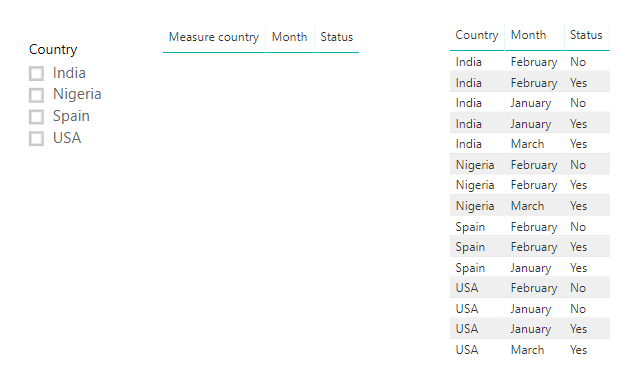
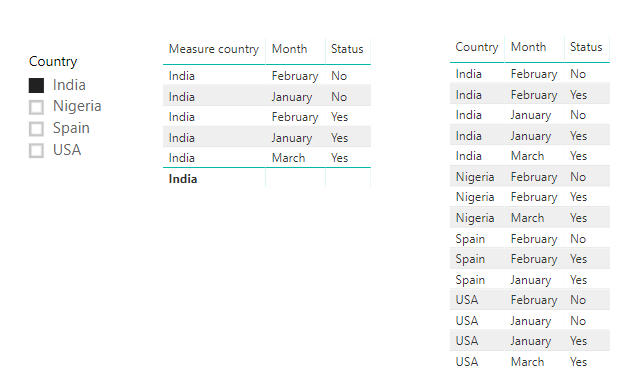
Create a measure for that column you want to apply filters on, rather than directly dragging the column into visual.
Please check below example.
isselected = CALCULATE(ISFILTERED(table[Country]),ALLSELECTED(table)) Measure country = IF([isselected]=TRUE(),SELECTEDVALUE(table[Country]),BLANK())
Best regards,
Yuliana Gu
Hi @maurolpj,
Create a measure for that column you want to apply filters on, rather than directly dragging the column into visual.
Please check below example.
isselected = CALCULATE(ISFILTERED(table[Country]),ALLSELECTED(table)) Measure country = IF([isselected]=TRUE(),SELECTEDVALUE(table[Country]),BLANK())
Best regards,
Yuliana Gu
Good afternoon, does anyone know a way to put a table at power BI desktop which will be seen only if an specific data was selected? For example, I have, as database a list of failures divided in different systems. I would like to do a kind of report that will show up a table summarizing the failures when I select the system, otherwise, the table must be empty.
Thanks
The Power BI Data Visualization World Championships is back! Get ahead of the game and start preparing now!
| User | Count |
|---|---|
| 38 | |
| 35 | |
| 33 | |
| 32 | |
| 29 |
| User | Count |
|---|---|
| 134 | |
| 96 | |
| 78 | |
| 67 | |
| 65 |