Join us at FabCon Atlanta from March 16 - 20, 2026, for the ultimate Fabric, Power BI, AI and SQL community-led event. Save $200 with code FABCOMM.
Register now!The Power BI Data Visualization World Championships is back! It's time to submit your entry. Live now!
HI
I have investigated multiple demos and didnt find the answer for the following question :
Top N - How to enter dynamicly select the list of the first N records as the filter TOPN is hardcoded to an individual value
Select TOP N : 5 10 20
Company Sales
A 100
B 50
C 30
D 5
Solved! Go to Solution.
Hi @alextarki ,
>>The filter should be by company rather then by sales measure
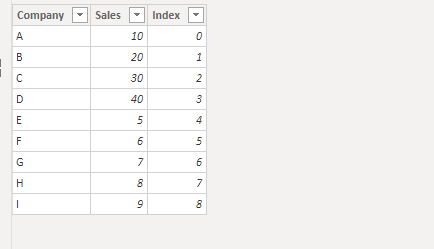
Do you mean to show the data of the top n companies. And you need to add an index column for it:
Create a topn table for slicer:
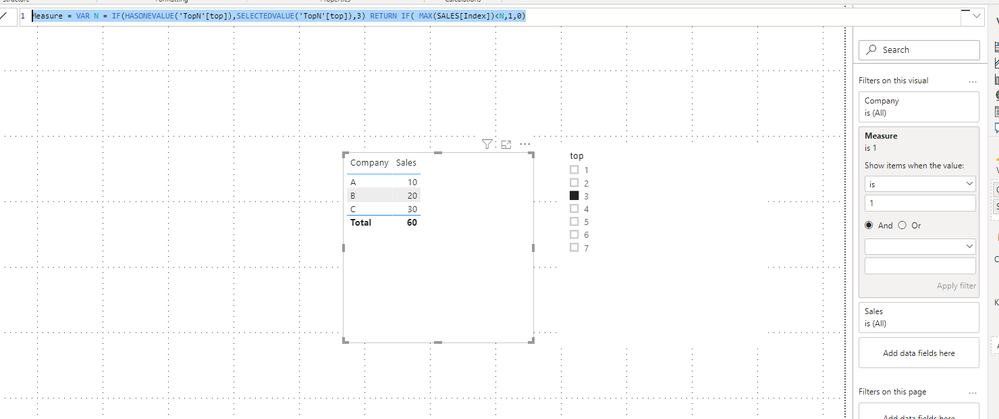
Create a measure for filter on the visual:
Measure =
VAR N =
IF ( HASONEVALUE ( 'TopN'[top] ), SELECTEDVALUE ( 'TopN'[top] ), 3 )
RETURN
IF ( MAX ( SALES[Index] ) < N, 1, 0 )
For more details ,please refer to https://community.powerbi.com/t5/Desktop/Dynamic-TopN-reports-in-Power-BI/td-p/122091
Best Regards,
Dedmon Dai
| Company | Sales |
| A | 100 |
| B | 150 |
| C | 200 |
| D | 250 |
| E | 300 |
| F | 350 |
| G | 400 |
salesmeasure = SUM(SalesTable[Sales])
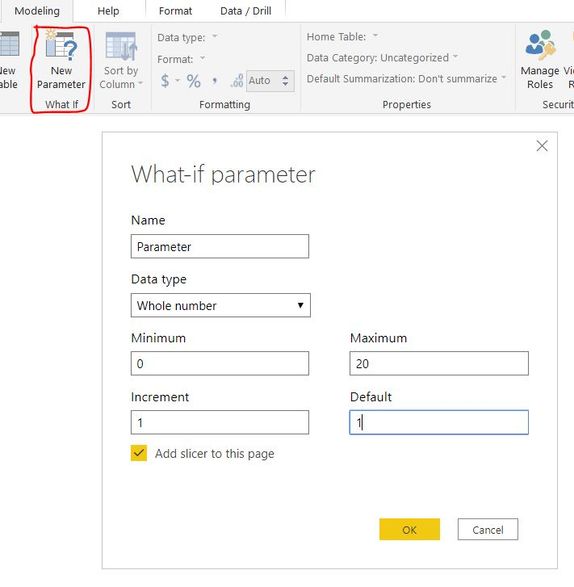
create a what-if parameter
Create a DAX measure
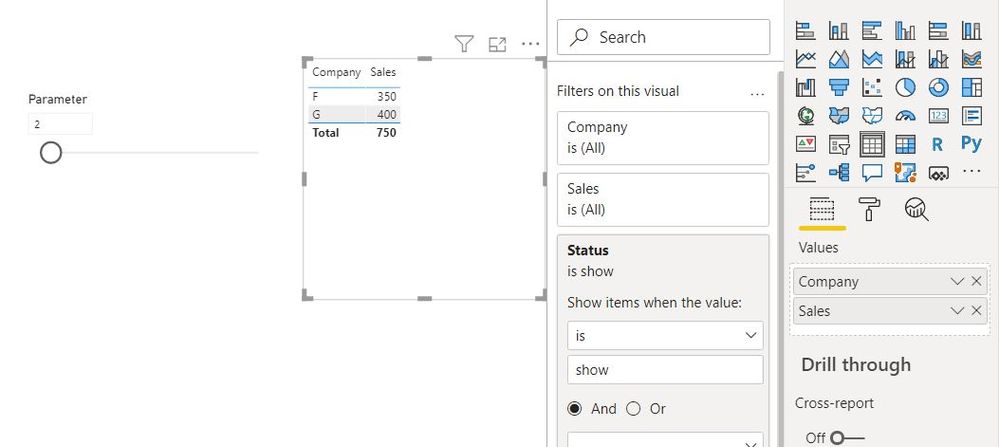
Status =
var _rank=CALCULATE(RANKX(ALL(SalesTable),SalesTable[salesmeasure],,DESC,Dense))
var _result= IF(Parameter[Parameter Value]>=_rank,"show","hide")
return _result
You can use the above measure in the visual level filter.
Did I answer your question? Mark my post as a solution!
Appreciate with a kudos 🙂
Thanks
The filter should be by company rather then by sales measure
IF I select 30 then filter should deliver the list of 30 companies
Hi @alextarki ,
>>The filter should be by company rather then by sales measure
Do you mean to show the data of the top n companies. And you need to add an index column for it:
Create a topn table for slicer:
Create a measure for filter on the visual:
Measure =
VAR N =
IF ( HASONEVALUE ( 'TopN'[top] ), SELECTEDVALUE ( 'TopN'[top] ), 3 )
RETURN
IF ( MAX ( SALES[Index] ) < N, 1, 0 )
For more details ,please refer to https://community.powerbi.com/t5/Desktop/Dynamic-TopN-reports-in-Power-BI/td-p/122091
Best Regards,
Dedmon Dai
Refer to this similar post https://community.powerbi.com/t5/Desktop/Top-n-Filter-with-Dynamic-fields/m-p/901378
Did I answer your question? Mark my post as a solution!
Appreciate with a kudos 🙂
Unfortunately, this topic is not related to my point I need dynamic list of value : I select TOP 10 it shows 10 records ,
I select TOP 20 - it shows 20 records
The Power BI Data Visualization World Championships is back! It's time to submit your entry.
Check out the January 2026 Power BI update to learn about new features.
| User | Count |
|---|---|
| 61 | |
| 45 | |
| 30 | |
| 24 | |
| 23 |
| User | Count |
|---|---|
| 144 | |
| 106 | |
| 64 | |
| 38 | |
| 31 |