
cancel
Showing results for 
Search instead for 
Did you mean: 

We've captured the moments from FabCon & SQLCon that everyone is talking about, and we are bringing them to the community, live and on-demand. Starts on April 14th. Register now

Reply
PowerBINoobie
Regular Visitor

Dynamic Status Based on Multiple Date Columns

Hello, I am fairly new to PowerBi and hoping someone can help me with a problem I have been having. 

I have PartsTable with a Start Date, Process Date, Shipped Date, and Status columns. I also have a calendar table with multiple relationships defined to each date column in PartsTable(Im unsure if this is actually needed).


Sample Data question.PNG

It is good to see an active status, but I want to see if possible a dynamic status. So for instance for part AAA status as of 3/1/2008 is shipped, but if I set a date different date range prior to 3/1/2008 and after 2/25/2008 it would appear as Processing. 

Any assitance would be appreaciated. Thank you. 

1 ACCEPTED SOLUTION
v-chuncz-msft
Community Support
Community Support

@PowerBINoobie,


You may create a measure as shown below.

Measure =
VAR d =
    MIN ( 'Calendar'[Date] )
RETURN
    SWITCH (
        TRUE (),
        ISBLANK ( MAX ( PartsTable[Process Date] ) )
            || MAX ( PartsTable[Process Date] ) > d, "Started",
        ISBLANK ( MAX ( PartsTable[Shipped Date] ) )
            || MAX ( PartsTable[Shipped Date] ) > d, "Processing",
        "Shipped"
    )
Community Support Team _ Sam Zha
If this post helps, then please consider Accept it as the solution to help the other members find it more quickly.

View solution in original post

2 REPLIES 2
brianheath
New Member

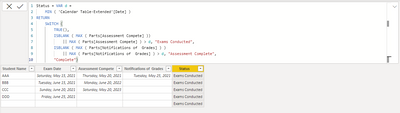
Hi.. I am trying to replicate this for my own particular use but it does not seem to be updating.

I have created and linked the calander table and entered the code as proposed, but it seems to only pick up the first status regardless. Have I missed an important step somewhere?

brianheath_0-1632971919851.png

Any pointers/suggestions or alternative ideas would be greatly valued.. 

Thanks in advance 

Brian 

v-chuncz-msft
Community Support
Community Support

@PowerBINoobie,


You may create a measure as shown below.

Measure =
VAR d =
    MIN ( 'Calendar'[Date] )
RETURN
    SWITCH (
        TRUE (),
        ISBLANK ( MAX ( PartsTable[Process Date] ) )
            || MAX ( PartsTable[Process Date] ) > d, "Started",
        ISBLANK ( MAX ( PartsTable[Shipped Date] ) )
            || MAX ( PartsTable[Shipped Date] ) > d, "Processing",
        "Shipped"
    )
Community Support Team _ Sam Zha
If this post helps, then please consider Accept it as the solution to help the other members find it more quickly.

Helpful resources

Announcements
New to Fabric survey Carousel

New to Fabric Survey

If you have recently started exploring Fabric, we'd love to hear how it's going. Your feedback can help with product improvements.

Power BI DataViz World Championships carousel

Power BI DataViz World Championships - June 2026

A new Power BI DataViz World Championship is coming this June! Don't miss out on submitting your entry.

Join our Fabric User Panel

Join our Fabric User Panel

Share feedback directly with Fabric product managers, participate in targeted research studies and influence the Fabric roadmap.

March Power BI Update Carousel

Power BI Community Update - March 2026

Check out the March 2026 Power BI update to learn about new features.