Join us at FabCon Atlanta from March 16 - 20, 2026, for the ultimate Fabric, Power BI, AI and SQL community-led event. Save $200 with code FABCOMM.
Register now!The Power BI Data Visualization World Championships is back! It's time to submit your entry. Live now!
Hi,
How to create a dynamic slicers for specfic time periods like below?
Thanks
Solved! Go to Solution.
@Kathir ,
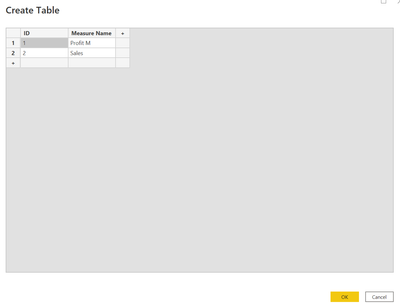
You can try to create above slicer values in a disconnected table like below using enter data option manually,
Then write a measure for the selected value has to be shown while selection of values in the measure,
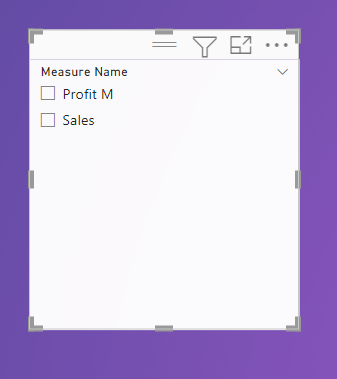
Last step is to use the values in the new table for slicer in the report.
Thanks,
Arul
@Kathir ,
You can try to create above slicer values in a disconnected table like below using enter data option manually,
Then write a measure for the selected value has to be shown while selection of values in the measure,
Last step is to use the values in the new table for slicer in the report.
Thanks,
Arul
The Power BI Data Visualization World Championships is back! It's time to submit your entry.
Check out the January 2026 Power BI update to learn about new features.
| User | Count |
|---|---|
| 61 | |
| 48 | |
| 35 | |
| 25 | |
| 23 |
| User | Count |
|---|---|
| 134 | |
| 110 | |
| 59 | |
| 39 | |
| 32 |