
Join us at FabCon Atlanta from March 16 - 20, 2026, for the ultimate Fabric, Power BI, AI and SQL community-led event. Save $200 with code FABCOMM.
Register now!The Power BI Data Visualization World Championships is back! Get ahead of the game and start preparing now! Learn more
Hello Community,
I 'm trying to create a dynamic sql with a date parameter (from list of date).
I have a excel file with a date. I loaded it !
After i created a "Startdate" Parameter with a value "2018-09-15".
I extract my data by passing this parameter into the SQL :
let
StartDate=vStartDate,
Source = Teradata.Database("tda10010", [Query="select TICK_ID, RECR_CRTN_DTTM, TICK_DT from PRODSIDCVUESIDC.V_ALL_SPRTBOOK_TICK#(lf)where TICK_DT >= '" &StartDate& "'"]),It works ! I want to pass my date from my excel file.
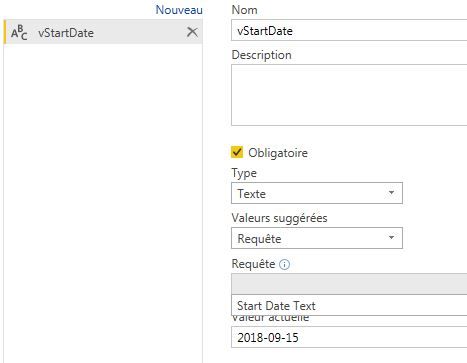
I converted my table, from the excel file, in list "Start Date Text" and i tried to transform my parameter "Stardate" using my list (one value "2018-09-15") :
I encountered a Formula.Firewall error such as :
Formula.Firewall Error in Power Query & Power BI: Rebuild This Data Combination
Do you know why ?
Thank you !
Solved! Go to Solution.
Hi JBABIKPC,
You may call another data source in one query, I would recommend you to create your queries following diagram below:
These blogs may help:
https://www.excelguru.ca/blog/2015/03/11/power-query-errors-please-rebuild-this-data-combination/
Regards,
Jimmy Tao
Hi JBABIKPC,
You may call another data source in one query, I would recommend you to create your queries following diagram below:
These blogs may help:
https://www.excelguru.ca/blog/2015/03/11/power-query-errors-please-rebuild-this-data-combination/
Regards,
Jimmy Tao
Hi @v-yuta-msft
Thank you. It seems to be a solution but it doesn't work for me.
I have the same issue 😞
let
Source = Teradata.Database("tda10010", [HierarchicalNavigation=true]),
PRODSIDCVUESIDC = Source{[Schema="PRODSIDCVUESIDC"]}[Data],
V_ALL_SPRTBOOK_TICK1 = PRODSIDCVUESIDC{[Name="V_ALL_SPRTBOOK_TICK"]}[Data],
ParamRecord = [FilterParameter=vStartDate],
Query = Value.NativeQuery(
V_ALL_SPRTBOOK_TICK1, "select TICK_ID, RECR_CRTN_DTTM, TICK_DT from PRODSIDCVUESIDC.V_ALL_SPRTBOOK_TICK#(lf)where TICK_DT >= @FilterParameter",ParamRecord),
#"Colonnes renommées" = Table.RenameColumns(Source,{{"RECR_CRTN_DTTM", "DateTime"}, {"TICK_DT", "Date"}}),
#"Lignes groupées" = Table.Group(#"Colonnes renommées", {"Date", "DateTime"}, {{"Nb de bets/s", each Table.RowCount(_), type number}}),
#"Type modifié" = Table.TransformColumnTypes(#"Lignes groupées",{{"DateTime", type time}}),
#"Lignes triées" = Table.Sort(#"Type modifié",{{"Date", Order.Ascending}}),
#"Personnalisée ajoutée" = Table.AddColumn(#"Lignes triées", "TimeID", each Time.ToText([DateTime], "HHmmss"))
in
#"Personnalisée ajoutée"The Power BI Data Visualization World Championships is back! Get ahead of the game and start preparing now!
Check out the November 2025 Power BI update to learn about new features.
| User | Count |
|---|---|
| 66 | |
| 44 | |
| 40 | |
| 29 | |
| 19 |
| User | Count |
|---|---|
| 200 | |
| 129 | |
| 103 | |
| 72 | |
| 56 |