Join us at FabCon Atlanta from March 16 - 20, 2026, for the ultimate Fabric, Power BI, AI and SQL community-led event. Save $200 with code FABCOMM.
Register now!The Power BI Data Visualization World Championships is back! It's time to submit your entry. Live now!
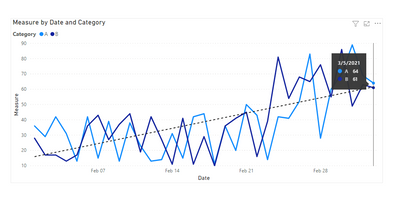
I have a line graph showing trend lines for prices of multiple commodities. I need a vertical reference line (dynamic) on this graph to differentiate between the current and forecast values on the X-axis of this graph. (For example, if I am viewing the graph in January 2021, the line should be placed between January and February 2021)
Using a combination chart is not working.
Is there any other way to achieve this?
Solved! Go to Solution.
Hi @Anonymous ,
You can create measure to calculate specific period values and show it in the line chart:
Measure =
CALCULATE (
SUM ( 'Table'[Sales] ),
FILTER (
'Table',
'Table'[Category]
IN DISTINCT ( 'Table'[Category] )
&& 'Table'[Date].[MonthNo] >= MONTH ( TODAY () )
&& 'Table'[Date].[MonthNo]
<= MONTH ( TODAY () ) + 1
)
)
Best Regards,
Community Support Team _ Yingjie Li
If this post helps, then please consider Accept it as the solution to help the other members find it more quickly.
Hi @Anonymous ,
You can create measure to calculate specific period values and show it in the line chart:
Measure =
CALCULATE (
SUM ( 'Table'[Sales] ),
FILTER (
'Table',
'Table'[Category]
IN DISTINCT ( 'Table'[Category] )
&& 'Table'[Date].[MonthNo] >= MONTH ( TODAY () )
&& 'Table'[Date].[MonthNo]
<= MONTH ( TODAY () ) + 1
)
)
Best Regards,
Community Support Team _ Yingjie Li
If this post helps, then please consider Accept it as the solution to help the other members find it more quickly.
@Anonymous Read this post to get your answer quickly.
https://community.powerbi.com/t5/Community-Blog/How-to-Get-Your-Question-Answered-Quickly/ba-p/38490
Subscribe to the @PowerBIHowTo YT channel for an upcoming video on List and Record functions in Power Query!!
Learn Power BI and Fabric - subscribe to our YT channel - Click here: @PowerBIHowTo
If my solution proved useful, I'd be delighted to receive Kudos. When you put effort into asking a question, it's equally thoughtful to acknowledge and give Kudos to the individual who helped you solve the problem. It's a small gesture that shows appreciation and encouragement! ❤
Did I answer your question? Mark my post as a solution. Proud to be a Super User! Appreciate your Kudos 🙂
Feel free to email me with any of your BI needs.
create a measure that computes this, and add it to the visual values
The Power BI Data Visualization World Championships is back! It's time to submit your entry.
Check out the January 2026 Power BI update to learn about new features.
| User | Count |
|---|---|
| 61 | |
| 48 | |
| 35 | |
| 25 | |
| 23 |
| User | Count |
|---|---|
| 142 | |
| 111 | |
| 65 | |
| 38 | |
| 33 |