Join us at FabCon Atlanta from March 16 - 20, 2026, for the ultimate Fabric, Power BI, AI and SQL community-led event. Save $200 with code FABCOMM.
Register now!The Power BI Data Visualization World Championships is back! Get ahead of the game and start preparing now! Learn more
Hi All - looking for help here.
i've a table which has the following values;
| Year | 2019 | ||||
| Allocated to team | Jan | Feb | Mar | Apr | Total |
| ABC | 21 | 32 | 10 | 56 | 119 |
| XYZ | 45 | 14 | 36 | 95 | |
| HGS | 48 | 82 | 24 | 154 | |
| NKO | 67 | 20 | 46 | 56 | 189 |
| OIU | 98 | 16 | 13 | 127 | |
| KLO | 12 | 17 | 82 | 111 | |
| AGY | 34 | 28 | 29 | 12 | 103 |
| YTE | 17 | 86 | 43 | 65 | 211 |
| UJN | 60 | 37 | 98 | 32 | 227 |
| Total | 354 | 282 | 360 | 340 |
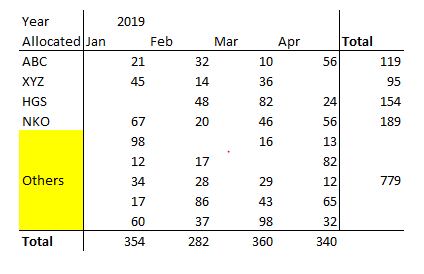
Now i want below table - 1) to show top 4 teams based on rolling 4 months automatically sorted; 2) group rest (other than Top-4) as 'Others'
Anyone please rush to provide help me?
Many thanks,
N
Anyone please could someone reply?
This looks like what you need here: https://blog.gbrueckl.at/2019/05/power-bi-dynamic-topn-others-with-drill-down/
Imke Feldmann (The BIccountant)
If you liked my solution, please give it a thumbs up. And if I did answer your question, please mark this post as a solution. Thanks!
How to integrate M-code into your solution -- How to get your questions answered quickly -- How to provide sample data -- Check out more PBI- learning resources here -- Performance Tipps for M-queries
Not exactly this is working for me.... here i have to;
1) Top 4 based on totals
2) and for rolling 4 months
The Power BI Data Visualization World Championships is back! Get ahead of the game and start preparing now!
| User | Count |
|---|---|
| 38 | |
| 36 | |
| 33 | |
| 32 | |
| 29 |
| User | Count |
|---|---|
| 129 | |
| 88 | |
| 79 | |
| 68 | |
| 63 |